
Smooth Hover
Smooth hover animation for GUI elements like buttons and inventory.
Screenshots
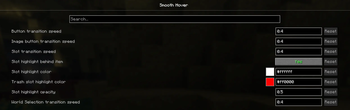
About this Mod

Have you ever wondered why Minecraft doesn't have smooth animations for buttons and other ui elements? Well, this mod is for you! Enhance your gameplay experience with smooth animations for Minecraft's UI components!
Features
Smooth hover animation for all buttons!

Resource pack used above is Unique Dark but mod doesn't need one, as well as additional support from other mod/resource pack devs.
Smooth fade-in-out for inventory slots!
- Option to toggle slots display mode
- Option to change transition speed
- Option to change color
- Option to change opacity
- Option to change trash slot hover color (26.x+)
- Smooth animations for world/server selections (26.x+)

Highly optimized
Each feature has almost no impact on performance!
Recommended mods
I also highly encourage you to try these mods, if you liked mine:
Compatibility
This mod should work with every other mod out there! If you would like me to add some features - feel free to dm me on our discord server!
Usage in modpacks
Feel free to use this mod in any Modrinth and Curseforge modpack, but you cannot use it in any modpack that is hidden behind a paywall, e.g. Patreon without my permission.
Я запрещаю вам использовать данный мод в своих сборках, доступ к которым предоставляется через Patreon, Boosty или иные средства, предусматривающие получение, для загрузки мода и/или сборки, включающей данный мод, вознаграждения/оплаты без моего прямого разрешения.
Available Versions
How to Install Smooth Hover on Your Client
Install the Mod Loader Locally
Install fabric for your local Minecraft version.
Download the Matching File
Choose the Smooth Hover file for fabric and Minecraft 26.3.
Install Mod
Place the .jar file in your local .minecraft/mods folder and restart Minecraft. No server-side installation is required.
Compatibility
Mod Loaders
Minecraft Versions
26.3, 26.2, 26.1.2 (+14 more)
Server-side
✗ UnsupportedRecommended RAM
4 GB(min. 3 GB)Frequently Asked Questions
Does Smooth Hover need to be installed on the Minecraft server?
No. Modrinth marks Smooth Hover as unsupported on the server side. Install it only in your local Minecraft mods folder. Your server can remain unchanged unless the mod page lists an additional dependency.
Which version and loader does Smooth Hover require?
Use a file for fabric, neoforge and your exact Minecraft version. Supported versions include 26.3, 26.2, 26.1.2. Files for different loaders are not interchangeable.
Smooth Hover is not working – what should I check?
First check the Minecraft version, loader version and required dependencies. Put the .jar file in your local .minecraft/mods folder and remove older duplicates. Because this mod is client-side, adding server RAM will not fix it.
Similar Mods

![[ETF] Entity Texture Features](https://cdn.modrinth.com/data/BVzZfTc1/af683d206d50b05258d865b0d6e4aa2f2cee12f2_96.webp)
![[EMF] Entity Model Features](https://cdn.modrinth.com/data/4I1XuqiY/6e5bbd0d06b1741bfdab6c0cfab6de8fdaf0064c_96.webp)



Minecraft Server for Your Group
Smooth Hover stays on your client. Host a compatible world for your group.