
Modrinth · Fabric, Forge, NeoForge · Client mod
Sit
Sit is a client-side mod. Install it on your computer; the server does not need it.
Simple stair sitting plugin.
- Downloads
- 246.0K
- Author
- UsainSrht
- Loader
- Fabric, Forge, NeoForge
- Minecraft
- 1.13 – 26.3
- Updated
- –
Screenshots
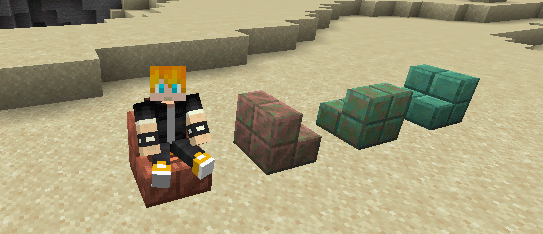
What Sit looks like


Images: Sit on Modrinth, published by the project team.
Setup
Install Sit on your client
Client-side mods only run on your computer. More server RAM does not change their performance.
- 01
Install the loader locally
Install Fabric or Forge or NeoForge for your Minecraft version in your launcher.
- 02
Download the file
Download the Sit file for your loader and your exact Minecraft version, for example 26.3.
- 03
Add it to the mods folder
Put the .jar file in your local .minecraft/mods folder and remove older duplicates.
- 04
Launch
Launch Minecraft with the loader profile. Nothing needs to change on the server.
- On the server
- Unknown
- On the client
- Unknown
- Loader
- Fabric, Forge, NeoForge
- Minecraft
- 26.3, 26.2, 26.1.2 +48 more
- License
- MIT License
Releases
Published releases
Pick the file that matches your server’s loader and Minecraft version. The server and players need the same release.
Sit · Modrinth- Sit 1.7August 4, 2024Minecraft 1.13, 1.13.1, 1.13.2, 1.14, 1.14.1, 1.14.2, 1.14.3, 1.14.4, 1.15, 1.15.1, 1.15.2, 1.16, 1.16.1, 1.16.2, 1.16.3, 1.16.4, 1.16.5, 1.17, 1.17.1, 1.18, 1.18.1, 1.18.2, 1.19, 1.19.1, 1.19.2, 1.19.3, 1.19.4, 1.20, 1.20.1, 1.20.2, 1.20.3, 1.20.4, 1.20.5, 1.20.6, 1.21 · paper, purpur, spigot
- 1.5December 28, 2022Minecraft 1.19.2, 1.19.3 · paper, purpur
- 1.4December 18, 2022Minecraft 1.19.2, 1.19.3 · paper, purpur
- 1.3December 14, 2022Minecraft 1.19.2, 1.19.3 · paper, purpur
- 1.2September 28, 2022Minecraft 1.19.2 · paper, purpur
Original description by the project author
A simple stair sitting plugin.
Features
- Custom sitable layouts.
- Capability to sit on every block depending on your configuration.
- Configurable permissions for each layout.
- Configurable stair entity for each layout.
- option to hide saddle if the entity is PIG.
- Configurable stair offset for each layout.
VERSION
The Sit plugin should work from 1.13 to latest version.
! 1.8 not available !
Example config.yml
sitables:
  stairs:
    entity:
      type: PIG
      saddle: true
    offsets:
      x: 0.5
      y: -0.4
      z: 0.5
    #BLOCKDATA, BLOCKS
    check: BLOCKDATA
    list:
      - org.bukkit.block.data.type.Stairs
  slabs:
    entity:
      type: PIG
      saddle: true
    offsets:
      x: 0.5
      y: -0.4
      z: 0.5
    check: BLOCKDATA
    list:
      - org.bukkit.block.data.type.Slab
  fun:
    # if require is set to true
    # player must have "sit.fun" permission to sit on the block's this layout has
    permission:
      require: true
      # %s is the layout name
      name: "sit.%s"
    entity:
      type: ARMOR_STAND
      saddle: false
    offsets:
      x: 0.5
      y: -1.1
      z: 0.5
    check: BLOCKS
    list:
      - END_ROD
Join Our Discord
For support, updates, and community discussion, join our Discord:

Does Sit need to be installed on the Minecraft server?
No. Modrinth marks Sit as unsupported on the server side. Install it only in your local mods folder. Your server can stay unchanged unless the project page lists an additional dependency.
Which version and loader does Sit require?
Use a file for Fabric, Forge, NeoForge and your exact Minecraft version. Supported versions include 26.3, 26.2, 26.1.2. Files for different loaders are not interchangeable.
Sit is not working – what should I check?
First check the Minecraft version, loader version and required dependencies. Because the mod is client-side, more server RAM will not fix it.
Similar mods
Popular mods in the same category
 Client only

Iris Shaders
by coderbot
A modern shader pack loader for Minecraft intended to be compatible with existing OptiFine shader packs
 Client only

[ETF] Entity Texture Features
by Traben
Emissive, Random & Custom texture support for entities in resourcepacks just like Optifine but for Fabric
 Client only

[EMF] Entity Model Features
by Traben
EMF is an, OptiFine format, Custom Entity Model replacement mod available for Fabric and Forge.
 Client only

Not Enough Animations
by tr7zw
Bringing first-person animations to the third-person
Looking for mods for your own server?
The catalog lists mods that run on Minecraft servers.