
Totem Optimizer
anti ghost (prevents ghosting by sending extra updates), Client side visually instant toteming, Fixes totem flicker.
Screenshots

About this Mod
Totem Optimizer


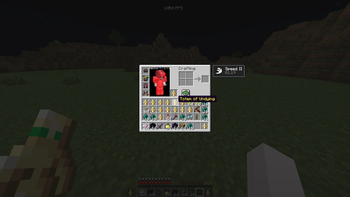
Adds anti ghost by adding more inventory updates and for things to react quicker visually as well as reduced flicker client side.
When moving a totem into your mainhand or offhand, Minecraft can sometimes visually desync, flicker, or show the wrong slot state for a moment when inventory updates are being corrected.
Totem Optimizer helps reduce that by forcing extra inventory reupdates on the client, which helps prevent ghosting and keeps the shown inventory state corrected faster.
Works across 1.21 - 1.21.11 in the same jar (1.21.X)
Also supports 26.1 - 26.1.2 with the 26.1.X version.
Requires:
What it does
Totem Optimizer sends extra inventory updates so your client refreshes the shown slot state faster. (Exact way anti ghost does it, though not the same code it works pretty much the same so it should be allowed on mctiers.)
This helps when retoteming into your mainhand or offhand and the item visually flickers, ghosts, or looks delayed for a moment.
The server still controls the real inventory. This mod does not give any real advantage other than reducing ghosting, and does not change how totems actually work.
It only helps the client keep the inventory display updated faster.

There is also server opt out support, so servers can disable Totem Optimizer if they do not want players using it on their server.
This mod is client side, but if a server opts out then the optimizer will turn itself off there. just incase people want this but there should be no need to have it really.
if you want the opt out just make a ticket in the discord!
How to Install Totem Optimizer on Your Client
Install the Mod Loader Locally
Install fabric for your local Minecraft version.
Download the Matching File
Choose the Totem Optimizer file for fabric and Minecraft 26.2.
Install Mod
Place the .jar file in your local .minecraft/mods folder and restart Minecraft. No server-side installation is required.
Compatibility
Mod Loaders
Minecraft Versions
26.2, 26.1.2, 26.1.1 (+13 more)
Server-side
✗ UnsupportedRecommended RAM
4 GB(min. 3 GB)Frequently Asked Questions
Does Totem Optimizer need to be installed on the Minecraft server?
No. Modrinth marks Totem Optimizer as unsupported on the server side. Install it only in your local Minecraft mods folder. Your server can remain unchanged unless the mod page lists an additional dependency.
Which version and loader does Totem Optimizer require?
Use a file for fabric and your exact Minecraft version. Supported versions include 26.2, 26.1.2, 26.1.1. Files for different loaders are not interchangeable.
Totem Optimizer is not working – what should I check?
First check the Minecraft version, loader version and required dependencies. Put the .jar file in your local .minecraft/mods folder and remove older duplicates. Because this mod is client-side, adding server RAM will not fix it.
Similar Mods

![[ETF] Entity Texture Features](https://cdn.modrinth.com/data/BVzZfTc1/af683d206d50b05258d865b0d6e4aa2f2cee12f2_96.webp)
![[EMF] Entity Model Features](https://cdn.modrinth.com/data/4I1XuqiY/6e5bbd0d06b1741bfdab6c0cfab6de8fdaf0064c_96.webp)



Minecraft Server for Your Group
Totem Optimizer stays on your client. Host a compatible world for your group.