
Towns and Towers
Spice up your world with new villages, pillager outposts, and even new ships!
Screenshots
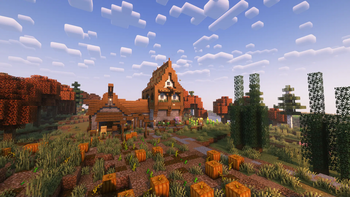
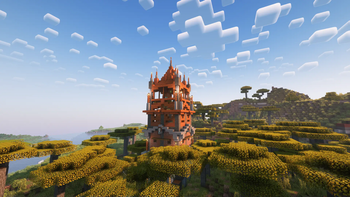
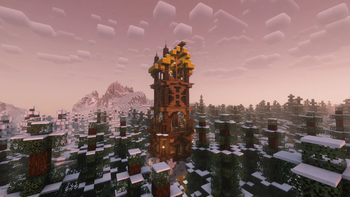
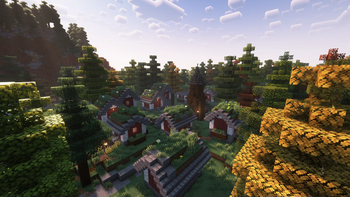
About this Mod
AS OF RIGHT NOW, TOWNS
AND TOWERS IS AVAILABLE FOR BOTH FORGE AND FABRIC/QUILT, VERSIONS 1.18.2 AND 1.19.2 RESPECTIVELY. WORKS SERVERSIDE.
FROM VERSION 1.19.3 AND ABOVE (ALL THE WAY TO 1.20.4), THE PACK IS DEPENDANT ON CRISTELLIB, STILL WORKING SERVERSIDE.
FROM VERSION 1.19.3 AND ABOVE (ALL THE WAY TO 1.20.4), THE PACK IS DEPENDANT ON CRISTELLIB, STILL WORKING SERVERSIDE.

What is Towns and Towers?
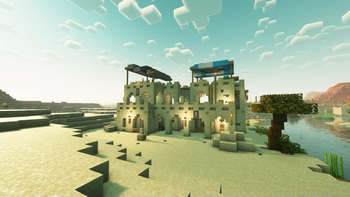
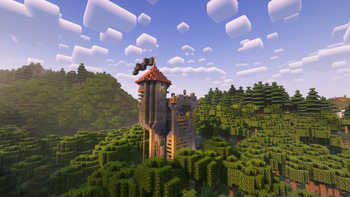
Towns & Towers is a mod that aims to expand upon the 1.14 update created by Mojang with new villages, pillager outposts, and even brand-new ships. The structures themselves are a bit more detailed than their vanilla counterparts, but they still fit seamlessly into the world. Not only that but many are inspired by real-life buildings or architectural styles, giving them a fresh new feel. There are over 50 structures added by Towns and Towers so far (as of update 1.9), so have fun exploring! And remember, it’s not the destination that’s important, but the journey to get there.
If you wish to see all of the structures our mod adds, take a look at our gallery here.
Compatibility
For a full list of mods that are currently compatible with Towns and towers, please look here.
The pack should be compatible with most world generation mods, like Terralith, WWOO, BYG, BoP, etc., as well as mods that add also add new structures/villages, such as Repurposed Structures or ChoiceTheorem's Overhauled Villages. However, some features from other mods are not currently present, like the guards from Villager Guards mod or certain buildings from Farmer's Delight for example. This will be addressed in the future via a series of datapacks, which will implement features from those mods into ours.
Frequently Asked Questions
1. Is it safe to update Towns and Towers to a newer version?
In general yes. Just
note that sometimes when we update a few things get changed, so there might be a
bit of console spam. If any serious problems arise because of that, let us know.
And, as always, make backups. Better be safe than sorry.
2. Is it safe to add Towns and Towers to an already existing world?
Yep. Just note that the
new structures will only spawn in newly generated chunks.
3. Is this mod for Forge or Fabric/Quilt?
Both. We have a
universal version for both (now three?) mod loaders.
4. How can I locate the new structures?
For 1.18.2: /locate
towns_and_towers:[structure_from_list]
For 1.19+: /locate structure
towns_and_towers:[structure_from_list]
Note that some structures have the exclusives tag added
in front. Those structures cannot be located if you only have T&T installed. You
also need to have one of the mods that T&T is paired with. For a full list,
scroll down below (if I remember to add it...).
5. Does Towns and Towers modify existing vanilla structures?
As of the latest
update, no. Only new structures are added.
6. What about the loot of these structures?
The majority of
structures use vanilla loot tables for better mod compatibility (see the
Compatibility section below for more info), but they also use some custom loot
tables to better integrate said structures into the world. You will still find
pillager outpost loot in pillager outposts, profession chests in villages, as
well as bells, workstations, etc., but also new stuff like food, armor, and
other goodies.
7. How can I report bugs/issues/suggestions?
Write them down below
in the comments and I’ll try to answer them as soon as possible and as best as
possible. I’m still relatively new to all of this, so excuse that.
8. Can I include Towns and Towers into my modpack?
Sure, but make sure to
give credit and a link to our page, and make sure you don't include a modified
version of our mod.
9. 1.16.5???
https://www.youtube.com/watch?v=DTvrv4f3Yho
Credits
- Kubek as the original author of Towns and Towers;
- William Wythers, ChoiceTheorem, Apollo, Robified and TelepathicGrunt for being based;
- Various other creators and their builds for being a massive inspiration (check out our Planet Minecraft page here for a full list)
If you find any glitches, bugs or have any other suggestions, please let us know. We'll have a bug report page soon (hopefully).
Available Versions
How to Install Towns and Towers on Your Server
Order Server
Order a Minecraft Java server with at least 4 GB RAM (6 GB recommended).
Set datapack Loader
In the panel under "Egg", select the datapack loader and matching Minecraft version (26.3).
Install Mod
Open the mod browser in the dashboard and search for "Towns and Towers". Click "Install" – done! Alternatively, upload the .jar via SFTP to the /mods folder.
Compatibility
Mod Loaders
Minecraft Versions
26.3, 26.2, 26.1.2 (+23 more)
Server-side
✓ RequiredRecommended RAM
6 GB(min. 4 GB)Frequently Asked Questions
Towns and Towers server crashes on startup – what to do?
Most common cause: wrong datapack version or insufficient RAM. Check the server log (latest.log) for "OutOfMemoryError" or "Mixin" errors. With Mado Hosting: ensure at least 4 GB RAM is allocated and the loader matches the mod version (26.3). You can switch loaders with one click in the panel.
Is Towns and Towers compatible with datapack and fabric and forge and neoforge and quilt?
Towns and Towers officially supports datapack, fabric, forge, neoforge, quilt for Minecraft 26.3, 26.2, 26.1.2. Note: Forge and Fabric mods are NOT cross-compatible – pick one loader and stick with it. The Mado dashboard automatically detects incompatible loader combinations.
Server lagging with Towns and Towers – how to optimize performance?
Recommended RAM: 6 GB (per 5 players). Use /spark profiler to check if Towns and Towers consumes the most tick time. Common fixes: reduce server view-distance to 8-10, install "performant" or "starlight" as supplementary mods on Forge. With Mado Hosting, your server runs on NVMe SSDs with dedicated CPU cores for minimal latency.
Similar Mods




Rent Modded Server
Install Towns and Towers with just one click on your server.
Details
- License
- Creative Commons Attribution Non Commercial Share Alike 4.0 International
- Server-side
- Required