
Traveler's Titles
Epic, RPG-like titles when entering biomes & dimensions!
Screenshots
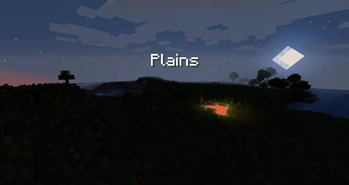
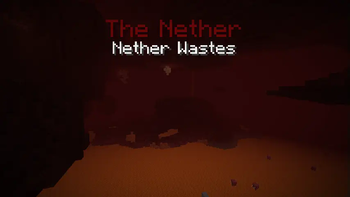
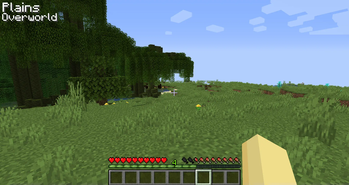
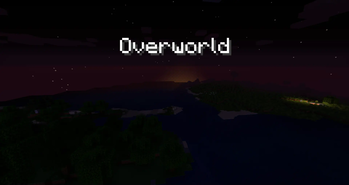
About this Mod
Traveler's Titles
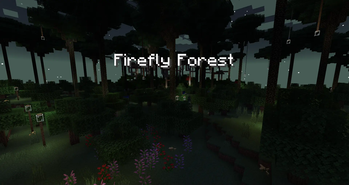
Traveler's Titles is a simple client-side mod that adds RPG-like titles when entering biomes or dimensions.
- Completely customizable - change text size, color, location, duration, & more
- Includes built-in titles for many modded dimensions - Atum, Twilight Forest, Bumblezone, Lost Cities, & more!
- Supports all modded biomes
- Supports custom titles with the Waystones mod! Will display a Waystone's title when you're near it (1.18+ Forge only)
- Supports custom sounds when entering new biomes, dimensions, or Waystone regions
- Dimension & biome blacklisting
Beautiful Custom Dimension Titles
Try out the beautiful Visual Traveler's Titles resource pack add-on by UnRoman for completely custom dimension titles! It includes support for a bunch of modded dimensions.
Adding Custom Sounds
To use custom sounds, all you have to do is create a small resource pack with the namespace travelerstitles. In the sounds folder, you can add any or all of three custom sounds, named dimension.ogg, biome.ogg, and waystone.ogg. Each of these sounds will play when entering a new dimension, biome, and waystone, respectively. If no custom sound is provided for any of these, then no sound will play for the respective type of title.
Additional Customization
Using lang files in resource packs, you can add your own dimension & biome titles!
Dimensions use a lang entry format like the following:
"travelerstitles.namespace.dimensionname": "Title"
Biomes use the same lang entries as always, guaranteeing built-in support for any mod's biomes, like so:
"biome.namespace.biomename": "Title"
However, should you want to change a vanilla or modded biome's title without potentially affecting other areas of the game that might use the biome's translation, you can use a special format specifically for this mod via the following:
"travelerstitles.biome.namespace.biomename": "Title"
Both dimensions and biomes also support an optional color lang entry which will override the configured default text color for that specific dimension or biome. The following is a complete example that adds a red title for the Nether and a green title for the Plains biome:
"travelerstitles.minecraft.the_nether": "The Nether",
"travelerstitles.minecraft.the_nether.color": "ff0000",
"travelerstitles.biome.minecraft.plains": "Plains",
"biome.minecraft.plains.color": "00ff00"
Note that for a biome's color entry, it is also acceptable to have the key start with travelerstitles, and any biome color entry with travelerstitles prepended to it will take priority over other entries.
For example, the following would resullt in blue (0000ff) text for the desert biome, since entries prepended with travelerstitles take priority:
"biome.minecraft.desert.color": "ff0000",
"travelerstitles.biome.desert.color": "0000ff"
Also note that colors are RGB hex-formatted strings.
See here for the lang entries that come included with the mod in 1.19.2. Lang entries for other versions may be available on a different branch.
Debug commands
The following commands work in single player worlds if you have sufficient permissions. They can be used to preview what titles will look like when you encounter them in the game.
/biometitle <biome>
/dimensiontitle <dimension>

Available Versions
How to Install Traveler's Titles on Your Client
Install the Mod Loader Locally
Install fabric for your local Minecraft version.
Download the Matching File
Choose the Traveler's Titles file for fabric and Minecraft 26.1.2.
Install Mod
Place the .jar file in your local .minecraft/mods folder and restart Minecraft. No server-side installation is required.
Compatibility
Mod Loaders
Minecraft Versions
26.1.2, 26.1.1, 1.21.4 (+8 more)
Server-side
✗ UnsupportedRecommended RAM
4 GB(min. 3 GB)Frequently Asked Questions
Does Traveler's Titles need to be installed on the Minecraft server?
No. Modrinth marks Traveler's Titles as unsupported on the server side. Install it only in your local Minecraft mods folder. Your server can remain unchanged unless the mod page lists an additional dependency.
Which version and loader does Traveler's Titles require?
Use a file for fabric, forge, neoforge and your exact Minecraft version. Supported versions include 26.1.2, 26.1.1, 1.21.4. Files for different loaders are not interchangeable.
Traveler's Titles is not working – what should I check?
First check the Minecraft version, loader version and required dependencies. Put the .jar file in your local .minecraft/mods folder and remove older duplicates. Because this mod is client-side, adding server RAM will not fix it.
Similar Mods




Minecraft Server for Your Group
Traveler's Titles stays on your client. Host a compatible world for your group.