
Modrinth · Fabric, Forge, NeoForge
Turbo for Distant Horizons on your Minecraft server
Turbo for Distant Horizons runs on Minecraft servers with Fabric or Forge or NeoForge. Order your server, set the loader in the panel and install the mod with one click in the mod browser.
Distant Horizons addon: generates distant terrain from the world noise several times faster, with real trees and structures.
- Downloads
- 4.2K
- Author
- Pocky-l
- Loader
- Fabric, Forge, NeoForge
- Minecraft
- 1.20.1 – 26.3
- Updated
- –
Screenshots
What Turbo for Distant Horizons looks like

Images: Turbo for Distant Horizons on Modrinth, published by the project team.
Setup
Install Turbo for Distant Horizons on your server
The server and players need the same loader and Minecraft version. Back up the world before adding or updating mods.
- 01
Configure
6 GB of RAM is preselected. You choose the term and add-ons and pay by credit card or PayPal.
- 02
Set the loader
In the panel, set the server software to Fabric or Forge or NeoForge and choose the matching Minecraft version, for example 26.3.
- 03
Install the mod
Search the mod browser for “Turbo for Distant Horizons” and install the release for your loader. Alternatively, upload the .jar to the mods folder via SFTP. Required dependencies are listed on the project page.
- 04
Connect
Every player installs the same Turbo for Distant Horizons release locally and connects using the server address from the panel.
- On the server
- Required
- On the client
- Required
- Loader
- Fabric, Forge, NeoForge
- Minecraft
- 26.3, 26.2, 26.1.2 +3 more
- License
- MIT License
The panel
Install mods, find errors.
Real screenshots from the Mado panel. Both come with every Minecraft server.
Mod browser
Modrinth and CurseForge, right in the panel.
The browser filters by your Minecraft version. Install mods with one click, without uploading .jar files.

AI crash analysis
When a mod crashes, the analyzer reads the log.
Mods often fail on a wrong loader version, Java version or missing dependency. The analyzer names a likely cause and suggests a fix.

Releases
Published releases
Pick the file that matches your server’s loader and Minecraft version. The server and players need the same release.
Turbo for Distant Horizons · Modrinth- Turbo for Distant Horizons 1.6.0+26.3 (Fabric)November 7, 2026Minecraft 26.3 · Fabric
- Turbo for Distant Horizons 1.6.0+26.3 (Neoforge)November 7, 2026Minecraft 26.3 · NeoForge
- Turbo for Distant Horizons 1.6.0+26.1.2 (Fabric)November 7, 2026Minecraft 26.1.2 · Fabric
- Turbo for Distant Horizons 1.6.0+26.1.2 (Neoforge)November 7, 2026Minecraft 26.1.2 · NeoForge
- Turbo for Distant Horizons 1.6.0+26.2 (Fabric)November 7, 2026Minecraft 26.2 · Fabric
Original description by the project author




A generator for Distant Horizons that builds distant terrain straight from the world's noise, without generating a single chunk.
Join a new world and the whole horizon is there about 3 seconds later. It starts coarse and sharpens pass by pass, beginning with what you look at. Surface, trees and structures come from the game's own rules and seeds, so the distance matches the world you will walk into.
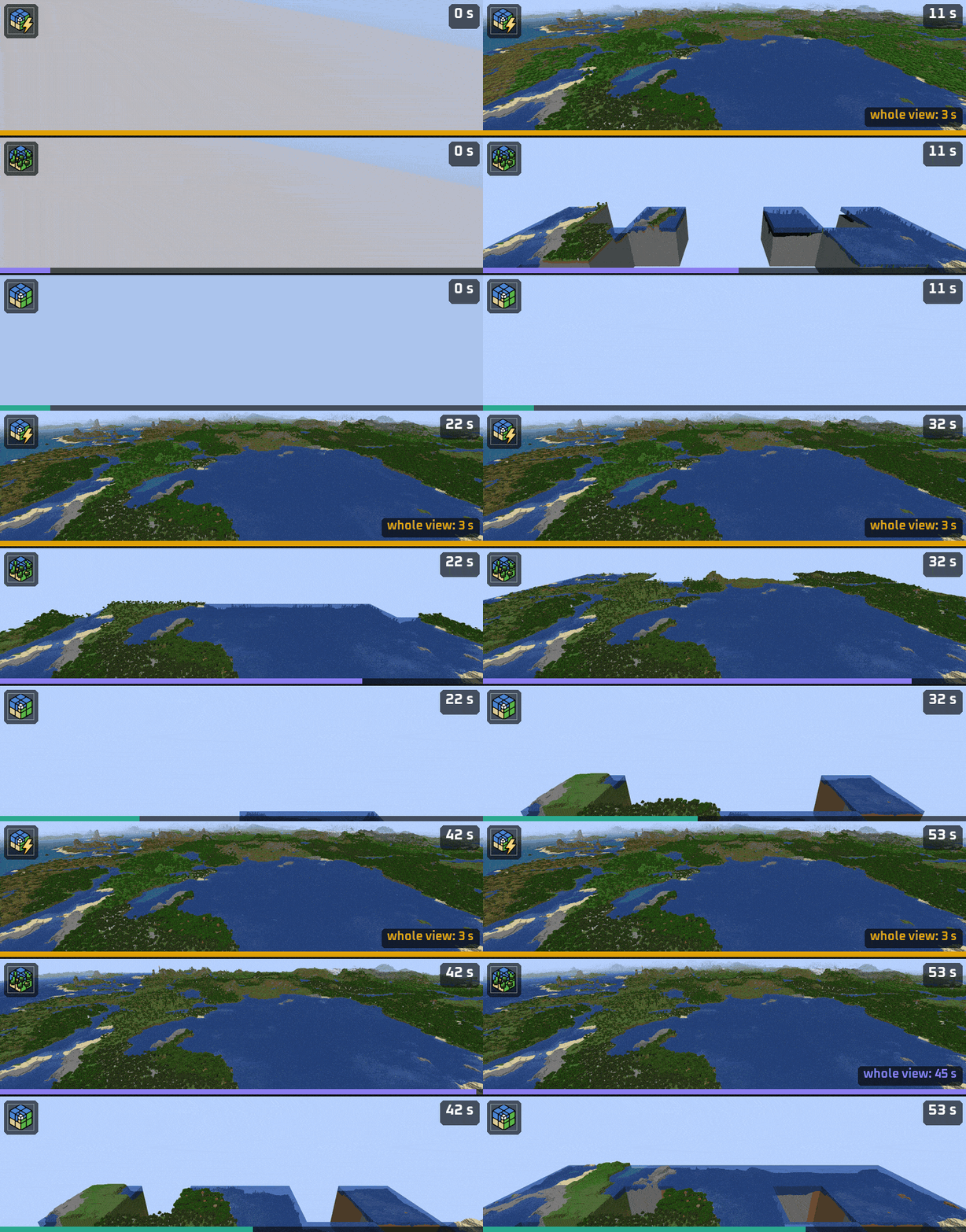
Same seed, same camera, clock running from the moment of joining, shown at 3x speed.
Top: this mod. Middle: another seed-based generator for Distant Horizons. Bottom: Distant Horizons alone.
93% less time to the whole view · 61% less time to a finished picture · 39% fewer pixels off the real world
Speed, measured
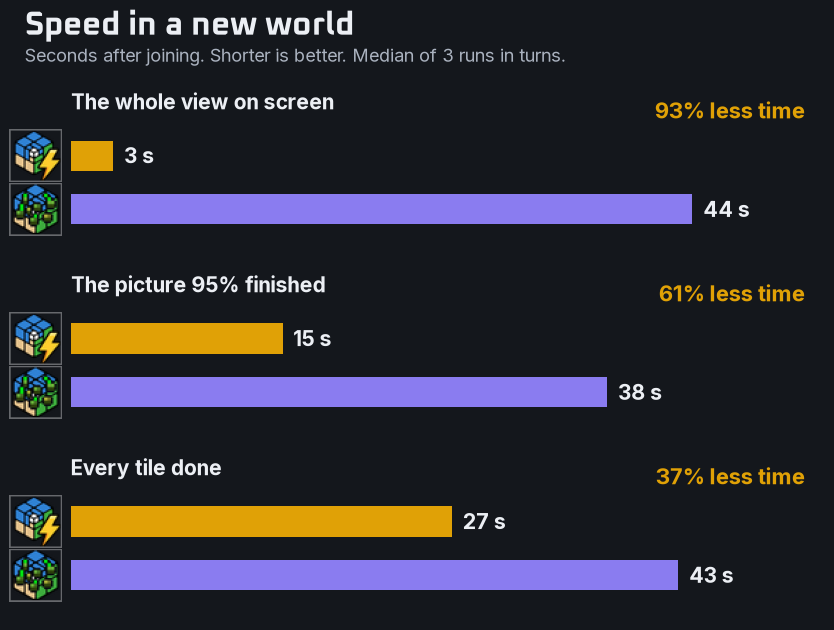
A fresh world for every run, the generators in turns, nothing else running. "Finished" means a pixel has reached the colour it ends up with.
The frame rate stayed within one FPS of the other generator (58 and 59 under a limit of 60).
Closer to the real world
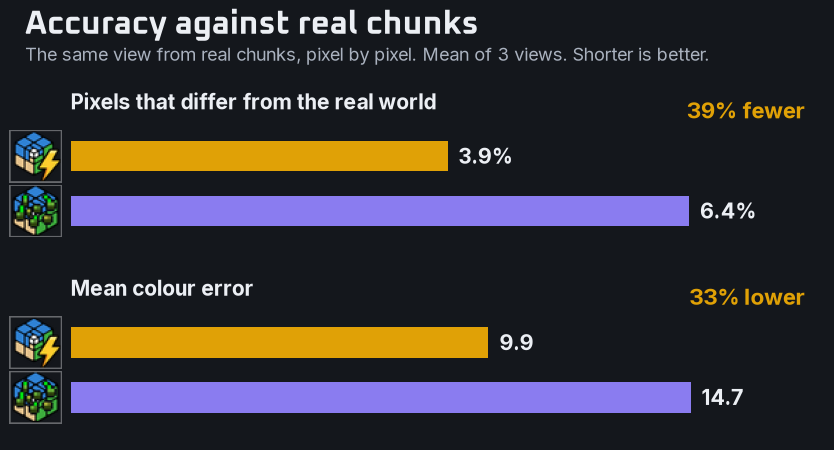
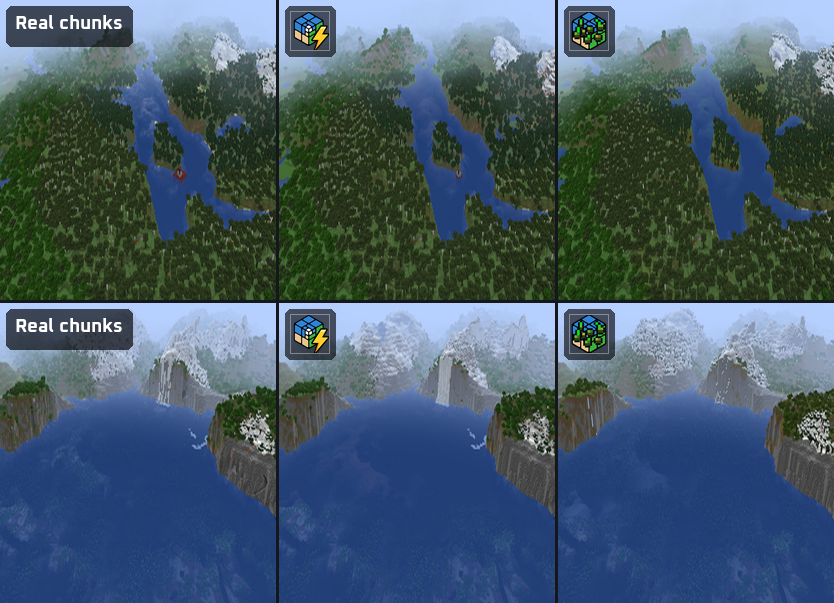
Distant Horizons fed by real chunks gives the reference picture. Each finished frame is compared with it pixel by pixel.
Land heights match real chunks on 94 to 98% of columns at every distance, and biomes on 99.5%.
Why the horizon comes first
A tile has 64 x 64 columns whether a column is 1 block wide or 32, so it costs about the same at every detail level. The coarsest tiles buy the most land: about 25 of them cover a view 8 km across. The mod asks Distant Horizons for those first, then lowers the wish one level per pass. Each pass halves the column width everywhere at once, and tiles are ordered from a point ahead of you. A section replaces its parent when all four are ready, so the view stays whole while it sharpens.
Noise instead of chunks
The world's density function is rewritten so its 2D parts run once per column, and caves are left out of the height search. Heights are read on the game's own cell corners, which takes 2 or 3 probes per column. That is how a far tile stays as cheap as a near one. Tiles run on their own worker threads, and each one stays in its own section, so Distant Horizons rebuilds far less per tile.
The game's own world
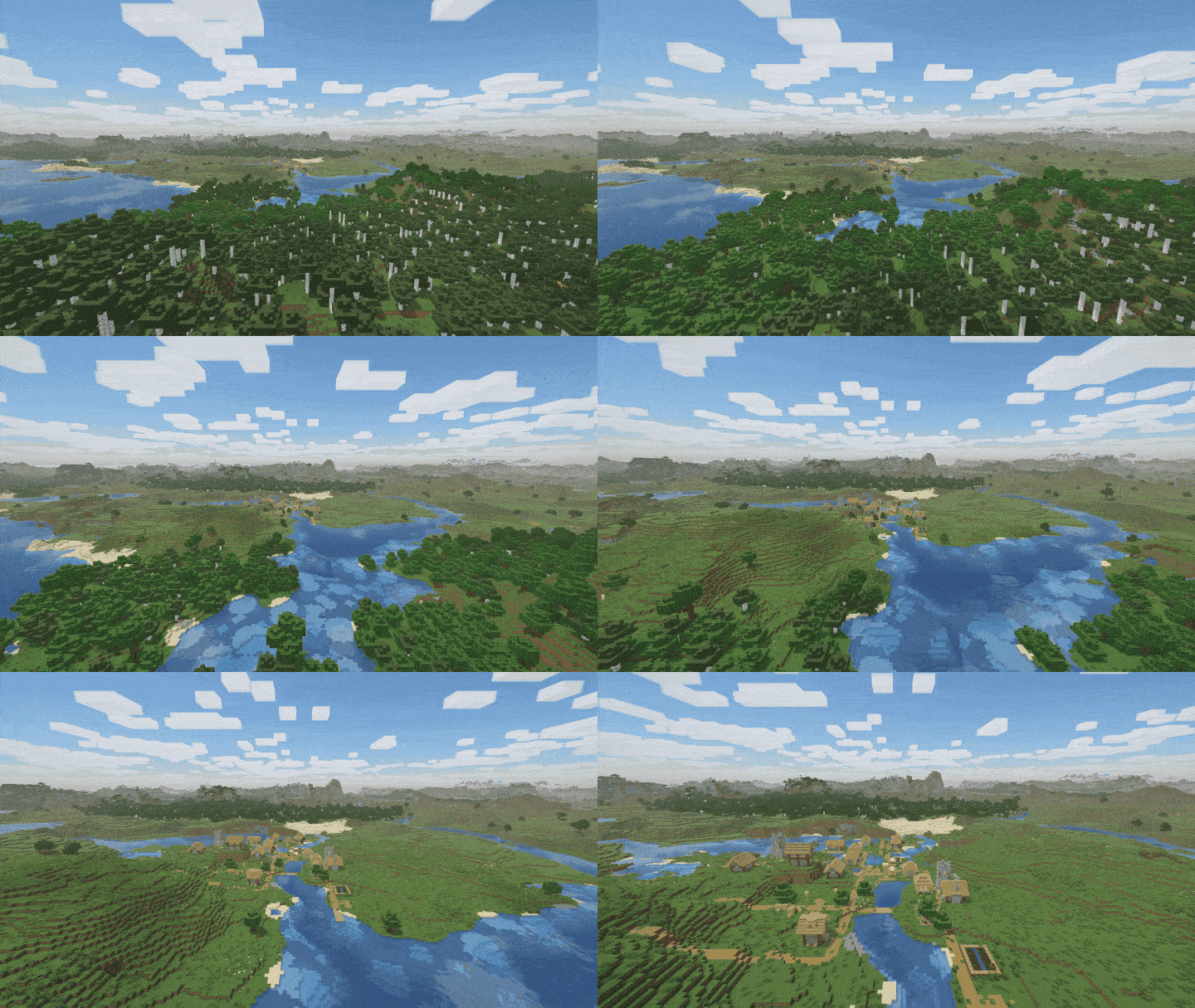
Structures start from the game's seeds and stand where the game will build them. In a comparison with real generation every one was found at its real place.
The world's surface rules cover the ground, also those of data packs. Trees and plants are the game's own features, replayed up to 4-block columns.
Exact terrain near you
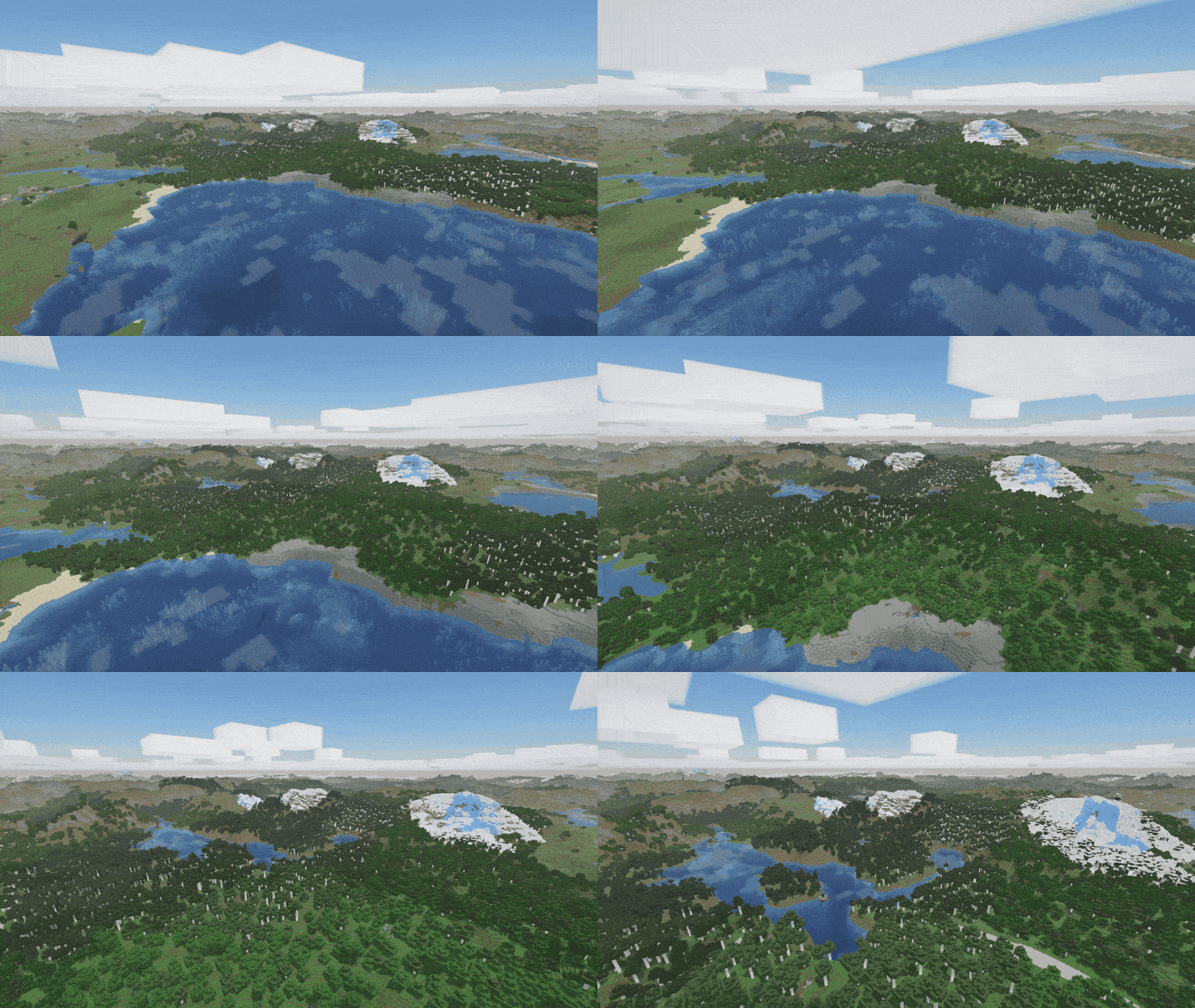
While the generator is idle, the chunks just past your render distance are redrawn by the game's real generator, with caves, ores on cliffs and lakes. In test runs 92 to 95% of columns then matched the real world.
Chunks your world has saved, like builds and adventure maps, reach Distant Horizons as they are.
The Nether and the End
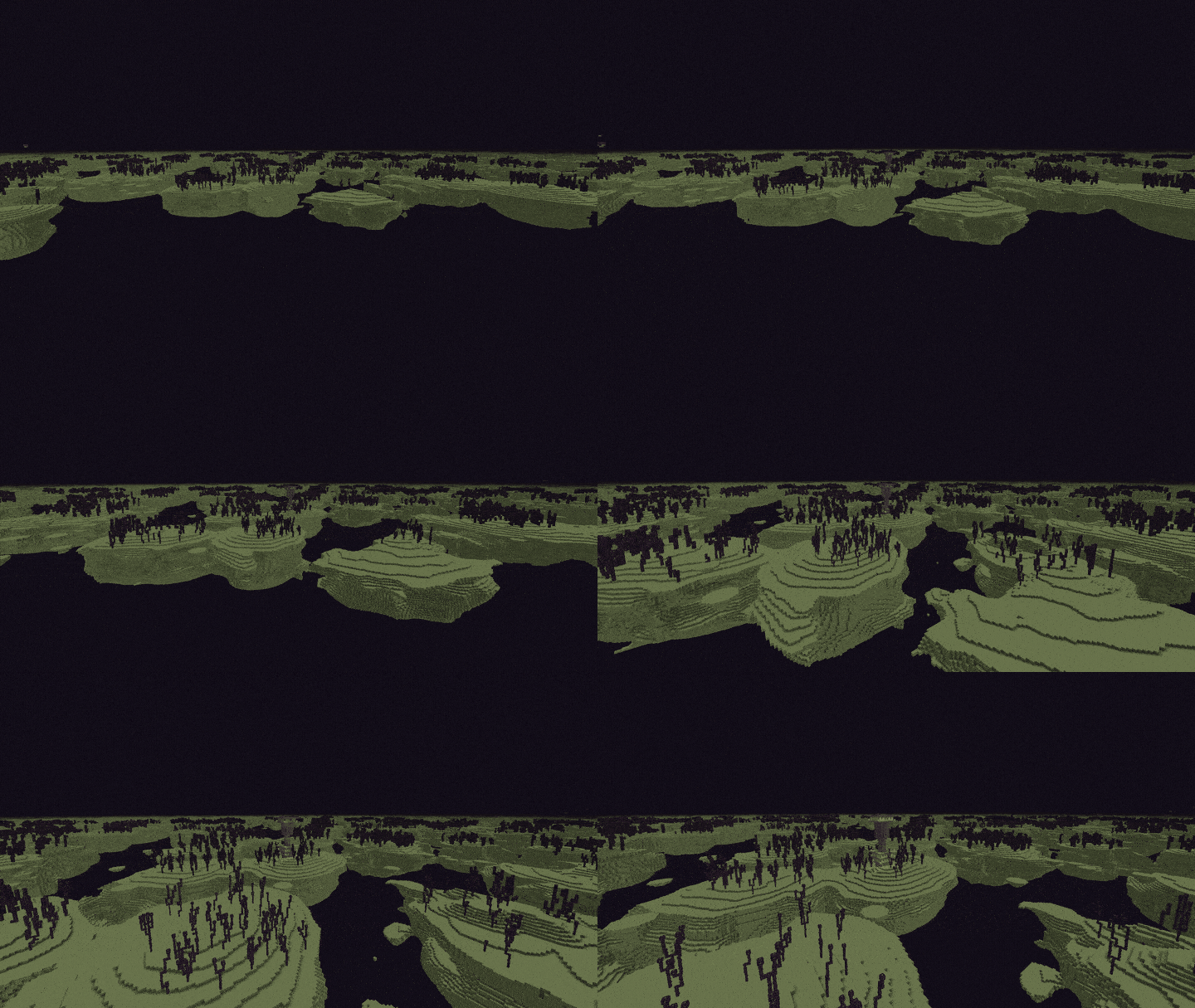
Floating islands, chorus and end cities in the End. Caverns, the lava sea and fortresses under the bedrock roof of the Nether.
Getting started
Put the mod next to Distant Horizons 3.3 (3.3.3 or a later 3.3) on Minecraft 1.20.1, 1.21.1, 1.21.11, 26.1.2, 26.2 or 26.3, with NeoForge or Fabric, or Forge on 1.20.1. Fabric also needs Fabric API and Forge Config API Port. There is nothing to set up. The mod is free and open source under the MIT license.
In multiplayer a server without Distant Horizons shares the seed, so players generate the distance themselves. A server with it sends its own distant terrain and keeps the seed.
Settings are under Mods > Turbo for Distant Horizons > Config, and /dhturbo regenerate redraws the distance of a world, for example after an update.
Good to know
The horizon comes first in singleplayer, and its first seconds are coarse: columns 32 blocks wide. Terrain already drawn keeps its look until you run /dhturbo regenerate. Beyond exact_radius caves and underground structures are not drawn. A world whose terrain the mod cannot read, for example from a mod with its own chunk generator, is left to Distant Horizons, and whoever runs the world is told in chat. The 1.20.1 version is behind: it is at 1.4.0, without exact terrain and the horizon pass.
Works with


More mods by Pocky


Speed: i5-12400F, 6 cores, Minecraft 1.21.1, Distant Horizons 3.3.3 with 6 threads and a LOD radius of 256 chunks, one seed, medians of 3 runs, all three measured on 2026-11-07 against the newest version of the other generator. The first frames count from 3 seconds, when the camera is in place. Accuracy: 3 views on 2 seeds, LOD radius 64 chunks. Your numbers will differ with your PC and world. How the mod works and how to check its accuracy yourself: how it works.
Made by Pocky. Built on the Distant Horizons API by James Seibel and the Distant Horizons team, the logo is the Distant Horizons icon with a lightning bolt. Not affiliated with the Distant Horizons team. The other generator is shown with a stand-in icon.
Turbo for Distant Horizons server crashes on startup – what to do?
Common causes: the loader or Minecraft version does not match the mod file, a dependency is missing, or RAM is too low. Check the log (latest.log) for “OutOfMemoryError”, “Mixin” or missing mods. At Mado, the AI crash analysis reads the log and suggests a cause. You can change the loader and version in the panel.
Which loader does Turbo for Distant Horizons run on?
According to Modrinth, Turbo for Distant Horizons supports Fabric, Forge, NeoForge for Minecraft 26.3, 26.2, 26.1.2. Forge and Fabric files are not interchangeable: pick one loader for the server and clients.
How much RAM does a server with Turbo for Distant Horizons need?
As guidance, 4–6 GB for a server with this mod. This is an estimate, not a measured minimum. More mods, many players and long view distances need more. The spark profiler shows whether a mod is costing tick time.
Similar mods
Popular mods in the same category
 Client only

Sodium
by jellysquid3
A high-performance rendering engine replacement for Minecraft, which greatly improves frame rates and reduces micro-stutter.
 Client only

Iris Shaders
by coderbot
A modern shader pack loader for Minecraft intended to be compatible with existing OptiFine shader packs
 Client only

Entity Culling
by tr7zw
Using async path-tracing to hide Block-/Entities that are not visible
 Server-ready

FerriteCore
by malte0811
Memory usage optimizations
Ready for your server with Turbo for Distant Horizons?
6 GB of RAM from €12.00 per month. 35% off your first month with MADO35.