
Modrinth · Fabric
Viper Vein Miner on your Minecraft server
Viper Vein Miner runs on Minecraft servers with Fabric. Order your server, set the loader in the panel and install the mod with one click in the mod browser.
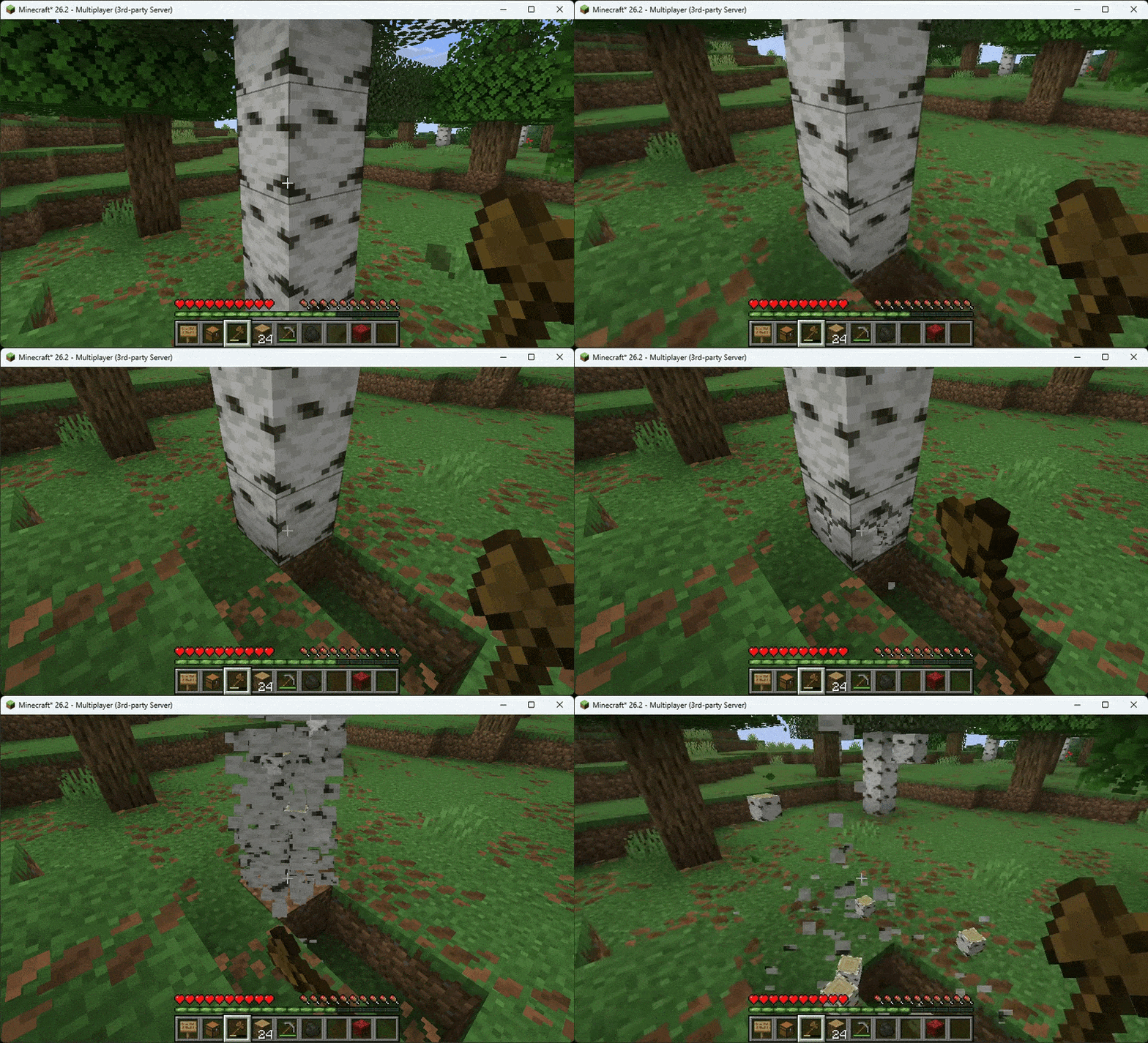
Viper Vein Miner is a lightweight, Server-Side vein-mining mod. Break one ore or log and mine its connected vein in a single action
- Downloads
- 9.3K
- Author
- –
- Loader
- Fabric
- Minecraft
- 1.21 – 26.3
- Updated
- –
Screenshots
What Viper Vein Miner looks like


Images: Viper Vein Miner on Modrinth, published by the project team.
Setup
Install Viper Vein Miner on your server
The server and players need the same loader and Minecraft version. Back up the world before adding or updating mods.
- 01
Configure
4 GB of RAM is preselected. You choose the term and add-ons and pay by credit card or PayPal.
- 02
Set the loader
In the panel, set the server software to Fabric and choose the matching Minecraft version, for example 26.3.
- 03
Install the mod
Search the mod browser for “Viper Vein Miner” and install the release for your loader. Alternatively, upload the .jar to the mods folder via SFTP. Required dependencies are listed on the project page.
- 04
Connect
Viper Vein Miner is not needed on the client. Players connect using the server address from the panel.
- On the server
- Required
- On the client
- Not needed
- Loader
- Fabric
- Minecraft
- 26.3, 26.2, 26.1.2 +14 more
- License
- MIT License
The panel
Install mods, find errors.
Real screenshots from the Mado panel. Both come with every Minecraft server.
Mod browser
Modrinth and CurseForge, right in the panel.
The browser filters by your Minecraft version. Install mods with one click, without uploading .jar files.

AI crash analysis
When a mod crashes, the analyzer reads the log.
Mods often fail on a wrong loader version, Java version or missing dependency. The analyzer names a likely cause and suggests a fix.

Releases
Published releases
Pick the file that matches your server’s loader and Minecraft version. The server and players need the same release.
Viper Vein Miner · Modrinth- 1.0.4November 17, 2026Minecraft 26.3 · Fabric
- 1.0.4November 17, 2026Minecraft 26.2 · Fabric
- 1.0.4November 17, 2026Minecraft 26.1, 26.1.1, 26.1.2 · Fabric
- 1.0.4November 17, 2026Minecraft 1.21, 1.21.1, 1.21.2, 1.21.3, 1.21.4, 1.21.5, 1.21.6, 1.21.7, 1.21.8, 1.21.9, 1.21.10, 1.21.11 · Fabric
Original description by the project author
Viper Vein Miner
Viper Vein Miner is a lightweight, Client-Side + Server-Side vein-mining mod for Minecraft 1.21.x, 26.1.x, and 26.2.x. By default, it mines ores and trees only while leaving every other block untouched. Ore veins include diagonally connected blocks whose faces do not touch.
Supported Versions
| Version | Java | Status |
|---|---|---|
| 1.21.x | 21 | Full support |
| 26.1.x | 25 | Full support |
| 26.2.x | 25 | Full support |
Purpose & Function
The goal of Viper Vein Miner is to make mining ores and chopping trees faster without unexpectedly breaking ordinary blocks. Ores connect through all 26 neighboring positions, while logs use direct face-to-face connections.
- Safe Default Selection: Ores and logs are enabled out of the box; all other blocks are disabled.
- Diagonal Ore Detection: Ore blocks can connect through faces, edges, or corners. They do not need to share a face.
- Tree Mining: Chop directly connected logs without breaking every block individually.
- Optional All-Blocks Mode: Enable any matching block type as a vein when you want broader behavior.
- Vanilla-Style Tool Use: The held tool takes durability damage for each mined block.
- Durability Protection: Mining stops before the held tool would break.
- Configurable Vein Limit: Control how many blocks can be mined at once; the default is 64.
- Live Preview: Connected blocks are highlighted before mining so you can see what will be affected.
- Server-Authoritative Mining: Block breaking is handled on the server for synchronized multiplayer behavior.
Key Features
| Feature | Description |
|---|---|
| Ores & Trees Only | Ores and logs are enabled by default; ordinary blocks are not |
| 26-Position Ore Search | Finds face-, edge-, and corner-connected ores, including diagonals |
| Tree Miner | Mines face-connected logs of the same block type |
| 3 Activation Modes | Choose CROUCH, KEYBIND, or ALWAYS |
| Custom Keybind | Hold V by default when using KEYBIND mode |
| Vein Preview | Displays a translucent yellow highlight over affected blocks |
| Tool Protection | Stops mining before the tool reaches its breaking point |
| Vein Size Limit | Configurable maximum with a default of 64 blocks |
| All-Blocks Mode | Optionally allow connected blocks of any type to act as veins |
| Multiplayer Support | Server-side mining with client-side preview and keybind support |
| Lightweight | Requires only Fabric Loader and Fabric API |
Enhance your server setup! Check out my other server-side mods over at : Fabric Server Essentials
How to Use
- Install Fabric Loader, Fabric API, and Viper Vein Miner.
- Install the mod on the server when playing multiplayer; install it on the client for highlighting and keybind support.
- Crouch and break an ore or log using the default configuration.
- Watch the connected vein break until the configured limit is reached or the tool is nearly broken.
The default activation mode is CROUCH. To use the keybind instead, set activationMode to KEYBIND, then hold V while mining.
Configuration
The configuration file is generated automatically at:
config/viper_vein_miner_config.json
Default configuration:
{
  "enableTreeMiner": true,
  "enableOreMiner": true,
  "allBlocksAreVeins": false,
  "maxVeinSize": 64,
  "activationMode": "CROUCH",
  "renderHighlight": true,
  "highlightAlpha": 0.4
}
| Option | Description | Default |
|---|---|---|
enableTreeMiner |
Enables face-connected log mining | true |
enableOreMiner |
Enables face-, edge-, and corner-connected ore mining | true |
allBlocksAreVeins |
Allows any connected matching blocks to be vein-mined | false |
maxVeinSize |
Maximum blocks mined in one operation | 64 |
activationMode |
Activation method: CROUCH, KEYBIND, or ALWAYS |
CROUCH |
renderHighlight |
Shows the affected-block preview | true |
highlightAlpha |
Preview opacity from 0.0 to 1.0 |
0.4 |
Restart the game or server after editing the configuration file.
Existing configuration files keep their saved values. For the intended ores-and-trees-only behavior, use enableTreeMiner: true, enableOreMiner: true, and allBlocksAreVeins: false.
Installation
| Requirement | Needed |
|---|---|
| Fabric Loader | Yes |
| Fabric API | Yes |
| Client Installation | Required for singleplayer, preview, and keybind mode |
| Server Installation | Required for multiplayer vein mining |
| Mod Menu | Not required |
Use the JAR matching your Minecraft version and place it in the mods folder.
Built for miners who want less repetitive block breaking without losing control. See the vein, protect your tool, and mine it in one strike.
Viper Vein Miner server crashes on startup – what to do?
Common causes: the loader or Minecraft version does not match the mod file, a dependency is missing, or RAM is too low. Check the log (latest.log) for “OutOfMemoryError”, “Mixin” or missing mods. At Mado, the AI crash analysis reads the log and suggests a cause. You can change the loader and version in the panel.
Which loader does Viper Vein Miner run on?
According to Modrinth, Viper Vein Miner supports Fabric for Minecraft 26.3, 26.2, 26.1.2.
How much RAM does a server with Viper Vein Miner need?
As guidance, 3–4 GB for a server with this mod. This is an estimate, not a measured minimum. More mods, many players and long view distances need more. The spark profiler shows whether a mod is costing tick time.
Similar mods
Popular mods in the same category
 Server-ready

YetAnotherConfigLib (YACL)
by isxander
A builder-based configuration library for Minecraft!
 Server-ready

Text Placeholder API
by Patbox
Placeholder and Text manipulation library for your Minecraft mods.
 Client only

Dynamic FPS
by juliand665
Reduce resource usage while Minecraft is in the background, idle, or on battery.
 Server-ready

No Chat Reports
by Aizistral
Makes chat unreportable (where possible)
Ready for your server with Viper Vein Miner?
4 GB of RAM from €8.00 per month. 35% off your first month with MADO35.