
VulkanMod Extra
A comprehensive performance and quality-of-life enhancement mod for VulkanMod.
Screenshots
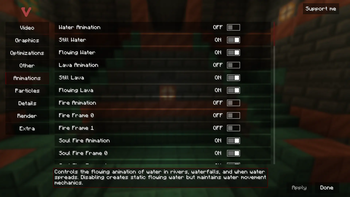
About this Mod
VulkanMod Extra






The ultimate performance control suite for VulkanMod. Turn off what you don't need, keep what you love, and squeeze every last frame out of your Minecraft experience.
What is VulkanMod Extra?
VulkanMod Extra extends VulkanMod with granular control over every visual effect in Minecraft. Built on a modern modular architecture, it seamlessly integrates into VulkanMod's settings GUI while providing unprecedented optimization capabilities.
Think of it as having a professional audio mixing board, but for Minecraft's graphics. Every slider, every toggle, every option is there to help you create your perfect balance between visual quality and raw performance.
Key Features
Animation Control
Fine-tune which textures animate and which stay static. Every animation type can be toggled independently:
- Master Toggle - Disable all animations with one switch
- Fluids - Water (still/flowing), Lava (still/flowing) animations
- Environmental - Fire, Portal swirls, Sculk sensor pulses
- Blocks - All other animated block textures
Particle Management
Control over 80+ individual particle types. From rain splashes to enchantment glimmers, you decide what renders:
- Master Toggle - One switch to rule them all
- Weather Effects - Rain splashes, snow particles, cloud formations
- Block Interactions - Breaking particles, dust, debris
- Entity Effects - Villager emotions, mob particles, player effects
- Environmental - Bubbles, smoke, ash, cherry leaves
- Special Effects - Portal particles, enchantments, explosions
Rendering Optimizations
Deep control over Minecraft's rendering pipeline:
- Entity Rendering - Item frames, armor stands, paintings
- Lighting System - Dynamic light updates optimization
- Beacon Beams - Height limiting for performance
- Fog Effects - Per-environment fog control with detailed multipliers
- Name Tags - Toggle for players and entities
World Details
Customize your world's atmosphere:
- Sky Elements - Sun, moon, stars, sky color
- Weather Visuals - Rain/snow rendering separate from mechanics
- Biome Colors - Toggle biome-specific coloring
- Cloud Settings - Height and render distance controls
HUD & Interface
Enhanced display features:
- FPS Counter - Basic or extended metrics display
- Coordinates - Real-time position tracking
- Toast Notifications - Control achievement/recipe popups
- Debug Info - Steady refresh rate for F3 screen
Performance Impact
Based on community testing and feedback:
| Feature Disabled | Average FPS Gain | Notes |
|---|---|---|
| All Animations | +15-25 FPS | Most impact on lower-end GPUs |
| All Particles | +10-20 FPS | Scales with particle density |
| Weather Effects | +5-10 FPS | During rain/snow |
| Fog Rendering | Not tested yet | Likely helps in water/lava |
| Entity Extras | +2-5 FPS | Item frames, armor stands |
Results vary based on hardware, world complexity, and other mods installed. These are estimates from user reports - your results may differ.
Installation
Requirements
- Minecraft: 1.21.1 - 1.21.5
- Mod Loader: Fabric Loader 0.17.2+
- Dependencies:
- Fabric API (Latest for your MC version)
- VulkanMod 0.5.3+
Quick Install
- Install Fabric Loader for your Minecraft version
- Download VulkanMod and place in
modsfolder - Download VulkanMod Extra and place in
modsfolder - Launch Minecraft
- Open Video Settings → VulkanMod tab to access all features
Multi-Version Support
VulkanMod Extra supports multiple Minecraft versions through our intelligent override system:
- 1.21.1 (Stable)
- 1.21.2 (Stable)
- 1.21.3 (Stable)
- 1.21.4 (Stable)
- 1.21.5 (Beta)
Download the version matching your Minecraft installation from our releases page.
Configuration
Settings are stored in .minecraft/config/vulkanmod-extra-options.json and can be edited manually or through the in-game GUI.
Configuration Structure
{
  "coreSettings": {
    "enableMod": true,
    "enableGuiIntegration": true,
    "enableDebugLogging": false
  },
  "animationSettings": {
    // Individual animation toggles
  },
  "particleSettings": {
    // 80+ particle type toggles
  },
  "renderSettings": {
    // Rendering optimizations
  },
  "detailSettings": {
    // World detail controls
  },
  "extraSettings": {
    // HUD and interface options
  }
}
Performance Presets (Coming Soon)
We're working on one-click optimization profiles:
- Potato - Maximum FPS, minimum visuals
- Balanced - Smart compromises for most systems
- Quality - Minor optimizations, preserve aesthetics
- Ultra - All features enabled
Technical Details
Architecture
VulkanMod Extra uses a modern modular architecture:
- Feature Registry System - Dynamic feature lifecycle management
- Configuration Manager - Automatic backup and migration support
- Mixin Integration - Surgical precision modifications
- Memory Optimization - 85% reduction in settings memory usage
- Thread Safety - Proper synchronization for all operations
Build System
Multi-version support through Gradle:
# Build for specific version
./gradlew build -Pminecraft_version=1.21.4

# Or build the default version for the branch
./gradlew build
Performance Characteristics
- Startup Impact: Minimal - the mod loads quickly
- Memory Usage: Lightweight configuration system
- Runtime Overhead: Negligible when features are disabled
- Config System: Fast JSON-based configuration
Compatibility
Known Compatible Mods
- Fabric API (Required)
- VulkanMod (Required)
- ModMenu (Recommended)
- Most optimization mods
Potential Conflicts
- Sodium/Iris (Use VulkanMod instead)
- OptiFine (Incompatible with VulkanMod)
- Canvas Renderer (Different rendering pipeline)
Troubleshooting
Common Issues
VulkanMod Extra options don't appear
- Ensure VulkanMod is installed and working
- Check that GUI integration is enabled in config
- Verify you're using compatible versions
Settings not saving
- Ensure valid JSON syntax if editing manually
- Try deleting config file to regenerate
- Check write permissions for config folder
Performance degradation
- Some features may impact FPS when enabled
- Start with all features disabled, enable gradually
- Check for mod conflicts
Crashes on startup
- Verify VulkanMod is functioning correctly
- Check log files in
.minecraft/logs - Ensure Vulkan drivers are installed
Contributing
We welcome contributions! Whether it's:
- Bug reports and fixes
- Feature suggestions and implementations
- Translations for other languages
- Documentation improvements
- Testing and benchmarking
Check our contribution guidelines to get started.
Development Roadmap
Current Focus (v0.2.x)
- ✅ Master toggle controls
- ✅ Enhanced GUI integration
- ✅ Multi-version support
- 🔄 Performance preset system
Upcoming Features (v0.3.x)
- Chunk rendering optimizations
- Advanced culling algorithms
- Memory usage profiler
- Custom shader support hooks
Future Plans (v1.0)
- Complete GUI redesign
- Advanced LOD system
- Dynamic performance scaling
- Cloud-based preset sharing
Support & Community
Need help or want to share your experience?
- Issues: GitHub Issues
- Discussions: GitHub Discussions
- Discord: Join the VulkanMod community
- Wiki: Documentation
Credits & Thanks
- xCollateral - Creator of VulkanMod
- FlashyReese - Inspiration from Sodium Extra
- Fabric Team - Amazing modding platform
- Contributors - Everyone who's helped improve the mod
- Community - For testing, feedback, and support
License
VulkanMod Extra is licensed under the MIT License.
You're free to:
- Use the mod in any modpack
- Modify and redistribute
- Use commercially
- Just please give credit!
Built with care for the Minecraft community
Making Minecraft run better, one frame at a time
Available Versions
How to Install VulkanMod Extra on Your Client
Install the Mod Loader Locally
Install fabric for your local Minecraft version.
Download the Matching File
Choose the VulkanMod Extra file for fabric and Minecraft 1.21.5.
Install Mod
Place the .jar file in your local .minecraft/mods folder and restart Minecraft. No server-side installation is required.
Compatibility
Mod Loaders
Minecraft Versions
1.21.5, 1.21.4, 1.21.3 (+2 more)
Server-side
✗ UnsupportedRecommended RAM
4 GB(min. 3 GB)Frequently Asked Questions
Does VulkanMod Extra need to be installed on the Minecraft server?
No. Modrinth marks VulkanMod Extra as unsupported on the server side. Install it only in your local Minecraft mods folder. Your server can remain unchanged unless the mod page lists an additional dependency.
Which version and loader does VulkanMod Extra require?
Use a file for fabric and your exact Minecraft version. Supported versions include 1.21.5, 1.21.4, 1.21.3. Files for different loaders are not interchangeable.
VulkanMod Extra is not working – what should I check?
First check the Minecraft version, loader version and required dependencies. Put the .jar file in your local .minecraft/mods folder and remove older duplicates. Because this mod is client-side, adding server RAM will not fix it.
Similar Mods


Minecraft Server for Your Group
VulkanMod Extra stays on your client. Host a compatible world for your group.