
Modrinth · NeoForge
WebDisplays [2.0] REMASTER on your Minecraft server
WebDisplays [2.0] REMASTER runs on Minecraft servers with NeoForge. Order your server, set the loader in the panel and install the mod with one click in the mod browser.
WebDisplays REMASTER brings the real Internet directly into your Minecraft world!
- Downloads
- 62.5K
- Author
- Xmutsix
- Loader
- NeoForge
- Minecraft
- 1.21.1
- Updated
- –
Screenshots
What WebDisplays [2.0] REMASTER looks like
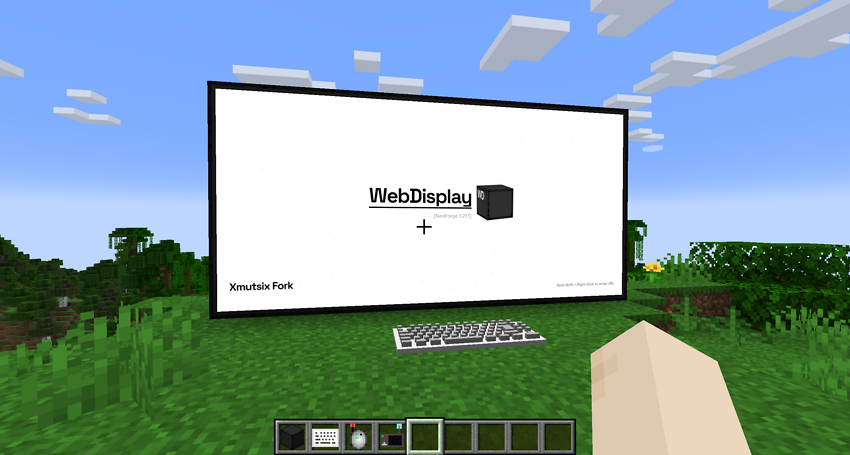
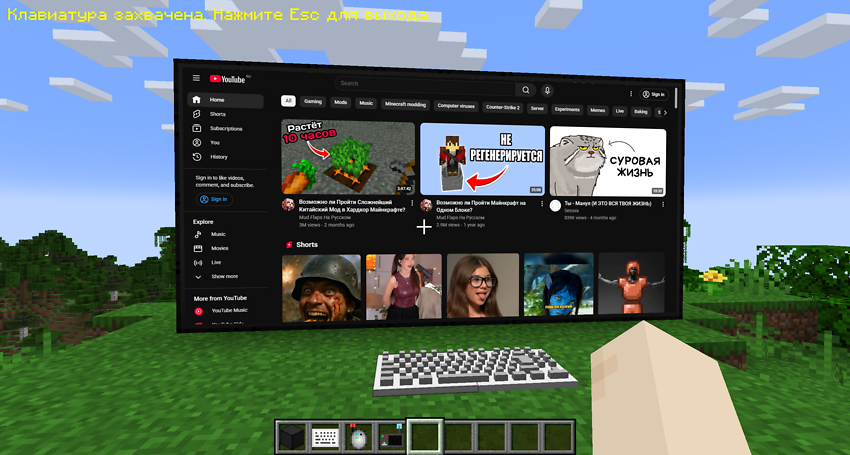

Images: WebDisplays [2.0] REMASTER on Modrinth, published by the project team.
Setup
Install WebDisplays [2.0] REMASTER on your server
The server and players need the same loader and Minecraft version. Back up the world before adding or updating mods.
- 01
Configure
4 GB of RAM is preselected. You choose the term and add-ons and pay by credit card or PayPal.
- 02
Set the loader
In the panel, set the server software to NeoForge and choose the matching Minecraft version, for example 1.21.1.
- 03
Install the mod
Search the mod browser for “WebDisplays [2.0] REMASTER” and install the release for your loader. Alternatively, upload the .jar to the mods folder via SFTP. Required dependencies are listed on the project page.
- 04
Connect
Every player installs the same WebDisplays [2.0] REMASTER release locally and connects using the server address from the panel.
- On the server
- Required
- On the client
- Required
- Loader
- NeoForge
- Minecraft
- 1.21.1
- License
- MIT License
The panel
Install mods, find errors.
Real screenshots from the Mado panel. Both come with every Minecraft server.
Mod browser
Modrinth and CurseForge, right in the panel.
The browser filters by your Minecraft version. Install mods with one click, without uploading .jar files.

AI crash analysis
When a mod crashes, the analyzer reads the log.
Mods often fail on a wrong loader version, Java version or missing dependency. The analyzer names a likely cause and suggests a fix.

Releases
Published releases
Pick the file that matches your server’s loader and Minecraft version. The server and players need the same release.
WebDisplays [2.0] REMASTER · ModrinthOriginal description by the project author
🌐 WebDisplays REMASTER

Bring the entire Internet into your Minecraft world.
Forget about Alt-Tabbing to check a wiki, watch a tutorial, or listen to music. With WebDisplays REMASTER, you can build fully functional, interactive web screens of any size right inside the game.
This version is a major overhaul for Minecraft 1.21.1. It not only fixes critical bugs from previous ports but introduces a completely new operating system-like experience.
🔥 NEW: The Dynamic Home Hub
Gone are the days of a blank white screen. Every new screen you create now launches the Dynamic Hub — a custom-built start page that evolves over time.
- 📱 App Shortcuts: Instant access to YouTube, Twitch, TikTok, Instagram, Twitter (X), and more with a single click.
- 🎮 In-Game Mini-Games: Bored while smelting ores? Play Geometry Dash and other HTML5 games directly on your Minecraft screen.
- ☁️ Dynamic Updates: The Hub is cloud-based. This means new apps and features can appear without you needing to update the mod file!


🛠️ Critical Fixes (The Remaster)
This mod was rebuilt to resolve game-breaking issues found in other 1.21.1 ports:
- ✅ CRASH FIX: Fixed a critical server/client crash that occurred when a player physically collided (walked into) the Keyboard block.
- ✅ INPUT FIX: Solved the annoying "Double Typing" bug. Typing on the keyboard no longer produces
dduupplliiccaatteeddtext. Input is crisp and responsive. - ✅ LASER POINTER FIX: The Laser Pointer is now fully functional. It renders a visible red beam and correctly registers clicks on distant screens.
- ✅ LOCALIZATION: Added full localization support (currently includes English and Russian).
📋 Prerequisites & Installation
To run this mod, you MUST install MCEF (Minecraft Chromium Embedded Framework). The mod handles the browser engine and is required for WebDisplays to function.
- Download NeoForge for Minecraft 1.21.1.
- Download MCEF: CurseForge Link or Modrinth Link.
- Download WebDisplays REMASTER.
- Place both
.jarfiles into your.minecraft/modsfolder.
⚠️ Credits & Original Project
This is an unofficial remastered and improved version of the original WebDisplays mod.
- Original Author: Montoyo
- Original Project: Link to CurseForge
This project respects the original MIT license. The goal of this fork is to provide a stable, crash-free experience for modern Minecraft versions with added quality-of-life features.
❤️ Support the Author
If you enjoy the new Hub and the fixes, you can support my work here:
>> DonationAlerts <<
WebDisplays [2.0] REMASTER server crashes on startup – what to do?
Common causes: the loader or Minecraft version does not match the mod file, a dependency is missing, or RAM is too low. Check the log (latest.log) for “OutOfMemoryError”, “Mixin” or missing mods. At Mado, the AI crash analysis reads the log and suggests a cause. You can change the loader and version in the panel.
Which loader does WebDisplays [2.0] REMASTER run on?
According to Modrinth, WebDisplays [2.0] REMASTER supports NeoForge for Minecraft 1.21.1.
How much RAM does a server with WebDisplays [2.0] REMASTER need?
As guidance, 3–4 GB for a server with this mod. This is an estimate, not a measured minimum. More mods, many players and long view distances need more. The spark profiler shows whether a mod is costing tick time.
Similar mods
Popular mods in the same category
 Server-ready

YetAnotherConfigLib (YACL)
by isxander
A builder-based configuration library for Minecraft!
 Server-ready

Text Placeholder API
by Patbox
Placeholder and Text manipulation library for your Minecraft mods.
 Client only

Dynamic FPS
by juliand665
Reduce resource usage while Minecraft is in the background, idle, or on battery.
 Server-ready

No Chat Reports
by Aizistral
Makes chat unreportable (where possible)
Ready for your server with WebDisplays [2.0] REMASTER?
4 GB of RAM from €8.00 per month. 35% off your first month with MADO35.