
Zetter — Painting Mod
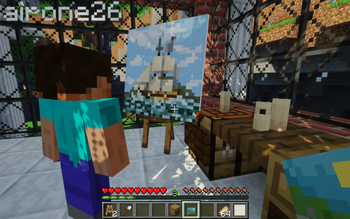
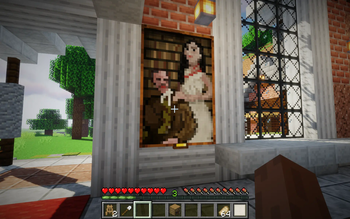
Zetter is a Minecraft mod with a simple goal of adding a custom drawing interface to create custom paintings in Minecraft
Screenshots
About this Mod
Completed features:
- Simultaneous canvas edit, dynamic picture updates for all players in range;
- Dynamic canvas texture loading/unloading;
- 18 types of frames from all vanilla types of wood, all of them can be decorated with golden nameplate which will show painting name by right-clicking it;
- Golden frames have more decoration, iron bezel-less frames allow players to create huge seamless paintings by placing them one next to another;
- Frames could be easily replaced, you can take your painting off the frame and use another;
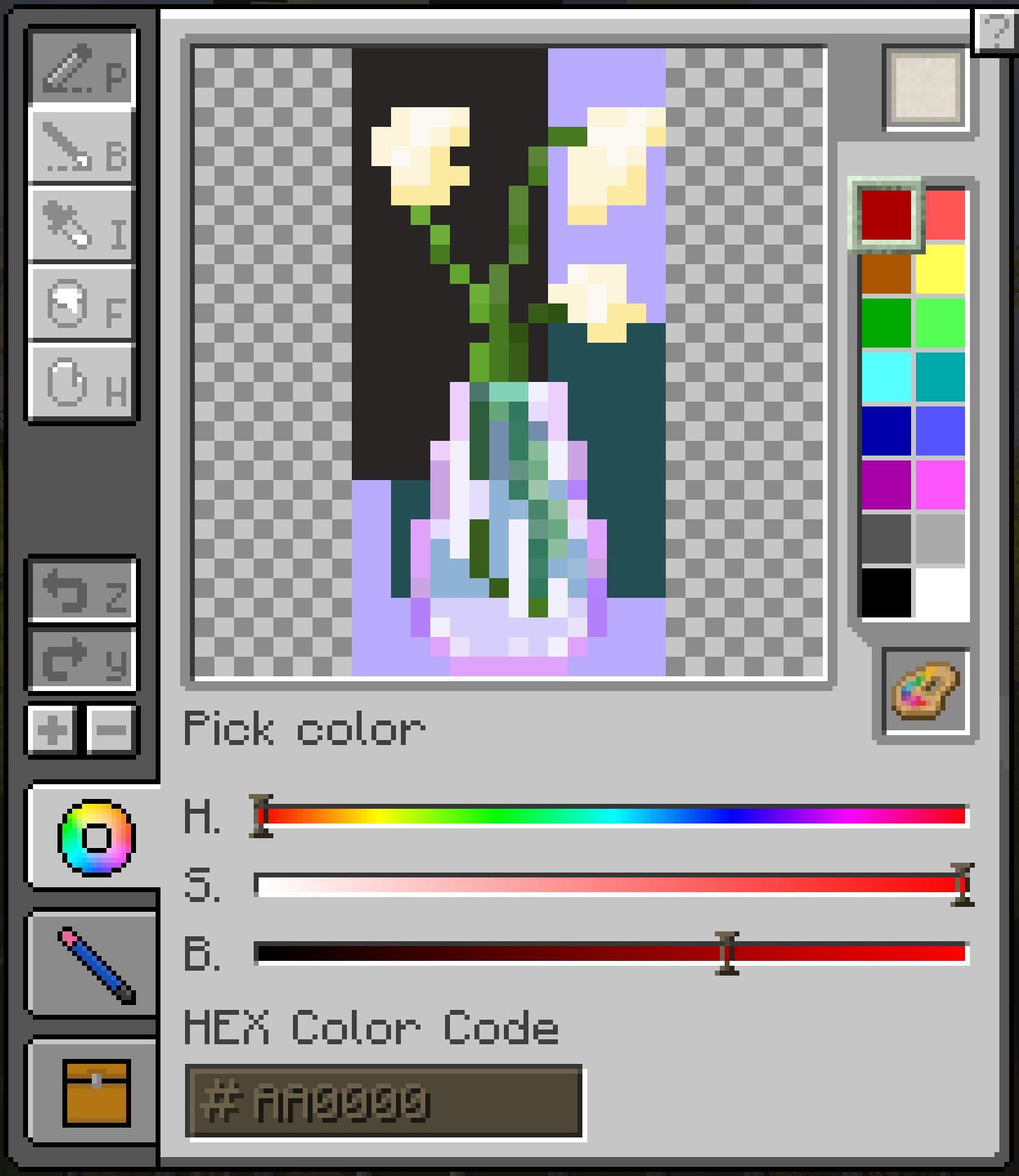
- Color code input fields (hex) and HSV sliders for color picking;
- Color blending options, classic RGB, subtractive, and realistic;
- Brush tool with smooth edges;
- Edit up to 2x2 canvases on easel;
- 16x16 paintings can be combined and placed on wall, resulting in up to 4x4 blocks paintings;
- Eyedropper, hand and zoom tool for easy navigation;
- Bucket tool;
- Save your colors in palettes, recharge palettes with paints and use them on multiple canvases;
- Hotkeys included;
- Export paintings to png files with
/zetter exportcommand
Available translations:
- American English (en_US 🇺🇸) ;
- Russian (ru_RU 🇷🇺) with the help from DrHesperus;
- Portuguese (pt_PT 🇵🇹, pt_BR 🇧🇷) thanks to StuarteLitro;
- Spanish (es_ES 🇪🇸, es_AR 🇦🇷, es_HN 🇭🇳, es_MX 🇲🇽, es_PE 🇵🇪 and others) thanks to iSrNinja;
- German (de_DE 🇩🇪) thanks to OttovonBismarckderErste;
- Chinese (zn_CN 🇨🇳) thanks to cream280;
- Polish (pl_PL 🇵🇱) thanks to Vakarian89;
- Hebrew (he_IL 🇮🇱) thanks to ItamarDenkberg;
Core values of this mod:
- Encourage players to create own pixel artworks and use it in their creations;
- Do not change vanilla gameplay in any way and try to be as much close to vanilla Minecraft feel as possible;
- Drawing should be fun and simple;
- Let power users to be power users as much as it doesn't overcomplicate UI;
- Server administrators should be able to easily moderate player artworks and decide what is appropriate on their server;
- Simultaneous canvas edit is super hard to implement properly, but I will because it's fun.
Planned features:
- Special admin table to check all pictures;
- Line tool;
- Setting to use higher resolution of canvases for higher-resolution texture packs, up to 64px on one block.
Available Versions
How to Install Zetter — Painting Mod on Your Server
Order Server
Order a Minecraft Java server with at least 3 GB RAM (4 GB recommended).
Set forge Loader
In the panel under "Egg", select the forge loader and matching Minecraft version (1.21.11).
Install Mod
Open the mod browser in the dashboard and search for "Zetter — Painting Mod". Click "Install" – done! Alternatively, upload the .jar via SFTP to the /mods folder.
Compatibility
Mod Loaders
Minecraft Versions
1.21.11, 1.21.10, 1.21.9 (+18 more)
Server-side
✓ RequiredRecommended RAM
4 GB(min. 3 GB)Frequently Asked Questions
Zetter — Painting Mod server crashes on startup – what to do?
Most common cause: wrong forge version or insufficient RAM. Check the server log (latest.log) for "OutOfMemoryError" or "Mixin" errors. With Mado Hosting: ensure at least 3 GB RAM is allocated and the loader matches the mod version (1.21.11). You can switch loaders with one click in the panel.
Is Zetter — Painting Mod compatible with forge and neoforge?
Zetter — Painting Mod officially supports forge, neoforge for Minecraft 1.21.11, 1.21.10, 1.21.9. The Mado dashboard automatically detects incompatible loader combinations.
Server lagging with Zetter — Painting Mod – how to optimize performance?
Recommended RAM: 4 GB (per 8 players). Use /spark profiler to check if Zetter — Painting Mod consumes the most tick time. Common fixes: reduce server view-distance to 8-10, install "performant" or "starlight" as supplementary mods on Forge. With Mado Hosting, your server runs on NVMe SSDs with dedicated CPU cores for minimal latency.
Similar Mods

![[ETF] Entity Texture Features](https://cdn.modrinth.com/data/BVzZfTc1/af683d206d50b05258d865b0d6e4aa2f2cee12f2_96.webp)
![[EMF] Entity Model Features](https://cdn.modrinth.com/data/4I1XuqiY/6e5bbd0d06b1741bfdab6c0cfab6de8fdaf0064c_96.webp)



Rent Modded Server
Install Zetter — Painting Mod with just one click on your server.