
Colonies And Technologies
Invite friends (via Essential mod) for MineColonies and technologies (Create/Applied Energistics2/Ad Astra/Forgematica/Mekanism), fun transportation (Immersive Aircraft/Automobility/Waystones), more mobs (and Fresh Animations), guns, QOL, etc.
Screenshots
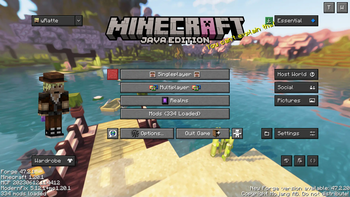
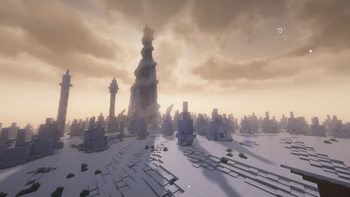
About this Modpack
This modpack is to experience Minecolonies (a mod that allows you to build your own city with your own villagers) and also have tons of other stuff to do, if you want, via different tech mods.
Includes Forgematica (building schematics), more dimensions like the Aether, CAWEZ'S Mantle to Stratus and Ad Astra, beautiful world generation (Terratonic), interesting locations to find, many new mobs, weapons, tools and armors and better immersion with added graphical mods, resource packs, music, sounds and shaders (via Oculus and Embeddium) too.
Recommended setup:
- 64bit Java (You'll need Java SE Development Kit 17)
- 8gig RAM allocated
Known Issues & Workarounds:
- Excessive stuttering when both Distant Horizons and Shaders are enabled: If you encounter 100% CPU utilisation during this, try adding the following in your Java Parameters: `-XX:+UseG1GC -Dsun.rmi.dgc.server.gcInterval=2147483646 -XX:+UnlockExperimentalVMOptions -XX:G1NewSizePercent=20 -XX:G1ReservePercent=20 -XX:MaxGCPauseMillis=50 -XX:G1HeapRegionSize=32M` (Thanks to "Noname49237" for finding this.)
- "Invalid Version 47.2.20 for modloader Forge" error while installing: This error only happens when trying to install the modpack on the Modrinth launcher. Until Modrinth fixes this, you can still install this modpack with Prismlauncher.
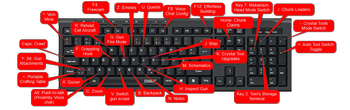
- If you ever experience a crash that causes the keybinds to reset to mod defaults, just use the reset all button to revert them to the modpack defaults.
- Barrels/chests that appeared from **MineTreasure will vanish after a certain time**, so loot it or loose it, but don't store stuff in them during that period, unless you're ok with loosing those items with the barrel when it despawns.
- If you want to create a superflat world, first (temporarily) disable the Terralith and Tectonic mods and use Chunky's commands to generate as many blocks as you want in it before re-enabling those 2 mods for your normal worlds. (More Info)
- Breaking Slopes from Automobility could crash the game. If that happens, breaking them with creative mode should work.
How to set up a dedicated server:
The following things are included:
- Map/Minimap/Navigation: Journeymap & MapFrontiers, Chalk, Explorer's Compass, Nature's Compass
- Terrain Generation/Dimensions: Terralith (overworld) & Remove Terralith Intro Message, Tectonic (works well with Terralith), Incendium (nether), Nullscape (end), Aether (new dimension), Spelunkery (caves & mining), Subterrestrial (underground buildings), Abridged (bridges over rivers), Better Archeology, Chunky, CAWEZ'S Mantle to Stratus, When Dungeons Arise: Seven Seas, Yungs Bridges
- Structures: Philips Ruins, Towers of the wild, When Dungeons Arise, MES - Moog's End Structures, Integrated Dungeons and Structures, Integrated Stronghold, Hopo better underwater ruins, Hopo Better Ruined Portals, Blossom Blade, Yungs Better Dungeons, YUNG's Better End Island, YUNG's Better Jungle Temples, Yungs Better Mineshafts, Yungs Better Nether Fortresses, Yungs Better Ocean Monuments, Yungs Better Witch Huts, qraftyfied, Abandoned urban, Sparse Structures Reforged, Create: Let The Adventure Begin, Medieval Buildings [End Edition], ATi Structures Mod, No More Villages, No More Ocean Monuments (Vanilla), No More Ocean Ruins (Vanilla), No More Ruined Portals (Vanilla)
- Villages/Villager improvements: Integrated Villages, Fresh Animations, MineColonies, Trade Uses, Villager death messages, Hey Berry! SHUT UP, Villager Names, TownTalk, Smarter Farmers (farmers replant), Villager Transportation, Tidal Towns
- Space Travel: Ad Astra
- Movement/Transport: Cars (Automobility), Travel Anchors, Better Climbing, Block Runner, Hang Glider, Immersive Aircraft & Man of Many Planes, Little Logistics, ElevatorMod, Hook, ParCool, Small Ships, Jump Over Fences, Air Hop
- Combat: Vic's Point Blank, Better Combat, Simply Swords, Better Tridents, Shield Expansion, MmmMmmMmmMmm (A target dummy that shows dps), More Bows Restrung, Landmines, Spoorn Weapon Attributes, Passive Shield, Simple Spears, Silent Gear, Marbled's Melees
- Tools: Piercing Paxels, Tool Upgrades, Mob Lassos, Scannable, Artifacts, Curios API, Mine Treasure, Mekanism Tools, Crystal Tools, Silent Gear, Torch Bandolier, Advanced Golems, Liteminer
- Armor: Full Turtle Armor, Immersive Armors, Useful Slime, Spoorn Armor Attributes, Cosmetic Armor Reworked, Silent Gear, Superior Shields, Marbled's Arsenal [MA], Armor of the Ages, Armor Stand Shift Swap
- Tech: Create, Applied Energistics 2, Plenty Plates, Spiky Spikes, Mekanism & Mekanism Generators, Chunk Loaders, Security Craft and SecurityCraft: More Protectables
- Storage: Bag of holding, Easy Shulker Boxes, Functional Storage, Nether Chested, Toms Simple Storage Mod, Traveler's Backpack, Echo Chest, Storage Labels, Expanded Storage
- Workstations: Portable Tables, Comforts (sleeping bags & hammocks), Easy Anvils (Repair costs don't keep escalating), Botany Pots, Workshop for handsome adventurer, Sawmill
- Mobs: Alex's mobs, Living Things, Ender Zoology, Guard Villagers, Tiny Skeletons, Bartering station, Geckolib, Naturalist, What Are You Voting For? 2023, Friendly Fire (Pet Protection), EveryXDance, Variants & Ventures, Meowing, Drodi's Slimes, Farsighted Mobs (Forge), LUMINOUS: Monsters, DragN’s Livestock Overhaul! and DragN's Livestock Overhaul: Pets Addon!, Zombies More
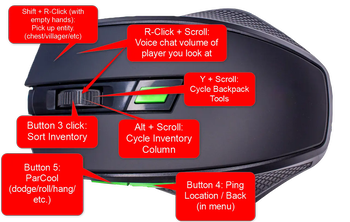
- QOL: Jade, JEI (Just enough item), Automatic Tools Swap, Slot Cycler, Trash Slot, Paper Doll, Stylish Effects, Equipment Compare, Controlling, Pick up notifier, Traveler's Titles, Not Enough Recipe Book (Removes Recipe book), Effect Descriptions, Crafting Tweaks, Better Advancements, Appleskin, Bridging Mod, Scaffolding drops nearby, Quick Right-Click (use workstation without placing), Overflowing bars, Gravel Miner, Farming for Blockheads, Held Item Tooltips, Enchantment Descriptions, Clean Tooltips, 2mal3's Recipes, Inventory Essentials, Inventory Totem, Mouse Tweaks, MoreJeiInfo (more details during F3+h), Mob Plaques, Separated Leaves, Carry On (Shift + r-click with empty hand to move chests/villagers/etc.), Seamless, Armor Statues, Eccentric Tome, Food Effect Tooltips (Forge), Improved Sign Editing, Yeetus Experimentus, Advanced Backups, GUI Followers, Effect Tooltips, WI Zoom, No Resource Pack Warnings forge, World Play Time, Inventory Sorter, Mekanism Cardboard Tooltip, NetherPortalFix, Not Interested! (send wandering traders away), Draggable Lists, Better Resource Pack Sorting, Pro Placer, Think before Drop, Better Third Person
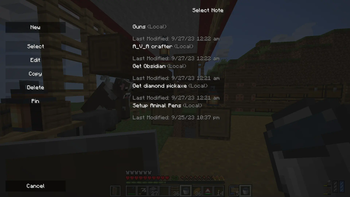
- Progress Tracking/Quests: Notes, Day Counter, Advancement Plaques, Completionist Index, Heracles, Loot Bundles, Starter Kit, New Death Messages
- Abilities: Improvable Skills
- Music / Video / Sound: Ambient Sounds, Sheep Squeak, Iam Music Player, Quality Sounds, Enhanced Audio (Sound Pack), Enhanced Audio: Ambience (Sound Pack), StargateSurpreme, Current Game Music Track, Alex's Mobs Extra Music, Boss Music Mod, WATERFrAMES, Armor Impact Sounds
- Gravestone mod: Corpse
- Graphical Changes: Distant Horizons, ItemPhysics Lite, FootprintParticle, YDM's Weapon master, EMF, ETF, Visuality: Reforged, Not Enough Animations, Distinguished Potions, Panorama Screens, Better Beds Reforged, Wavey Capes, What Are They Up To (Watut), Cake Chomps, Icons & Icons Advertisement Removal, Loading Backgrounds (Nature Loading Screens), 3D Item Icons, Better Animations, Sus Sand & Extra Sus Sand, F.M.R.P, Crosshair CUBE, Farmer's 3D, 3D crops Revamped, RAY's 3D Rails, Explosive Enhancement (Forge), Mickey Joe's Flowers!, 3D Bamboo Shoots, Super Simple 3D Dripstone, Gray's 3D items, 3D Default, Canoe Boats, Coastal Waves, Rainbows
- Shader Packs: Complementary Shaders - Unbound with Euphoria Patches, BSL Shaders
- Multiplayer: Essential (allows invites to single player worlds, emotes and cosmetics), PlayerRevive, Chat heads, Lootr (Instanced Loot), Plasmo Voice, Ping Wheel, Argonauts, Cadmus, Talk Balloons
- Building: Rechiseled & Rechiseled: Create, Macaw Roofs/Paths/Fences/Bridges/Doors/Windows, Forgematica (building blueprints - Forge version of Litematica), Connected Glass, Effortless Building, Freecam (Modrinth Edition), Amendments, Quark (and Zeta), Additional Placements, Rechiseled: AE2, Decorative Blocks, Dawn of Time - Builder Edition
- Furniture: Macaw Furniture, Furniture Expanded, Exline's Furniture, Cooking for Blockheads, Paladin's Furniture
- Food/Farming: Farmer's Delight, Replanting Crops, Universal Bonemeal, Burger Mod, Berries and More, Ender Tendril, Blazing Bamboo
- Humor: Daily dad
- Performance Mods: Modern Fix, Embeddium, Embedium++, Immediately Fast, Ferrite Core, Clumps, Radium, Saturn, Alternate Current, FPS Reducer, Noisium
- Mod Integrations: Mekanism: Ad Astra Ores, Disable Ad Astra Meteors, Crushed Astra, Polymorphic Energistics
- Difficulty adjusters: Majrusz's Progressive Difficulty (Since we have guns by the time go to the nether, we can add some difficulty then.), Ender Trigon (harder ender dragon fight)
- Configs and Pack Management: Modpack Update Checker, CraftTweaker, Splashy, Paxi, Mods Optimizer, Default Options
- Datapacks: (Auto added via Paxi to new worlds) ByeByeVanillaMineshaft (by Ohponopono), qraftyfied (mentioned above in Structures), Hopo Better Ruined Portals and Hopo better underwater ruins (mentioned above in Structures)
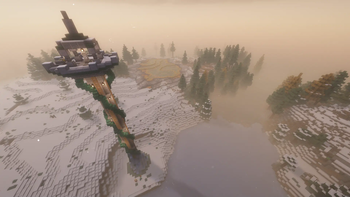
(Picture built from 3 images I got from Pixabay :).)
(Other mods - mostly dependancies: BlockUI, Citadel, Domum Ornamentum, Structurize, Forge CIT, Multi-Piston, CoroUtil, Silent Lib, Common Network, Lithostitched, Integrated API, Yungs API, Framework, Blueprint, Personality, WATERMeDIA, CERBON's API, Bad Packets, iChunUtil, Yet another config lib, HammerLib, Amber, OctoLib, Marbled's Core)
Available Versions
How to Set Up a Colonies And Technologies Server
Order Server
Choose at least 6 GB RAM (8 GB recommended for Colonies And Technologies). Based on player count: per 5 players.
Install Modpack in Dashboard
Open the modpack browser in the dashboard, search for "Colonies And Technologies" and click "Install". The forge loader and Minecraft 1.20.1 are configured automatically.
Start Server & Play
Start the server – all mods are loaded automatically. Share the server IP with friends and play together!
Frequently Asked Questions
Colonies And Technologies server crashes or won't start – what to do?
Most common causes: insufficient RAM or wrong forge loader. Check latest.log for "OutOfMemoryError" → increase RAM to at least 8 GB. For "Mixin" or "ClassNotFoundException" errors: modpack version and loader don't match. With Mado Hosting, loader and Minecraft version are auto-configured on modpack install – preventing most startup issues.
How much RAM does a Colonies And Technologies server really need?
Minimum 6 GB, recommended 8 GB for stable performance. per 5 players. Important: Minecraft modpacks need more RAM than vanilla – plan extra per additional player. With Mado Hosting, you can scale RAM up live at any time without data loss (from €7.800000000000001/month).
Can I add custom mods to Colonies And Technologies without conflicts?
Yes, but check compatibility: only use mods for the same loader (forge) and same Minecraft version (1.20.1). Common issues: ID conflicts with recipe mods and incompatible coremod versions. The Mado dashboard mod browser only shows compatible mods and warns about known conflicts.
Colonies And Technologies server lagging – performance tips
1) Increase RAM to 8 GB+. 2) Reduce server view-distance to 8 (server.properties). 3) Pre-generate chunks with the "Chunky" plugin. 4) Use /spark profiler to check which mods consume the most tick time. With Mado Hosting, all servers run on NVMe SSDs with dedicated CPU cores – eliminating hardware as a bottleneck.
Similar Modpacks
![Cobblemon Official Modpack [Fabric]](https://cdn.modrinth.com/data/5FFgwNNP/e7f9ee2e9d361623847853fe2ddce42f519ee64f.png)
![COBBLEVERSE - Pokemon Adventure [Cobblemon]](https://cdn.modrinth.com/data/Jkb29YJU/581ecf54530972afb18a04660afd820f2f24f6c7.png)
![Better MC [FABRIC] - BMC2](https://cdn.modrinth.com/data/shFhR8Vx/a19c2bcb51d38f32f138d3607e91cb2b7b8e387f_96.webp)


![Better MC [FORGE] - BMC4](https://cdn.modrinth.com/data/4BV47HRn/7f5ef7cc61b2593609aabef3ed07a866a4f11b73_96.webp)
Rent Colonies And Technologies Server
Start your own server with automatic modpack installation.
Supported Versions
Start your Colonies And Technologies Server now
From €7.80/month; 8 GB RAM is recommended for best performance.
Configure Server →