
Aaron’s Mod
Aaron's Mod is a collection of useful features for vanilla and Skyblock players!
Screenshots
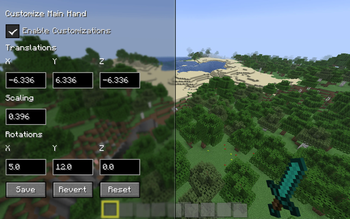
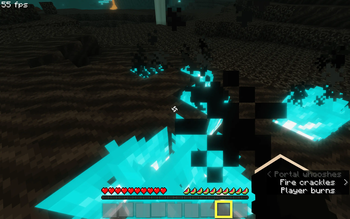
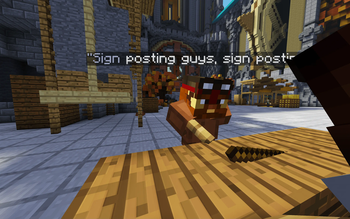
About this Mod
Aaron's Mod
Aaron's Mod is a collection of useful features for vanilla and Skyblock players alike!
Installation
- Install Fabric from here if you haven't already
- Install the latest version of the Fabric API
- Download this mod and put it into your
modsfolder
Optionally, install Mod Menu so that you can configure the mod!
Features
All of these are client side and can be toggled & customized inside of the configuration menu! To learn more about each feature, have a look at its correlating option in the configuration menu.
Vanilla:
Shadowed Scoreboard Text
Hide Scoreboard Score
Shadowed Name Tag Text
Hide Name tag Background
FPS Display
Extra Debug Info
Hide Fire Overlay
Hide Mob Spawner Animations
Correct Ambient Darkness
Zoom Key-bind - C (with option to increase/decrease zoom)
Old Message Trust Indicator Colours
Potion Enchantment Glint
Not Stopping Sounds on World Changes
Copy Chat Messages with Middle Click (with two different modes)
Custom Chat History Length
Image Preview (with option to increase/decrease image scaling)
Infinite Hotbar Scrolling
Showing Item Groups Outside of Creative
Not Resetting Cursor Position Between Chest GUIs
Optimized Screenshots (11% smaller file sizes with zero quality loss!)
Silence Resource Pack Log Spam
Secure Skin Downloads
Mac Only - Alternate FN+F3+N Keybind
Christmas Chests For the Whole Month of December
Particle Manager
- Particles can be toggled on or off
- You can change the scale of particles too!
- Works with all particles, vanilla or modded!
Text Replacer
- Allows you to visually replace almost any text on screen!
Skyblock:
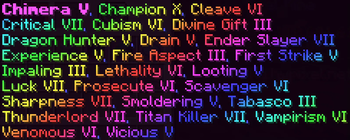
- Rainbowify Max Level Enchantments (with two different modes)
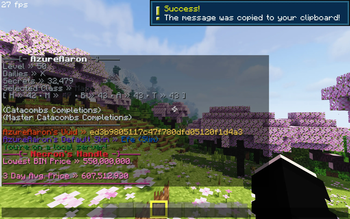
- Party Finder Stats Lookup
- Dungeon Score Messages
- Old Master Star Display
- Fancy Diamond Heads
- Hiding Item Tooltips in Click On Time
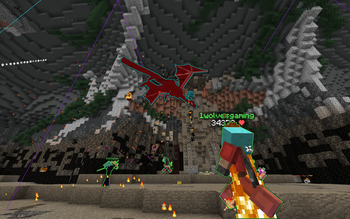
- M7 Dragon Statue Bounding Boxes
- M7 Dragon Spawn Timers
- M7 Dragon Health Display
- M7 Dragon Aim Waypoints, Arrow Stack Waypoints
- Glowing M7 Dragons (Glow colour dependent on dragon colour!)
Continue reading below for a list of commands the mod offers!
Commands
Inside of the configuration you can choose a colour profile! There is currently 7 available; Original, Midnight, Earth, Sakura, Cloudy, Halloween and Christmas. This setting will change the colours used to display command feedback.
Vanilla:
/aaronsmodOpens a screen with various links for the mod./copychat <excerpt>Copies the most recent message containing the excerpt (case sensitive)./defaultskin <player>Tells you the given player's default skin & model./pingLets you know what your ping is on multiplayer servers or realms./textreplacer add|remove <textReplacement> [<textComponent>]Allows you to use the mod's text replacer!/uuid <player>Returns the uuid of the given player./wardenwarninglevelHelps you keep track of what warning level you're at for Sculk Shriekers.
Skyblock:
/bzprice <product>Allows you to query the stats of a product on the Skyblock bazaar!/blessingsView all the blessings you've collected during your dungeon runs./crimson <player>View a player's statistics related to the Crimson Isle./croesus <player>Get an oversight on a player's unclaimed dungeon chests./cata <player>View a player's statistics related to the Catacombs./essence <player>See how much essence a player has collected./inventory <player>Shows you a player's equipped armour and key items./lbin <item name>Allows you to query some statistics about an item on the Skyblock auction house./mp <player>Get an oversight on a player's magical power and accessory bag configuration!/networth <player>View a players net worth and see where it comes from!/profile <player>View general stats about the given player's Skyblock profile.
Contributing & Maintaining
This mod will be maintained for only the latest version of Minecraft. I have no plans to create any ports of this mod either.
Feel free to send me any suggestions!
Available Versions
How to Install Aaron’s Mod on Your Client
Install the Mod Loader Locally
Install fabric for your local Minecraft version.
Download the Matching File
Choose the Aaron’s Mod file for fabric and Minecraft 26.2.
Install Mod
Place the .jar file in your local .minecraft/mods folder and restart Minecraft. No server-side installation is required.
Compatibility
Mod Loaders
Minecraft Versions
26.2, 26.1.2, 26.1.1 (+21 more)
Server-side
✗ UnsupportedRecommended RAM
4 GB(min. 3 GB)Frequently Asked Questions
Does Aaron’s Mod need to be installed on the Minecraft server?
No. Modrinth marks Aaron’s Mod as unsupported on the server side. Install it only in your local Minecraft mods folder. Your server can remain unchanged unless the mod page lists an additional dependency.
Which version and loader does Aaron’s Mod require?
Use a file for fabric and your exact Minecraft version. Supported versions include 26.2, 26.1.2, 26.1.1. Files for different loaders are not interchangeable.
Aaron’s Mod is not working – what should I check?
First check the Minecraft version, loader version and required dependencies. Put the .jar file in your local .minecraft/mods folder and remove older duplicates. Because this mod is client-side, adding server RAM will not fix it.
Similar Mods






Minecraft Server for Your Group
Aaron’s Mod stays on your client. Host a compatible world for your group.