
Modrinth · Fabric · Client mod
Auto Villager (Librarian) Reroll
Auto Villager (Librarian) Reroll is a client-side mod. Install it on your computer; the server does not need it.
This mod adds an easy to use feature to automatically reroll for enchanted books with an optional max cost setting.
- Downloads
- 5.6K
- Author
- Jonyboylovespie
- Loader
- Fabric
- Minecraft
- 26.1 – 26.3
- Updated
- –
Screenshots
What Auto Villager (Librarian) Reroll looks like


Images: Auto Villager (Librarian) Reroll on Modrinth, published by the project team.
Setup
Install Auto Villager (Librarian) Reroll on your client
Client-side mods only run on your computer. More server RAM does not change their performance.
- 01
Install the loader locally
Install Fabric for your Minecraft version in your launcher.
- 02
Download the file
Download the Auto Villager (Librarian) Reroll file for your loader and your exact Minecraft version, for example 26.3.
- 03
Add it to the mods folder
Put the .jar file in your local .minecraft/mods folder and remove older duplicates.
- 04
Launch
Launch Minecraft with the loader profile. Nothing needs to change on the server.
- On the server
- Not needed
- On the client
- Required
- Loader
- Fabric
- Minecraft
- 26.3, 26.2, 26.1.2 +2 more
- License
- MIT License
Releases
Published releases
Pick the file that matches your server’s loader and Minecraft version. The server and players need the same release.
Auto Villager (Librarian) Reroll · Modrinth- Experienced villager handling and quieter reroll updatesNovember 1, 2026Minecraft 26.3 · Fabric
- Auto Villager (Librarian) Reroll 1.0.1August 16, 2026Minecraft 26.2 · Fabric
- Auto Villager (Librarian) Reroll 1.0.0May 19, 2026Minecraft 26.1, 26.1.1, 26.1.2 · Fabric
Original description by the project author
Auto Villager Reroll
Automates librarian lectern rerolls. Configure a list of desired enchanted books, then the mod will repeatedly break and replace a lectern until one of those books appears in the villager's trades.
Usage
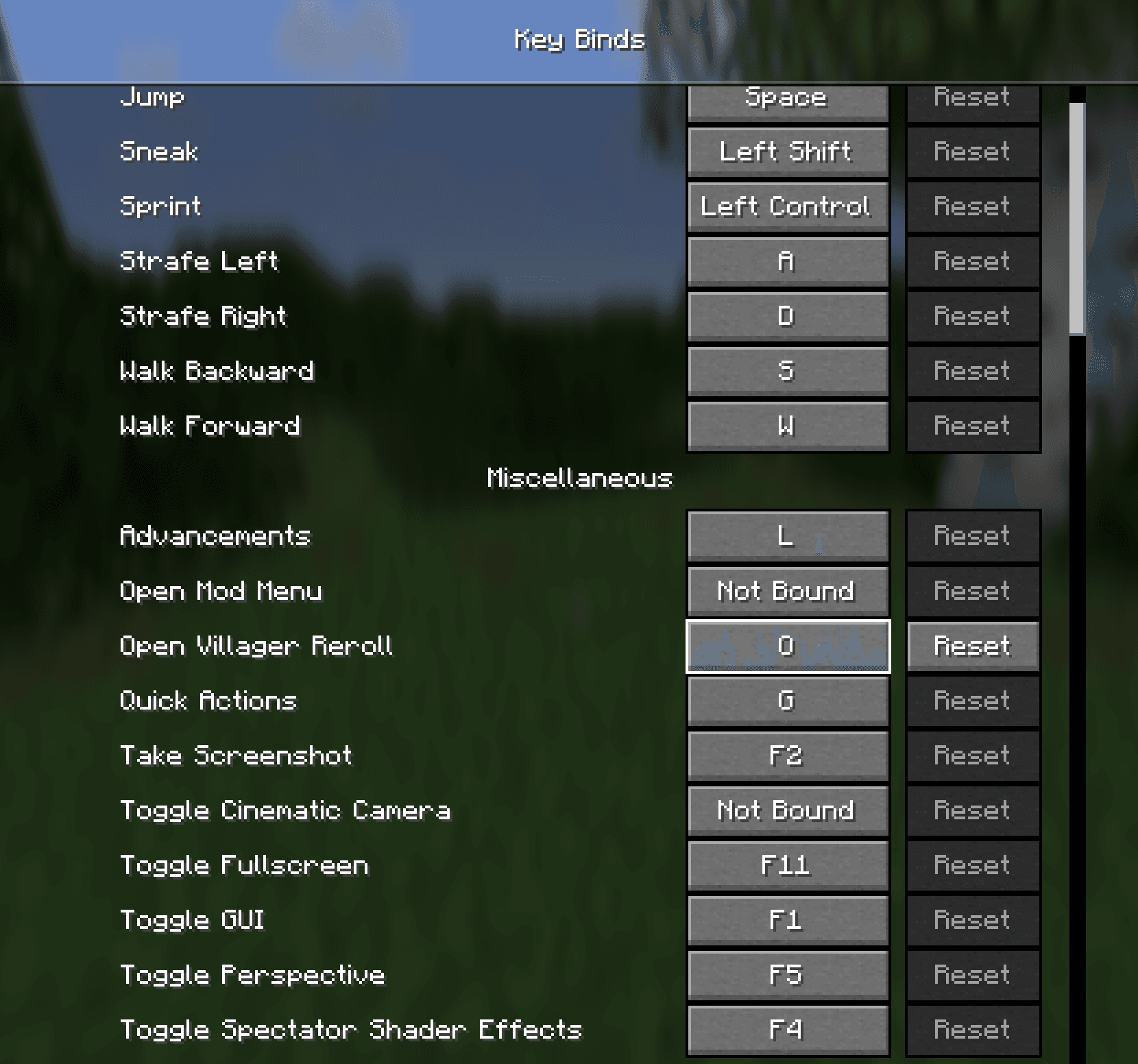
- Open the config screen — Press R (configurable in Controls → Miscellaneous → Open Villager Reroll).
- Add target books — Click Add, pick an enchantment, and set the maximum emerald price you're willing to pay.
- Lock in trade (optional) — Toggle this on to automatically lock in the trade when a match is found.
- Start — Click Start, then right-click a lectern. The mod will:
- Open the trade and check the villager's offers
- If no match, break the lecturn and place a new one from your invetory
- Repeat until a match is found or you stop the mod
- Stop — Click Stop in the GUI, or the mod stops automatically when a match is found.
Controls
| Key | Action |
|---|---|
| R | Open Villager Reroll config screen |
The hotkey can be rebound in Options → Controls → Miscellaneous → Open Villager Reroll.
Config
Saved to config/villager-reroll.json:
- targets — List of enchantments to search for, with max price per book
- range — Search radius for the villager (default: 6)
- jobSite — Lectern position (set automatically when you start)
- lockInTrade — Whether to auto-lock the trade on match
Does Auto Villager (Librarian) Reroll need to be installed on the Minecraft server?
No. Modrinth marks Auto Villager (Librarian) Reroll as unsupported on the server side. Install it only in your local mods folder. Your server can stay unchanged unless the project page lists an additional dependency.
Which version and loader does Auto Villager (Librarian) Reroll require?
Use a file for Fabric and your exact Minecraft version. Supported versions include 26.3, 26.2, 26.1.2. Files for different loaders are not interchangeable.
Auto Villager (Librarian) Reroll is not working – what should I check?
First check the Minecraft version, loader version and required dependencies. Because the mod is client-side, more server RAM will not fix it.
Similar mods
Popular mods in the same category
 Server-ready

VeinMiner
by Miraculixx
Mine the whole vein on mining a single ore/block. Make the tedious mining experience to something satisfying and fun! FTB Ultimine alternative
 Server-ready

Geckolib
by Gecko
A 3D animation library for entities, blocks, items, armor, and more!
 Client only

VeinMiner Hotkey
by Miraculixx
Veinminer Addon - Use a hotkey to veinmine with a dynamic crosshair & block highlighting
 Server-ready

Fzzy Config
by fzzyhmstrs
Config API with automatic GUIs, powerful validation options, server-client sync, and more!
Looking for mods for your own server?
The catalog lists mods that run on Minecraft servers.