
Modrinth · Fabric, Forge, NeoForge
Bartering Station on your Minecraft server
Bartering Station runs on Minecraft servers with Fabric or Forge or NeoForge. Order your server, set the loader in the panel and install the mod with one click in the mod browser.
Still running around bartering manually? Let's put those lazy piglins to work instead!
- Downloads
- 7.6M
- Author
- Fuzs
- Loader
- Fabric, Forge, NeoForge
- Minecraft
- 1.19.2 – 26.3
- Updated
- –
Screenshots
What Bartering Station looks like

Images: Bartering Station on Modrinth, published by the project team.
Setup
Install Bartering Station on your server
The server and players need the same loader and Minecraft version. Back up the world before adding or updating mods.
- 01
Configure
4 GB of RAM is preselected. You choose the term and add-ons and pay by credit card or PayPal.
- 02
Set the loader
In the panel, set the server software to Fabric or Forge or NeoForge and choose the matching Minecraft version, for example 26.3.
- 03
Install the mod
Search the mod browser for “Bartering Station” and install the release for your loader. Alternatively, upload the .jar to the mods folder via SFTP. Required dependencies are listed on the project page.
- 04
Connect
Every player installs the same Bartering Station release locally and connects using the server address from the panel.
- On the server
- Required
- On the client
- Required
- Loader
- Fabric, Forge, NeoForge
- Minecraft
- 26.3, 26.2, 26.1.2 +19 more
- License
- Mozilla Public License 2.0
The panel
Install mods, find errors.
Real screenshots from the Mado panel. Both come with every Minecraft server.
Mod browser
Modrinth and CurseForge, right in the panel.
The browser filters by your Minecraft version. Install mods with one click, without uploading .jar files.

AI crash analysis
When a mod crashes, the analyzer reads the log.
Mods often fail on a wrong loader version, Java version or missing dependency. The analyzer names a likely cause and suggests a fix.

Releases
Published releases
Pick the file that matches your server’s loader and Minecraft version. The server and players need the same release.
Bartering Station · Modrinth- v26.3.0-mc26.3.x+fabricSeptember 24, 2026Minecraft 26.3 · Fabric
- v26.3.0-mc26.3.x+neoforgeSeptember 24, 2026Minecraft 26.3 · NeoForge
- [NEOFORGE] [26.2.x] v26.2.0June 18, 2026Minecraft 26.2 · NeoForge
- [FABRIC] [26.2.x] v26.2.0June 18, 2026Minecraft 26.2 · Fabric
- [NEOFORGE] [26.1.x] v26.1.0April 30, 2026Minecraft 26.1, 26.1.1, 26.1.2 · NeoForge
Original description by the project author




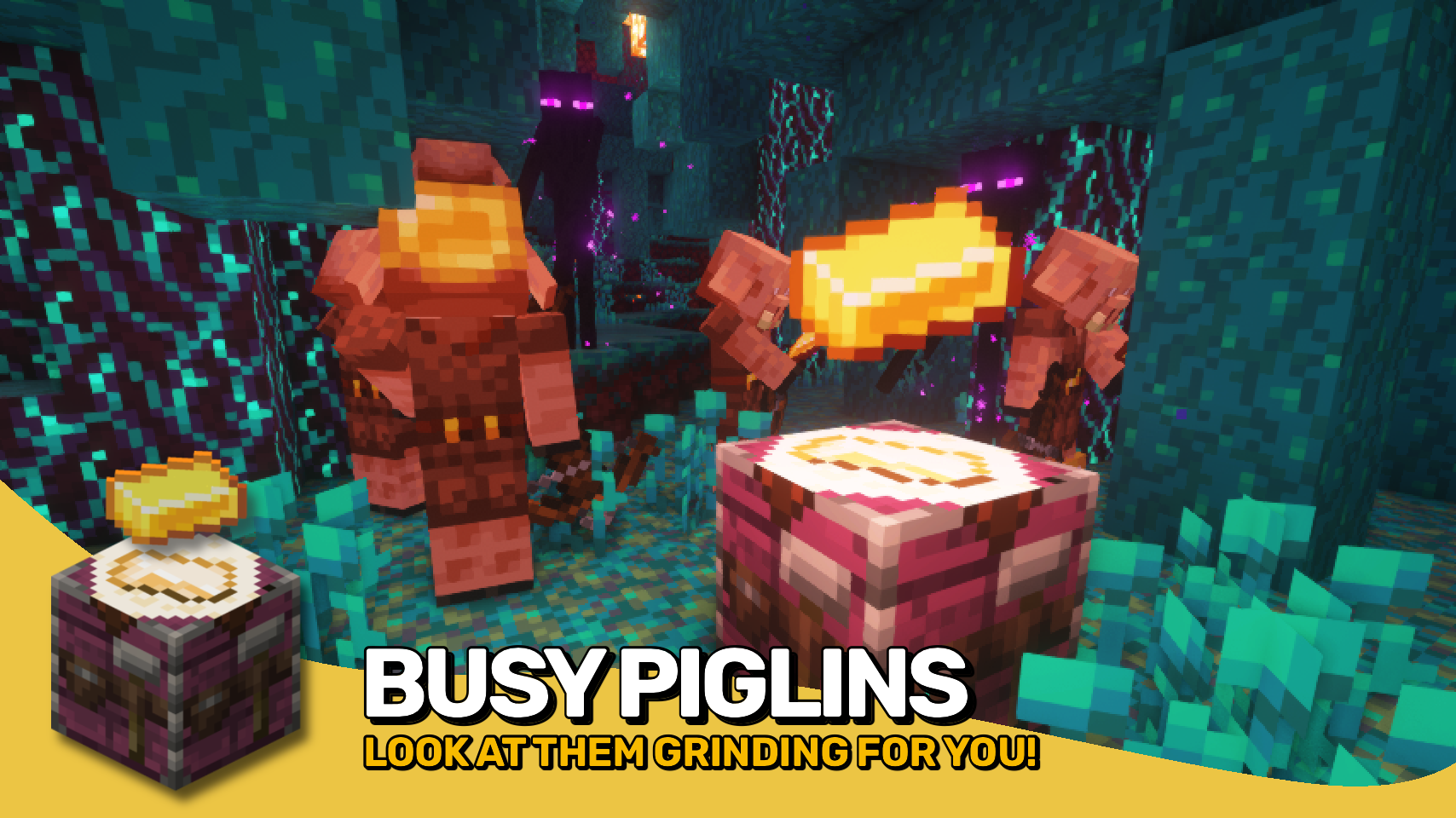
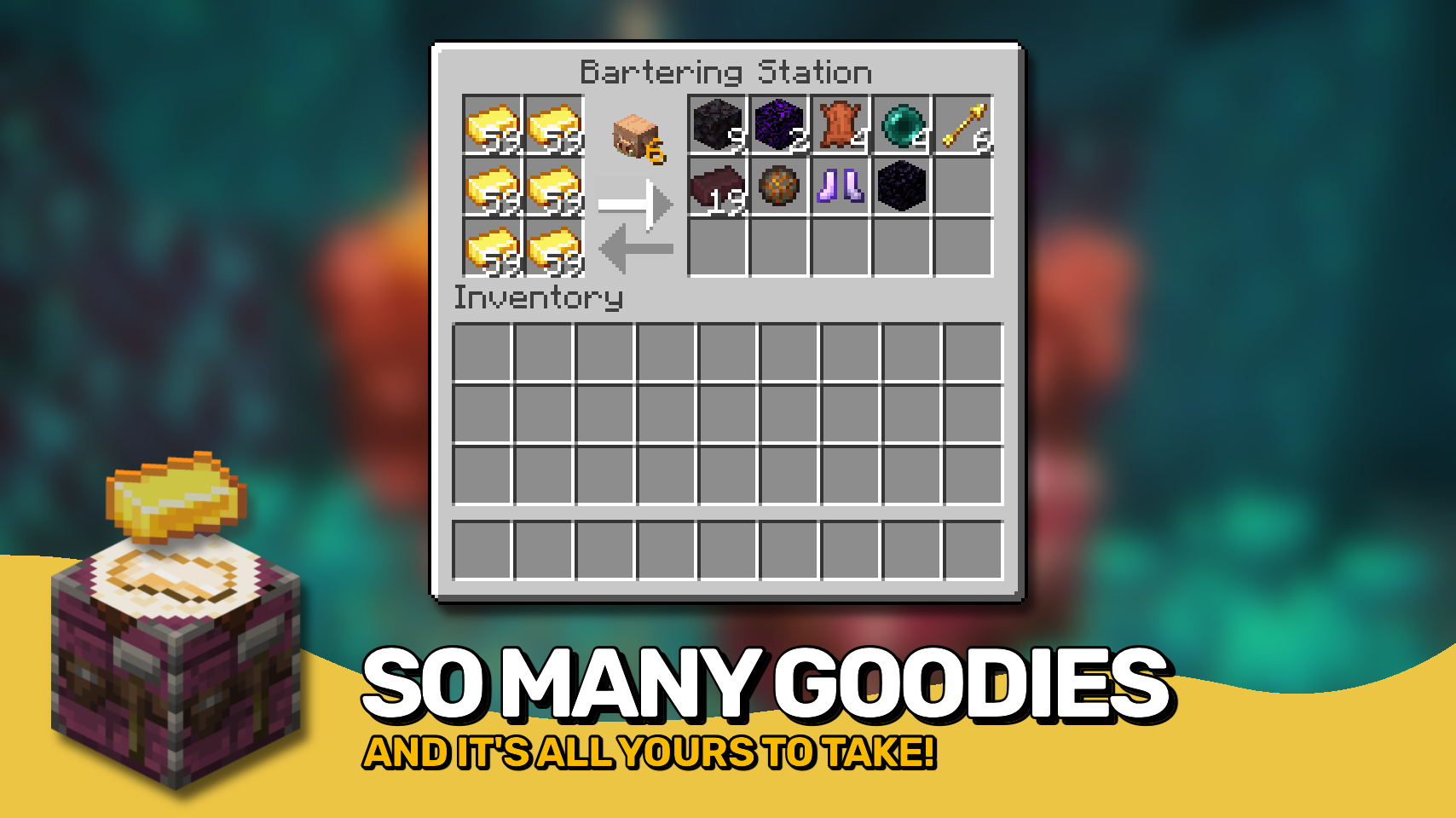
Bartering Station adds one brand new utility block: Put in all your gold ingots, they'll be given to the piglins in the area. All the goodies they return will automatically be collected in the station block. Now add some hoppers for inserting even more gold and extracting your returns. Profit has never been this easy!

- The bartering station hands out gold to up to 6 piglins in range every 15 seconds.
- For bartering with more than 6 piglins simultaneously, just setup more bartering stations!
- One ingot is taken from a single slot per cycle, so spread out your gold across all slots!
- If your gold is not being spent, move the piglins closer!
- The station collects all results from bartering and will stop working when all those slots are filled.


⏩ INSTALLATION REQUIRED ON CLIENT & REQUIRED ON SERVER
⏩ REQUIRES PUZZLES LIB TO BE INSTALLED (FABRIC & NEOFORGE)
⏩ REQUIRES FABRIC API TO BE INSTALLED (FABRIC)
⏩ REQUIRES FORGE CONFIG API PORT TO BE INSTALLED (FABRIC)

If available for a mod, configuration is possible directly from in-game using the mod menu (requires Mod Menu by Prospector to be installed on Fabric).
For manual configuration using an external text editor all files are found at .minecraft/config, named as MOD_ID-client.toml, MOD_ID-common.toml, or MOD_ID-server.toml, depending on the type of config. Not all types might exist for a mod, if any at all.

🌟 Thanks to Vazkii for the floating gold ingot code, which is taken from the matrix enchanting table renderer in their Quark mod.
 |
 |
|
 |
 |
|
 |
 |
|
 |
 |
|
 |
 |

© 2026 @heyitsfuzs. All rights reserved. This page was last edited on 11 September 2026, at 06:44 (UTC).
Bartering Station server crashes on startup – what to do?
Common causes: the loader or Minecraft version does not match the mod file, a dependency is missing, or RAM is too low. Check the log (latest.log) for “OutOfMemoryError”, “Mixin” or missing mods. At Mado, the AI crash analysis reads the log and suggests a cause. You can change the loader and version in the panel.
Which loader does Bartering Station run on?
According to Modrinth, Bartering Station supports Fabric, Forge, NeoForge for Minecraft 26.3, 26.2, 26.1.2. Forge and Fabric files are not interchangeable: pick one loader for the server and clients.
How much RAM does a server with Bartering Station need?
As guidance, 3–4 GB for a server with this mod. This is an estimate, not a measured minimum. More mods, many players and long view distances need more. The spark profiler shows whether a mod is costing tick time.
Similar mods
Popular mods in the same category
 Server-ready

VeinMiner
by Miraculixx
Mine the whole vein on mining a single ore/block. Make the tedious mining experience to something satisfying and fun! FTB Ultimine alternative
 Server-ready

Geckolib
by Gecko
A 3D animation library for entities, blocks, items, armor, and more!
 Client only

VeinMiner Hotkey
by Miraculixx
Veinminer Addon - Use a hotkey to veinmine with a dynamic crosshair & block highlighting
 Server-ready

Fzzy Config
by fzzyhmstrs
Config API with automatic GUIs, powerful validation options, server-client sync, and more!
Ready for your server with Bartering Station?
4 GB of RAM from €8.00 per month. 35% off your first month with MADO35.