
Burnt + Additions
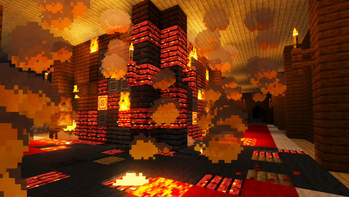
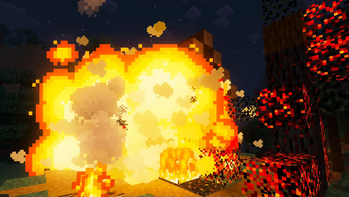
A Vanilla fire enhancing mod, if you light it, it will burn. Build your world and burn it down!
Screenshots
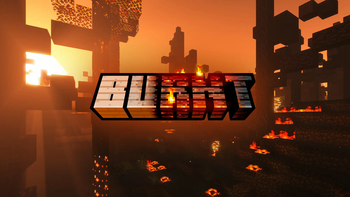
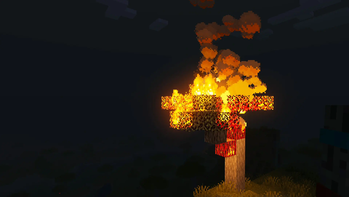
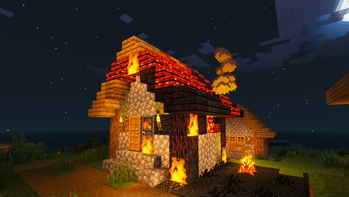
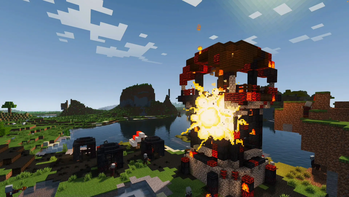
About this Mod
Burnt 1.10 is finally here!
Join the Discord: https://discord.gg/NUqTwsfTzn
Fire
We've watched it, played with it, and shouted angrily at it in Minecraft since the early early days. But it's not great, behaves badly, takes things from us and doesn't give back... so what if it could be something better?
This is BURNT. A Vanilla fire enhancing mod, if you light it, it will burn... Not disappear... BURN. In return, wooden structures and trees remain, burnt and twisted, and with resources you can use.
Finally a good use for the flint and steel. Light a log, a wooden structure, a village, even grass, and up it goes. Fire spreads realistically and the view is a pyromaniac's dream.
Burnt Mechanic:
- Use flint and steel on and wooden/leaves/grass block to trigger the burn
- The block will smoulder, then burn and spread to adjacent blocks
- When the block has gone out the burnt block variant remains
- Randomly, broken versions of the block can replace the block - break these for Charcoal
- Ash will spawn from solid burning blocks if you have the Supplementaries mod installed
- Craft or find the Flint Bow to fire burning arrows, (requires arrows) and trigger the burn
- Fire the Flint Bow at a Creeper to ignite it from a distance
- Craft or find Fire Barrels - Ignite with flint and steel, burning arrows, or redstone.
- Craft even more powerful Blaze Barrels.
- After a short delay, the barrel will explode with blast damage and trigger the burn to surrounding blocks
- Craft or find the Fire Extinguisher to put out fires.
- Rain will also extinguish fire
- You can also get burnt wood by placing wood in a smoker
- Burning builds will now experience random collapse events
- Fire barrel explosions cause blocks to break and fall
- Use the config file to adjust your settings.
- The config file will be generated the first time you load the mod, and can be found in the configs folder. When changing settings you will need to reload your world for them to take effect.
Dependencies:
- Requires Geckolib and Cloth Config
Compatible with:
- Most Biome mods - Biomes a plenty, Oh the Biomes we've gone, Regions Unexplored etc
- Tree Chop
- Pollution of the Realms
- Supplimentaries
I am working on compats for:
- Quark
- Spore
- Alex's Caves
- Decorative Blocks
- Create
Tips:
- Rain in the world will stop the spread of fire, water will extinguish any block on fire.
- Gamerule DoFireTick=False will stop all fire spread.
- Smokers will create burnt wood types with any wood.
- Back up any worlds you don't want to be destroyed by fire!
- Works server-side, however... largely untested.
- Works best with shaders, obvs. Lots of glowy things.
- Play with the config all you like, just be aware - dialing things up to 10 will likely lead to crashes!
- If you use wool for your redstone builds you can turn wool burning off in the config
- Have fun, it's a toy!
- I take no responsibility for your burnt base, sorry, not sorry.
Yes it's MCreator... hate away!
I've done lots of testing, but no doubt there will be more bugs! Please report all bugs here on my discord: https://discord.gg/NUqTwsfTzn
Available Versions
How to Install Burnt + Additions on Your Server
Order Server
Order a Minecraft Java server with at least 3 GB RAM (4 GB recommended).
Set fabric Loader
In the panel under "Egg", select the fabric loader and matching Minecraft version (1.21.1).
Install Mod
Open the mod browser in the dashboard and search for "Burnt + Additions". Click "Install" – done! Alternatively, upload the .jar via SFTP to the /mods folder.
Compatibility
Mod Loaders
Minecraft Versions
1.21.1, 1.20.1
Server-side
✓ RequiredRecommended RAM
4 GB(min. 3 GB)Frequently Asked Questions
Burnt + Additions server crashes on startup – what to do?
Most common cause: wrong fabric version or insufficient RAM. Check the server log (latest.log) for "OutOfMemoryError" or "Mixin" errors. With Mado Hosting: ensure at least 3 GB RAM is allocated and the loader matches the mod version (1.21.1). You can switch loaders with one click in the panel.
Is Burnt + Additions compatible with fabric and forge and neoforge?
Burnt + Additions officially supports fabric, forge, neoforge for Minecraft 1.21.1, 1.20.1. Note: Forge and Fabric mods are NOT cross-compatible – pick one loader and stick with it. The Mado dashboard automatically detects incompatible loader combinations.
Server lagging with Burnt + Additions – how to optimize performance?
Recommended RAM: 4 GB (per 8 players). Use /spark profiler to check if Burnt + Additions consumes the most tick time. Common fixes: reduce server view-distance to 8-10, install "performant" or "starlight" as supplementary mods on Forge. With Mado Hosting, your server runs on NVMe SSDs with dedicated CPU cores for minimal latency.
Similar Mods

![[ETF] Entity Texture Features](https://cdn.modrinth.com/data/BVzZfTc1/af683d206d50b05258d865b0d6e4aa2f2cee12f2_96.webp)
![[EMF] Entity Model Features](https://cdn.modrinth.com/data/4I1XuqiY/6e5bbd0d06b1741bfdab6c0cfab6de8fdaf0064c_96.webp)



Rent Modded Server
Install Burnt + Additions with just one click on your server.