
ChallengeTimer
an advanced timer/stopwatch for challenges etc
Screenshots


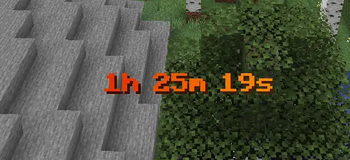


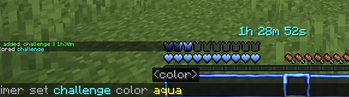
About this Mod
Challenge Timer
An advanced Minecraft Timer Mod for Challenges etc.
Tutorial: https://youtu.be/aHcGYtDmxuk
Features
- Countdown
- Countup (Stopwatch)
- multiple Timers supported
- Colors (names + hex-codes)
- Color Gradients (static & animated)
- customize animationtime + direction
- advanced Time Indication
- set Pre- & Suffix
- retime
- retype (count up/down)
- customize finished text (shown when the timer is over)
- format text (bold,underlined,..)
- pause timers
- customize pause text
Upcoming:
- more advanced formatting options
- assign timers to players
- more colors in gradients possible
Usage
How to add Countdown
  /timer add Countdown <Timername> <time>

  <time> given like "2d6h20m13s"

  Keywords:
  'd' : days
  'h' : hours
  'm' : minutes
  's' : seconds
How to add Stoppwatch
/timer add Countup <name> <time> Countup
How to start the Timer
/timer start <name>
How to reset the Timer
/timer reset <name>
How to remove Timer
/timer remove <name>
How to change the shown Timer
/timer set <name>
How to set Timer Color
/timer set <name> color <color(name or hex)>
How to use an animated Gradient
/timer set <name> color gradient <hex> <hex> animated
How to set Timer Time
/timer set <name> time <time>
How to set Pre/Suffix
  /timer settings prefix/suffix <prefix/suffix>

  ! the pre/suffix color is the default_color
How to set default Timer Color
/timer settings default_color <color(name or hex)>
How to let Pre/Suffix inherit from Timer Formattings
  /timer settings defaultColor useTimerFormattings

  ! fe gradients and formattings like bold/underlined
How to set finished-text (text shown after timer over)
  /timer settings finishedText <text>

  Keywords:
  {name} = name of current timer
How to pause/unpause
/timer pause
How to set paused-text (text shown after timer over)
  /timer settings pausedText <text>

  Keywords:
  {name} = name of current timer
  {time} = time of current timer
How to en/disable timers
/timer en/disable
System Infos
Minecraft Verion: Minecraft Java Fabric 1.21.5
Fabric Loader: 0.16.14 (usually preset)
🔗 Links


Authors
License
Available Versions
How to Install ChallengeTimer on Your Server
Order Server
Order a Minecraft Java server with at least 3 GB RAM (4 GB recommended).
Set fabric Loader
In the panel under "Egg", select the fabric loader and matching Minecraft version (1.21.11).
Install Mod
Open the mod browser in the dashboard and search for "ChallengeTimer". Click "Install" – done! Alternatively, upload the .jar via SFTP to the /mods folder.
Compatibility
Mod Loaders
Minecraft Versions
1.21.11, 1.21.10, 1.21.9 (+4 more)
Server-side
✓ RequiredRecommended RAM
4 GB(min. 3 GB)Frequently Asked Questions
ChallengeTimer server crashes on startup – what to do?
Most common cause: wrong fabric version or insufficient RAM. Check the server log (latest.log) for "OutOfMemoryError" or "Mixin" errors. With Mado Hosting: ensure at least 3 GB RAM is allocated and the loader matches the mod version (1.21.11). You can switch loaders with one click in the panel.
Is ChallengeTimer compatible with fabric?
ChallengeTimer officially supports fabric for Minecraft 1.21.11, 1.21.10, 1.21.9. The Mado dashboard automatically detects incompatible loader combinations.
Server lagging with ChallengeTimer – how to optimize performance?
Recommended RAM: 4 GB (per 8 players). Use /spark profiler to check if ChallengeTimer consumes the most tick time. Common fixes: reduce server view-distance to 8-10, install "performant" or "starlight" as supplementary mods on Forge. With Mado Hosting, your server runs on NVMe SSDs with dedicated CPU cores for minimal latency.
Similar Mods






Rent Modded Server
Install ChallengeTimer with just one click on your server.