
Wiki Cobblemon
A pokemon wiki for the cobblemon mod
Screenshots
About this Mod
Wiki Cobblemon — In-game Cobblemon Wiki & Spawn Checker - OutDated
Wiki Cobblemon is a client-side Fabric mod that brings a fast, elegant in-game wiki for Cobblemon species: spawns, evolutions, abilities, moves, drops, stats, forms & genders — plus a live spawn “Check Mode” that validates if a Pokémon can spawn at your current location.
Highlights
- Auto language: UI follows the player’s in-game language.
- Open instantly with O (configurable).
- Quick-open (H): opens the page of the Pokémon you’re currently looking at (configurable).
- Team Builder (B): plan moves, natures, types, forms, and more.
- Single-pane layout: side panes are mutually exclusive to keep the UI compact.
- Smart Search with fuzzy matching (typos, aliases, form names,
namespace:id). - 3D model viewer with Shiny toggle.
- Forms & Gender chips (scrollable) to switch variants quickly.
- Spawns by biome tags (source labels: Minecraft, Cobblemon, Terralith, Wythers, Other).
Click a tag to reveal conditions (time, weather, Y-level, skylight/see sky, context, moon phase, structures, weight/rarity, anti-conditions). - Check Mode: one click tests your current location and marks each condition PASS/FAIL.
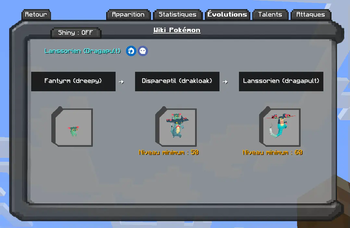
- Evolutions with concise, readable requirements.
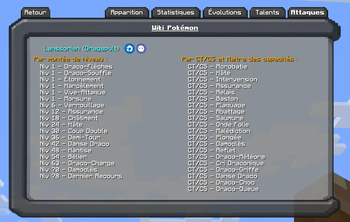
- Moves organized by Level-up, TM, Tutor, Egg.
- Abilities list (hidden abilities flagged) with inline descriptions.
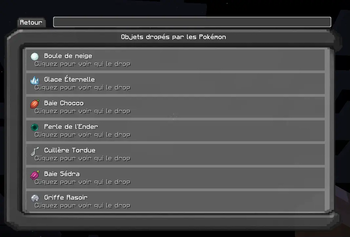
- Drops/Loot: species drops or fallback loot tables with item icons & tooltips.
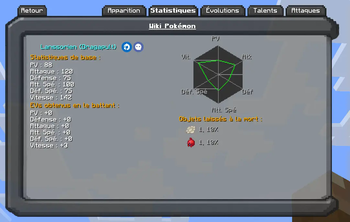
- Stats & EV yields in a clear side panel.
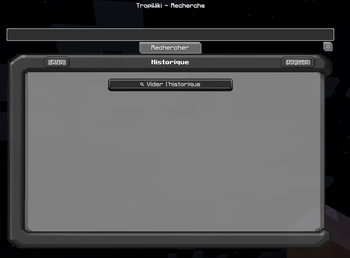
- Home view with Favorites and Recently Viewed.
Usage
Keybinds
- O — Open TropiWiki anywhere.
- H — Open the page for the Pokémon you’re looking at.
- B — Open Team Builder.
Commands
/tropiwiki                     # open the wiki
/tropiwiki flush history       # clear “recently viewed”
/tropiwiki flush favorites     # clear favorites
/tropiwiki encounters clear    # clear encounters
- Tips:
- You can type imperfect names (“pikashu”), form names, or full ids (
cobblemon:pikachu). - Click biome chips to show full spawn rules and use Check Mode to validate them in your current spot.
- Use the star to favorite a species; use the shiny button to preview the shiny model.
- You can type imperfect names (“pikashu”), form names, or full ids (
Data & Compatibility
- Client-side only. No server installation required.
- TropiWiki indexes data locally from installed datapacks/mod resources (e.g., Cobblemon species & spawn pools, loot tables).
If a server uses custom datapacks different from your local data, results may vary.
- UI strings reuse existing Minecraft/Cobblemon translations, matching your language pack.
Persistence & Config
- Favorites, history, and cache are stored at:
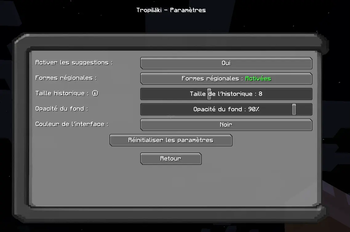
config/tropiwiki/tropiwiki_client.json - You can clear history or favorites via the commands above.
Requirements
- Fabric Loader
- Cobblemon (for species/models/moves/abilities data)
Notes
- Lightweight, no world changes, no telemetry.
- Not affiliated with the Cobblemon project.
Available Versions
How to Install Wiki Cobblemon on Your Client
Install the Mod Loader Locally
Install fabric for your local Minecraft version.
Download the Matching File
Choose the Wiki Cobblemon file for fabric and Minecraft 1.21.1.
Install Mod
Place the .jar file in your local .minecraft/mods folder and restart Minecraft. No server-side installation is required.
Compatibility
Mod Loaders
Minecraft Versions
1.21.1
Server-side
✗ UnsupportedRecommended RAM
4 GB(min. 3 GB)Frequently Asked Questions
Does Wiki Cobblemon need to be installed on the Minecraft server?
No. Modrinth marks Wiki Cobblemon as unsupported on the server side. Install it only in your local Minecraft mods folder. Your server can remain unchanged unless the mod page lists an additional dependency.
Which version and loader does Wiki Cobblemon require?
Use a file for fabric and your exact Minecraft version. Supported versions include 1.21.1. Files for different loaders are not interchangeable.
Wiki Cobblemon is not working – what should I check?
First check the Minecraft version, loader version and required dependencies. Put the .jar file in your local .minecraft/mods folder and remove older duplicates. Because this mod is client-side, adding server RAM will not fix it.
Similar Mods






Minecraft Server for Your Group
Wiki Cobblemon stays on your client. Host a compatible world for your group.
Details
- License
- Creative Commons Attribution Non Commercial Share Alike 4.0 International
- Server-side
- Unsupported