
Modrinth · NeoForge
Create Aeronautics: Toolgun on your Minecraft server
Create Aeronautics: Toolgun runs on Minecraft servers with NeoForge. Order your server, set the loader in the panel and install the mod with one click in the mod browser.
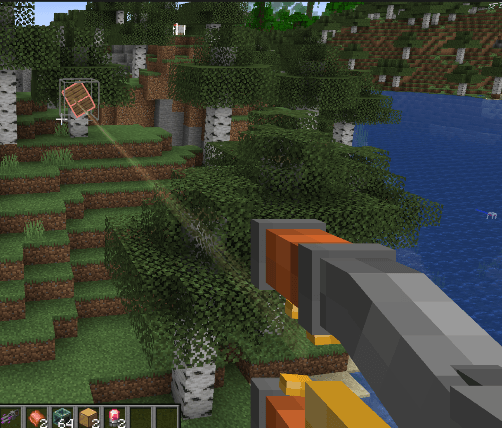
A toolgun mod featuring a gravity gun with towing functionality, a toolgun for fast saving and printing of physical-structure blueprints, and other useful utilities.
- Downloads
- 438.6K
- Author
- ENXV233
- Loader
- NeoForge
- Minecraft
- 1.21.1
- Updated
- –


Setup
Install Create Aeronautics: Toolgun on your server
The server and players need the same loader and Minecraft version. Back up the world before adding or updating mods.
- 01
Configure
6 GB of RAM is preselected. You choose the term and add-ons and pay by credit card or PayPal.
- 02
Set the loader
In the panel, set the server software to NeoForge and choose the matching Minecraft version, for example 1.21.1.
- 03
Install the mod
Search the mod browser for “Create Aeronautics: Toolgun” and install the release for your loader. Alternatively, upload the .jar to the mods folder via SFTP. Required dependencies are listed on the project page.
- 04
Connect
Every player installs the same Create Aeronautics: Toolgun release locally and connects using the server address from the panel.
- On the server
- Required
- On the client
- Required
- Loader
- NeoForge
- Minecraft
- 1.21.1
- License
- Creative Commons Attribution Non Commercial 4.0 International
The panel
Install mods, find errors.
Real screenshots from the Mado panel. Both come with every Minecraft server.
Mod browser
Modrinth and CurseForge, right in the panel.
The browser filters by your Minecraft version. Install mods with one click, without uploading .jar files.

AI crash analysis
When a mod crashes, the analyzer reads the log.
Mods often fail on a wrong loader version, Java version or missing dependency. The analyzer names a likely cause and suggests a fix.

Releases
Published releases
Pick the file that matches your server’s loader and Minecraft version. The server and players need the same release.
Create Aeronautics: Toolgun · ModrinthOriginal description by the project author
It is a tool mod made for Create: Aeronautics.
 !


Create Aeronautics: Toolgun is an expansion mod aimed at bringing a VMod-like engineering workflow into the Create Aeronautics vehicle environment, while being specifically adapted and extended around Aeronautics physical structures.
At present, the mod provides multiple tools for vehicle construction, debugging, manipulation, and a variety of practical diagnostic functions. Its core purpose is to support the saving, printing, deletion, and drag-control of Aeronautics physical structures, including structures with child physical substructures, dynamic structures, and container contents. It also adds welding and vehicle container features as usable items and mechanics.
For survival balance, the survival magnetic gun respects the balance of Aeronautics itself. It uses durability consumption to limit excessive use, avoiding a situation where players ignore normal physical handling methods such as grab handles just because they have a gravity-gun-like tool. Unlike conventional drag guns that hard-limit multi-structure dragging through mass checks, this mod instead limits the force applied to the target. As a result, large structures can still be dragged, but they may sometimes barely move at all.
Blueprint saving support is broad and designed for convenient, stable, and fast printing. Compatibility support is also included for the Synaxis and cable-control addons. Multi-structure saving and welded structure printing are fully supported, with strong performance overall.
Blueprints are stored in two locations:
Client local: game directory/enxv_aeronautics_structures/
Server side: server directory/enxv_aeronautics_server_structures/player UUID/
Can be printed using a command:/aerotoolgun print_blueprint
扩展模组,目标是在航空学载具环境中提供类似 vmod 工具枪的工程操作体验,并围绕航空学的物理结构进行适配与扩展。
目前模组已经提供多种面向载具建造、调试与操作的工具功能,以及很多实用的调试功能,重点服务于包含子物理结构、动态结构、容器内容物的航空学物理结构的保存、打印、删除与拖拽控制;并新增焊接,载具容器等使用物品和功能
本模组面向生存模式的磁力枪尊重了航空学本身的平衡系统,有耐久度损耗来限制肆意使用(避免出现有了引力枪就不使用比如把手这种抓握物理体的方式) 生存模式的磁力枪并不像常规拖拽枪,用质量检测来强行限制拖拽多结构,相反的,我们采用限制施加的力来控制玩家移动大型结构(可以拖拽大结构,但可能出现纹丝不动的情况)
蓝图保存支持:基本全部支持方便稳定快速打印,附属控制学/线缆模组也兼容支持,完全支持多结构和焊接打印,性能表现很好
蓝图会保存到两个目录:
客户端本地:游戏目录/enxv_aeronautics_structures/
服务器端:服务器目录/enxv_aeronautics_server_structures/玩家UUID/
可以使用命令打印蓝图/aerotoolgun print_blueprint
Create Aeronautics: Toolgun server crashes on startup – what to do?
Common causes: the loader or Minecraft version does not match the mod file, a dependency is missing, or RAM is too low. Check the log (latest.log) for “OutOfMemoryError”, “Mixin” or missing mods. At Mado, the AI crash analysis reads the log and suggests a cause. You can change the loader and version in the panel.
Which loader does Create Aeronautics: Toolgun run on?
According to Modrinth, Create Aeronautics: Toolgun supports NeoForge for Minecraft 1.21.1.
How much RAM does a server with Create Aeronautics: Toolgun need?
As guidance, 4–6 GB for a server with this mod. This is an estimate, not a measured minimum. More mods, many players and long view distances need more. The spark profiler shows whether a mod is costing tick time.
Similar mods
Popular mods in the same category
 Server-ready

VeinMiner
by Miraculixx
Mine the whole vein on mining a single ore/block. Make the tedious mining experience to something satisfying and fun! FTB Ultimine alternative
 Server-ready

Geckolib
by Gecko
A 3D animation library for entities, blocks, items, armor, and more!
 Client only

VeinMiner Hotkey
by Miraculixx
Veinminer Addon - Use a hotkey to veinmine with a dynamic crosshair & block highlighting
 Server-ready

Fzzy Config
by fzzyhmstrs
Config API with automatic GUIs, powerful validation options, server-client sync, and more!
Ready for your server with Create Aeronautics: Toolgun?
6 GB of RAM from €12.00 per month. 35% off your first month with MADO35.