
Modrinth · Forge, NeoForge
Create: Vintage Improvements on your Minecraft server
Create: Vintage Improvements runs on Minecraft servers with Forge or NeoForge. Order your server, set the loader in the panel and install the mod with one click in the mod browser.
Some machines & compats
- Downloads
- 616.5K
- Author
- Negodya1
- Loader
- Forge, NeoForge
- Minecraft
- 1.18.2 – 1.20.1
- Updated
- –
Screenshots
What Create: Vintage Improvements looks like


Images: Create: Vintage Improvements on Modrinth, published by the project team.
Setup
Install Create: Vintage Improvements on your server
The server and players need the same loader and Minecraft version. Back up the world before adding or updating mods.
- 01
Configure
6 GB of RAM is preselected. You choose the term and add-ons and pay by credit card or PayPal.
- 02
Set the loader
In the panel, set the server software to Forge or NeoForge and choose the matching Minecraft version, for example 1.20.1.
- 03
Install the mod
Search the mod browser for “Create: Vintage Improvements” and install the release for your loader. Alternatively, upload the .jar to the mods folder via SFTP. Required dependencies are listed on the project page.
- 04
Connect
Every player installs the same Create: Vintage Improvements release locally and connects using the server address from the panel.
- On the server
- Required
- On the client
- Required
- Loader
- Forge, NeoForge
- Minecraft
- 1.20.1, 1.19.2, 1.18.2
- License
- MIT License
The panel
Install mods, find errors.
Real screenshots from the Mado panel. Both come with every Minecraft server.
Mod browser
Modrinth and CurseForge, right in the panel.
The browser filters by your Minecraft version. Install mods with one click, without uploading .jar files.

AI crash analysis
When a mod crashes, the analyzer reads the log.
Mods often fail on a wrong loader version, Java version or missing dependency. The analyzer names a likely cause and suggests a fix.

Releases
Published releases
Pick the file that matches your server’s loader and Minecraft version. The server and players need the same release.
Create: Vintage Improvements · Modrinth- Create: Vintage Improvements 1.18.2-0.2.0.3August 25, 2024Minecraft 1.18.2 · Forge
- Create: Vintage Improvements 1.19.2-0.2.0.3August 25, 2024Minecraft 1.19.2 · Forge
- Create: Vintage Improvements 1.20.1-0.2.0.3August 25, 2024Minecraft 1.20.1 · Forge, NeoForge
Original description by the project author

Need hosting?
Links


Another mods


About
Vintage Improvements is Create addon which adds new Kinetics Machines, metal rods, wires, sheets & springs
Review
McCastle Gaming:
Content
Compats
Rods, wires, springs & sheets can be made from materials, that other mods provide. List of supported mods:
- Ad Astra
- Create Crafts & Addtitions
- Create: The Factory Must Grow
- Mekanism
- Tinker's Construct
- Thermal Expansion
- Destroy
- Twilight Forest
- Create Big Cannons
Apotheosis Socketing supported via Helve Hammer
Sheets
Sheets can ba mede with pressing ingots

Rods
Rods can be made from plates.


If Create Crafts & Addtitions installed, this craft will be replaced by rolling with Rolling Mill.

This rods can be used in custom recipes in mod packs.
Wires
Wires can be made from rods.


If Create Crafts & Addtitions installed, this craft will be replaced by rolling with Rolling Mill.

This wires can be used in custom recipes in mod packs.

Belt Grinder
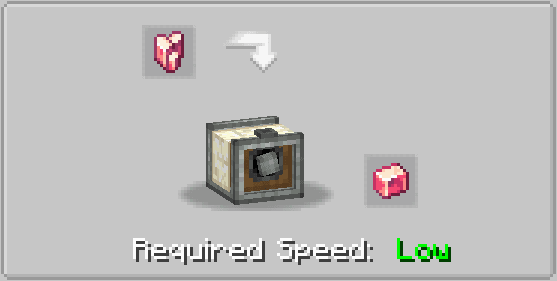
Belt Grinder craft

Grinder provides grinder polishing recipes with speed limits (any, low, medium & high). For example: Polished Rose Quartz recipe requires low speed (16 RPM or less, can be configured), otherwise recipe won't work and (if configured) Rose Quartz will be destroyed

There is an option in the config file to turn on automatic recognition of sandpaper polishing recipes and speed limits for this recipes
Belt's appearance can be changed via right click with a Sand Paper. Create Crafts & Addtitions, Create: SandPaper Overhaul are supported

Spring Coiling Machine & Springs
Spring Coiling Machine craft


Grinder provides coiling recipes.


Compressor
Compressor craft

Compressor works with Basin and have two operating modes: Vacuumizing and Pressurizing

Modes can be switched via right click with Wrench. Recipes may require fluids inside the Compressor internal tank, or may produce fluids into the Compressor internal tank


Vibrating Table
Vibrating Table craft

Vibrating Table provides vibrating recipes

In config you can turn on unpacking and leaves vibrating recipes (enabled by default). Unpacking allows uncrafting storage blocks into materials by Vibrating Table. Vibrating leaves gives match drops


Centrifuge
Centrifuge craft

Centrifuge needs 4 Basins intsalled to work and provides centrifugation recipes


Curving Press
Curving Press craft

Curving Press provides curving recipes. Before work you must install one of Curving Heads. Different heads provides different recipes

Stonecutter crafts

You also can create custom heads, just add "vintageimprovements:curving_heads" tag to item

In the config you can turn on automatic recognition of bucket-like recipes for Curving Press (enabled by default)

Some recipes cause damage to the curving heads, auto recipes damage can be customized via config

Helve Hammer & Netherite Sheet
Helve Hammer craft

Helve Hammer works with Smithing Table or Anvil. With Anvil (or blocks with "vintageimprovements:anvils" tag) Helve Hammer provides hammering recipes

Netherite Sheet can be used in custom recipes in mod packs

With Smithing Table Helve Hammer provides auto smithing recipes

Some recipes may require specific block instead of anvil, this block must have "vintageimprovements:custom_hammering_blocks" tag

Lathe & Recipe Card
Lathe craft

Lathe provides turning recipes
Usually recipes are selected manually. But you can automate this process with the Recipe Card


Laser
Laser craft


Laser provides laser cutting recipes

Laser consumes energy during works (only if another mod that provides energy is installed). Vintage Improvements doesn't provides any energy sources, but any sources of Forge Energy is supported: Mekanism, Thermal Expansion, Create Crafts & Additions, Botarium, Immersive Engineering
Sulfur & Sulfuric Acid

Sulfur Chunks can be obtain by crushing Azurine, Scoria or Scorchia. Sulfur Chunks can be combined into Sulfur, that can be burned into Sulfur Dioxide

Sulfur Dioxide with Iron/Vanadium nuggets can be transformed into Sulfur Trioxide

And finally, Sulfur Trioxide with Water form Sulfuric Acid

Vanadium & New armor trim materials

Vanadium Nuggets can be obtain by crushing Crimsite, Basalt or Tuff. Vanadium Ingots/Blocks can be crafted, thay can be used in Beacon as Payment/Base

Also you can use Vanadium and Create resources (Brass, Andesite Alloy, Zinc, Rose Quartz, Shadow Steel and Refined Radiance) as armor trim material

Copper Sulfate

Copper Sulfate can be crafted by Pressurizing Copper Ingot with Water & Sulfuric Acid. Copper Sulfate can be used as Bone Meal

Redstone Module
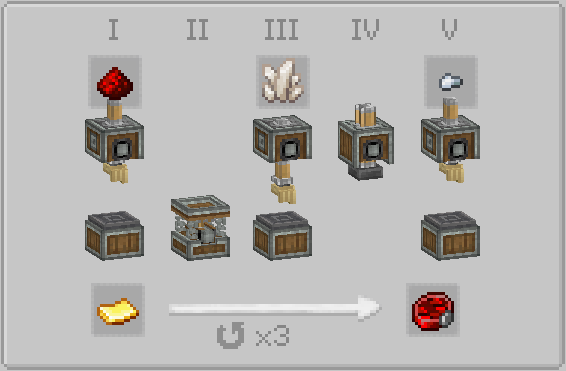
Redstone Module can be attached to Centrifuge or Curving Press to allow generation of a redstone signal by this blocks using a comparator
Compats

F.A.Q.
Fabric?
After 0.2 version release
Can I use your mod in my mod pack?
Yes of course
Where I can put my suggestion or bug I found?
On GitHub issues page or Discord suggestions/bug-report channel
Where I can put my language translation?
You can fork GitHub repository and then pull request your translation
KubeJS support?
Install this addon - Vintage KubeJS
Translations
- en_us (edited by padin)
- ru_ru
- zh_cn by Catchmons, Junnaturefox & Qi-Month
- pt_br by reds
Create: Vintage Improvements server crashes on startup – what to do?
Common causes: the loader or Minecraft version does not match the mod file, a dependency is missing, or RAM is too low. Check the log (latest.log) for “OutOfMemoryError”, “Mixin” or missing mods. At Mado, the AI crash analysis reads the log and suggests a cause. You can change the loader and version in the panel.
Which loader does Create: Vintage Improvements run on?
According to Modrinth, Create: Vintage Improvements supports Forge, NeoForge for Minecraft 1.20.1, 1.19.2, 1.18.2.
How much RAM does a server with Create: Vintage Improvements need?
As guidance, 4–6 GB for a server with this mod. This is an estimate, not a measured minimum. More mods, many players and long view distances need more. The spark profiler shows whether a mod is costing tick time.
Similar mods
Popular mods in the same category
 Server-ready

VeinMiner
by Miraculixx
Mine the whole vein on mining a single ore/block. Make the tedious mining experience to something satisfying and fun! FTB Ultimine alternative
 Client only

Euphoria Patches
by SpacEagle17
Euphoria Patches is an add-on for Complementary Shaders, extending it with more optional features and settings.
 Server-ready

Create
by simibubi
Aesthetic Technology that empowers the Player
 Server-ready

Nature's Compass
by Chaosyr
Allows you to locate biomes anywhere in the world.
Ready for your server with Create: Vintage Improvements?
6 GB of RAM from €12.00 per month. 35% off your first month with MADO35.