
Drop Stacker
Fabric mod for Minecraft that automatically merges dropped item entities on the ground into stacked entities — reducing item lag on servers and singleplayer worlds. Configurable stack size, scan radius, and scan interval.
Screenshots
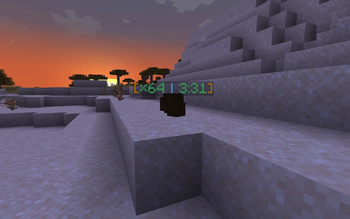
About this Mod
Drop Stacker
A Fabric mod for Minecraft that automatically stacks dropped item entities on the ground into a single entity, reducing entity lag and keeping your world tidy.
Features
- Instant Merging: New drops are absorbed into a nearby pile the moment they spawn — in the same tick, not after a scan interval. A mob's drops collapse before you see them land.
- Whole-Pile Collapse: Each merge pass drains every compatible neighbour at once, so a 100-item pile becomes one entity in a single pass instead of one item per pass.
- Limitless Piles: Stacks beyond vanilla's 64-item limit — up to your configured
maxStackSize, with per-item overrides. - Visual Feedback: Colorful stack count label displayed above items (configurable thresholds).
- Despawn Timer: Optional countdown on the label with urgency-based color coding (supports infinite items with
∞). - Adaptive Scanning: Idle piles progressively back off from scanning (up to
maxScanInterval), so a world full of settled items costs almost nothing. Safe because new drops push into piles on spawn rather than waiting to be polled. - Item Rules: Blacklist, whitelist, and per-item stack-size overrides — all accepting item tags (
#minecraft:logs) as well as exact ids. - Runtime Control:
/dropstackerreloads config, reports stats, and tunes settings without a restart. - Respects Named Items: An item entity with its own custom name is never relabelled or silently absorbed into another pile.
- Vanilla Parity: Merging honours vanilla's infinite-lifetime, near-despawn, and infinite-pickup-delay guards, and keeps the longest pickup delay so merging can't shorten it.
- Server-Side Only: All logic runs on the server. Vanilla clients see counts and timers with no mod installed.
Requirements
- Minecraft 26.2
- Fabric Loader 0.19.3+
- Fabric API
- Fabric Language Kotlin
- Java 25+
Commands
/dropstacker requires permission level 2 (gamemasters).
| Command | Description |
|---|---|
/dropstacker reload |
Reload the config file from disk |
/dropstacker stats |
Merge passes, entities collapsed, and current settings |
/dropstacker resetstats |
Reset the counters |
/dropstacker toggle |
Enable/disable stacking at runtime |
/dropstacker set maxStackSize <n> |
Change the stack cap |
/dropstacker set scanInterval <n> |
Change the scan interval |
/dropstacker set radius <n> |
Change the horizontal scan radius |
/dropstacker set verticalRadius <n> |
Change the vertical scan radius |
Configuration
The config file is created automatically at .minecraft/config/drop-stacker.json (or config/drop-stacker.json on a server). Fields update automatically on restart if you upgrade the mod.
{
  "enabled": true,
  "mergeOnSpawn": true,
  "maxStackSize": 1000,
  "radius": 5.0,
  "verticalRadius": 2.0,
  "scanInterval": 5,
  "maxScanInterval": 100,
  "maxMergePerPass": 64,
  "ageInheritance": "YOUNGEST",
  "labelMode": "ALWAYS",
  "showDespawnTimer": true,
  "countLowThreshold": 64,
  "countHighThreshold": 500,
  "hideSingleItemLabel": false,
  "despawnTicks": 6000,
  "blacklist": [],
  "whitelist": [],
  "overrides": {}
}
| Field | Description | Default |
|---|---|---|
enabled |
Master switch for all stacking | true |
mergeOnSpawn |
Merge new drops instantly as they spawn | true |
maxStackSize |
Maximum items per stacked entity | 1000 |
radius |
Horizontal scan radius (blocks) | 5.0 |
verticalRadius |
Vertical scan radius (blocks) | 2.0 |
scanInterval |
Ticks between merge scans for an active pile | 5 |
maxScanInterval |
Slowest scan rate an idle pile backs off to | 100 |
maxMergePerPass |
Max neighbours absorbed in one pass | 64 |
ageInheritance |
Despawn timer on merge: YOUNGEST, KEEP_RECEIVER, or OLDEST |
YOUNGEST |
labelMode |
When to show the label: ALWAYS, STACKED_ONLY, or NEVER |
ALWAYS |
showDespawnTimer |
Show despawn countdown on the label | true |
countLowThreshold |
Count at which the label turns Yellow | 64 |
countHighThreshold |
Count at which the label turns Red | 500 |
hideSingleItemLabel |
Hide the label if the stack only has 1 item | false |
despawnTicks |
World despawn rate (matches timer to server settings) | 6000 |
blacklist |
Items that are never stacked | [] |
whitelist |
If non-empty, only these items are stacked | [] |
overrides |
Per-item stack caps | {} |
Item rules
blacklist, whitelist, and overrides all accept exact item ids and item tags (prefixed with #):
{
  "blacklist": ["minecraft:elytra", "#minecraft:shulker_boxes"],
  "overrides": {
    "minecraft:cobblestone": 5000,
    "#minecraft:logs": 512
  }
}
A note on ageInheritance
The default YOUNGEST means a pile inherits the longest remaining lifetime when it absorbs a drop — so a pile next to a farm keeps resetting its despawn timer and effectively never despawns. That is convenient, but on a busy server it lets item piles accumulate indefinitely. Set KEEP_RECEIVER for vanilla despawn behaviour.
Building
./gradlew build
Output JAR is in build/libs/. Gradle provisions the required Java 25 toolchain automatically.
License
MIT — see LICENSE.
[!CAUTION]
I am not great at Kotlin and this project was built with AI assistance. There may be bad code, wrong patterns, or things that could be done much better. If you spot anything — please open an issue or a pull request. I genuinely appreciate it and will learn from it. Thank you.
Available Versions
How to Install Drop Stacker on Your Server
Order Server
Order a Minecraft Java server with at least 3 GB RAM (4 GB recommended).
Set fabric Loader
In the panel under "Egg", select the fabric loader and matching Minecraft version (26.3).
Install Mod
Open the mod browser in the dashboard and search for "Drop Stacker". Click "Install" – done! Alternatively, upload the .jar via SFTP to the /mods folder.
Compatibility
Mod Loaders
Minecraft Versions
26.3, 26.2, 26.1.2 (+11 more)
Server-side
✓ RequiredRecommended RAM
4 GB(min. 3 GB)Frequently Asked Questions
Drop Stacker server crashes on startup – what to do?
Most common cause: wrong fabric version or insufficient RAM. Check the server log (latest.log) for "OutOfMemoryError" or "Mixin" errors. With Mado Hosting: ensure at least 3 GB RAM is allocated and the loader matches the mod version (26.3). You can switch loaders with one click in the panel.
Is Drop Stacker compatible with fabric?
Drop Stacker officially supports fabric for Minecraft 26.3, 26.2, 26.1.2. The Mado dashboard automatically detects incompatible loader combinations.
Server lagging with Drop Stacker – how to optimize performance?
Recommended RAM: 4 GB (per 8 players). Use /spark profiler to check if Drop Stacker consumes the most tick time. Common fixes: reduce server view-distance to 8-10, install "performant" or "starlight" as supplementary mods on Forge. With Mado Hosting, your server runs on NVMe SSDs with dedicated CPU cores for minimal latency.
Similar Mods






Rent Modded Server
Install Drop Stacker with just one click on your server.