
Modrinth · Forge
Fluidlogged API on your Minecraft server
Fluidlogged API runs on Minecraft servers with Forge. Order your server, set the loader in the panel and install the mod with one click in the mod browser.
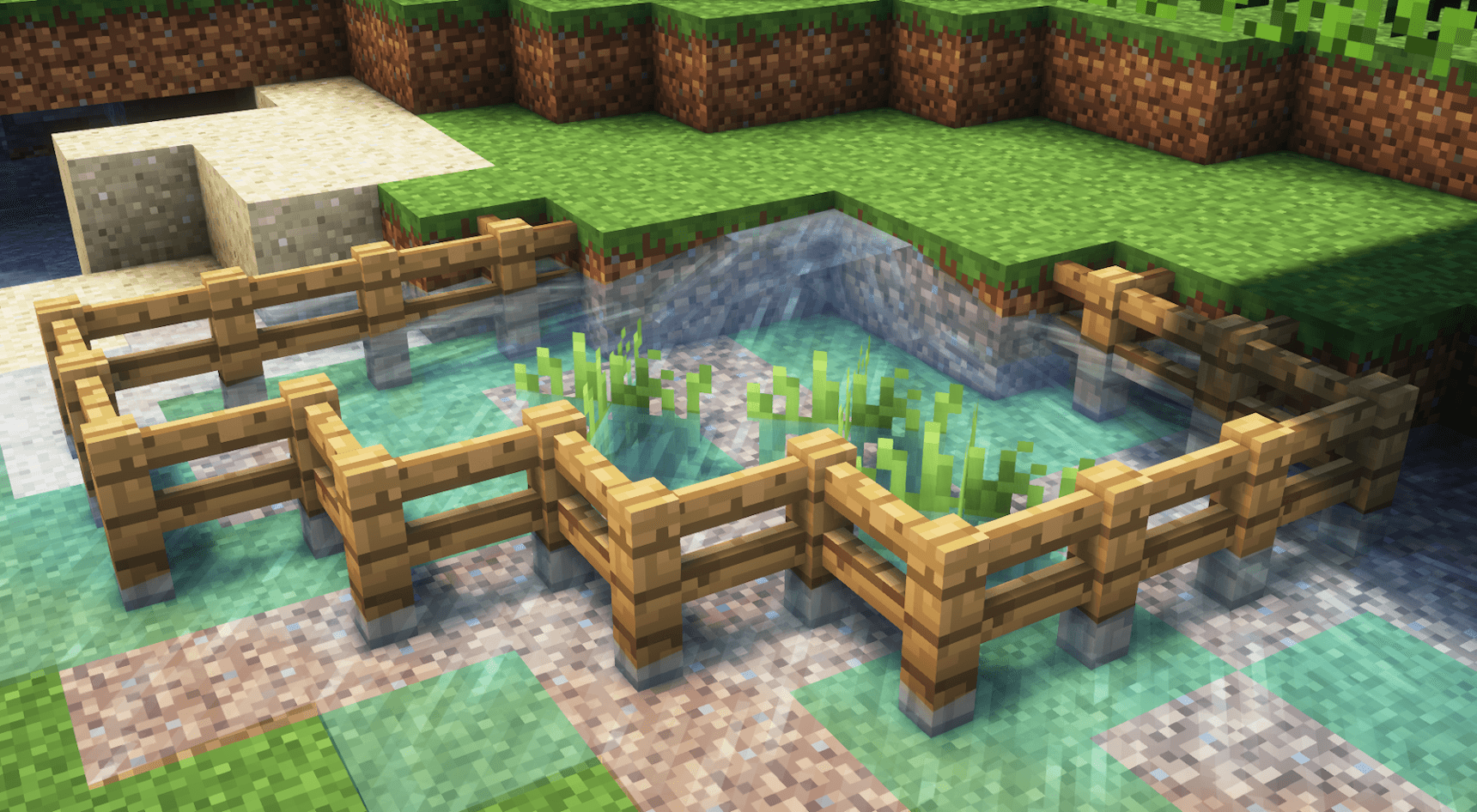
A library mod that adds highly customizable fluidlogging to 1.12.2!
- Downloads
- 229.6K
- Author
- jbredwards
- Loader
- Forge
- Minecraft
- 1.12.2
- Updated
- –
Screenshots
What Fluidlogged API looks like


Images: Fluidlogged API on Modrinth, published by the project team.
Setup
Install Fluidlogged API on your server
The server and players need the same loader and Minecraft version. Back up the world before adding or updating mods.
- 01
Configure
4 GB of RAM is preselected. You choose the term and add-ons and pay by credit card or PayPal.
- 02
Set the loader
In the panel, set the server software to Forge and choose the matching Minecraft version, for example 1.12.2.
- 03
Install the mod
Search the mod browser for “Fluidlogged API” and install the release for your loader. Alternatively, upload the .jar to the mods folder via SFTP. Required dependencies are listed on the project page.
- 04
Connect
Every player installs the same Fluidlogged API release locally and connects using the server address from the panel.
- On the server
- Required
- On the client
- Required
- Loader
- Forge
- Minecraft
- 1.12.2
- License
- LicenseRef-Custom-License
The panel
Install mods, find errors.
Real screenshots from the Mado panel. Both come with every Minecraft server.
Mod browser
Modrinth and CurseForge, right in the panel.
The browser filters by your Minecraft version. Install mods with one click, without uploading .jar files.

AI crash analysis
When a mod crashes, the analyzer reads the log.
Mods often fail on a wrong loader version, Java version or missing dependency. The analyzer names a likely cause and suggests a fix.

Releases
Published releases
Pick the file that matches your server’s loader and Minecraft version. The server and players need the same release.
Fluidlogged API · ModrinthOriginal description by the project author
A library mod that adds highly customizable fluidlogging to 1.12.2!
Fluidlogging is a mechanic that's inspired by Vanilla's Waterlogging mechanic, and that functions very similarly. The main difference is that Fluidlogged API has support for non-source fluids and all modded fluids!



If you're a modpack developer wanting to add Fluidlogged API to a modpack distributed outside of CurseForge or Modrinth, use File Director to avoid reuploading Fluidlogged API's files.
Any blocks can be made fluidloggable or non-fluidloggable through Fluidlogged API's configs, however it does make certain types of blocks fluidloggable by default. Any properly coded modded variants of these blocks are supported by default. Mods may also add fluidloggable blocks from their end. To see the full list of fluidloggable blocks, run the /fluidlogged_api print command in-game to create text files containing all active fluidlogging information.
Along with this, Fluidlogged API will download and apply community configs! This is to minimize the amount of work that players must do to have complete fluidlogging across mods, but this behavior can be fully disabled in fluidlogged_api/general.cfg if desired.
Fluidlogged API also heavily improves fluid collision accuracy, and fixes various Vanilla and modded fluid-related issues. Some Vanilla bug fixes include:
- MC-2591 Walking over the corner of lava deals damage
- MC-4533 Water graphical glitch when connecting diagonally
- MC-68129 Smooth lighting doesn't work properly underwater
- MC-100886 Falling sand with ID of water or lava does not render
- MC-125771 Block selection not showing up underwater
- MC-127030 Flowing water attempts to connect to waterlogged blocks when it shouldn't
- MC-127108 Waterlogged blocks turn lava into obsidian or cobblestone on physically unconnected sides
- MC-127270 Visual water level inside waterlogged blocks does not adjust correctly
- MC-227302 Smooth lighting doesn't work properly on the water surface
| Known Incompatibilities | Known Solutions |
|---|---|
| Better Water Mesh | None. |
| Corail Tombstone | Use Corail Tombstone v4.6.0 or later! |
| Oceanic Expanse | Use Oceanic Expanse v1.2.0 or later! |
| Phosphor | Use Alfheim or 燐/Hesperus instead! |
| The Aether II | Phosphor comes bundled with The Aether II. Luckily there exists The Aether II: Phosphor Not Included, which does as the name suggests! |
| Vintagium | Use Celeritas instead! |
Q / A:
How does this mod work?
Reading through the source code would be the best way of truly understanding the inner workings of this mod, but I'll describe a simplified version here:
For each block in the world, Vanilla has two features that get stored in each chunk: a required IBlockState and an optional TileEntity. Fluidlogged API adds a third feature that gets stored in each chunk: an optional FluidState, which stores the fluidlogged fluid if present.
This mod applies ASM (a bytecode manipulation library that's bundled with Forge) to allow Vanilla and Forge to properly read and make use of FluidStates.
Is this mod safe to add to existing worlds?
It's generally a good idea to always back up your worlds before adding any new mods. That being said, this mod doesn't change the behavior of IBlockStates, so adding it to existing worlds should be fine! Removing this mod from existing worlds should also be fine, just note that existing FluidStates will be removed and won't be recoverable upon doing so.
How do I use this mod's configs? How do I use this mod as a dependency?
This mod's wiki will eventually cover both of those topics, for now it only covers how to use this mod's config. If you want to use Fluidlogged API as a library (optional or required dependency), the best I can do until I finish the wiki is reference you to the source code of these other projects of mine: Campfire, Seared Ladder Backport, Subaquatic.
What should I do if I run into any bugs, crashes, or mod incompatibilities?
Reporting anything you find to this mod's issue tracker would greatly help me improve this mod! Without people generously taking the time to do so, this mod would not be where it is today!
If you want fluidlogging for versions beyond 1.12.2, check out Fluidlogged (not affiliated with Fluidlogged API) and Towelette!
Direct contact: [email protected]
This mod will not be ported.
Fluidlogged API server crashes on startup – what to do?
Common causes: the loader or Minecraft version does not match the mod file, a dependency is missing, or RAM is too low. Check the log (latest.log) for “OutOfMemoryError”, “Mixin” or missing mods. At Mado, the AI crash analysis reads the log and suggests a cause. You can change the loader and version in the panel.
Which loader does Fluidlogged API run on?
According to Modrinth, Fluidlogged API supports Forge for Minecraft 1.12.2.
How much RAM does a server with Fluidlogged API need?
As guidance, 3–4 GB for a server with this mod. This is an estimate, not a measured minimum. More mods, many players and long view distances need more. The spark profiler shows whether a mod is costing tick time.
Similar mods
Popular mods in the same category
 Server-ready

VeinMiner
by Miraculixx
Mine the whole vein on mining a single ore/block. Make the tedious mining experience to something satisfying and fun! FTB Ultimine alternative
 Server-ready

Geckolib
by Gecko
A 3D animation library for entities, blocks, items, armor, and more!
 Client only

VeinMiner Hotkey
by Miraculixx
Veinminer Addon - Use a hotkey to veinmine with a dynamic crosshair & block highlighting
 Server-ready

Fzzy Config
by fzzyhmstrs
Config API with automatic GUIs, powerful validation options, server-client sync, and more!
Ready for your server with Fluidlogged API?
4 GB of RAM from €8.00 per month. 35% off your first month with MADO35.