
JeremySeq's Damage Indicator
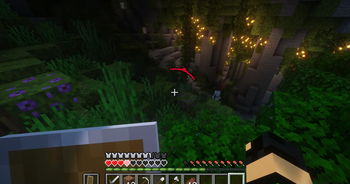
Adds a directional damage indicator.
Screenshots
About this Mod
No more guessing or searching for enemies! With the Damage Indicator, you'll instantly know the source of incoming damage.
This mod was inspired by the damage indicators in many popular first person shooter games.
2.0 and onward is client-side.
1.0 requires the mod to be on the server.
Features
- Directional Damage Indicator: an arrow pointing in the direction of any incoming damage
- Damage Text: text showing the amount of damage dealt to other mobs
- Health Bars: a text health bar for other mobs
- Blood Overlay (disabled by default): an overlay of red outlining your screen when you take damage
Config
- There is one config file called "damageindicator-client.toml"
You can... - enable/disable each feature
- change the color, placement, timing, and texture of the directional indicator
- make the health bar only show for targeted mobs


While you're here, check out ProtonMC – a free self-hostable control panel for Minecraft servers, built and maintained entirely by me. Click the image below for more details.

Available Versions
How to Install JeremySeq's Damage Indicator on Your Client
Install the Mod Loader Locally
Install fabric for your local Minecraft version.
Download the Matching File
Choose the JeremySeq's Damage Indicator file for fabric and Minecraft 1.21.1.
Install Mod
Place the .jar file in your local .minecraft/mods folder and restart Minecraft. No server-side installation is required.
Compatibility
Mod Loaders
Minecraft Versions
1.21.1, 1.21, 1.20.6 (+4 more)
Server-side
✗ UnsupportedRecommended RAM
4 GB(min. 3 GB)Frequently Asked Questions
Does JeremySeq's Damage Indicator need to be installed on the Minecraft server?
No. Modrinth marks JeremySeq's Damage Indicator as unsupported on the server side. Install it only in your local Minecraft mods folder. Your server can remain unchanged unless the mod page lists an additional dependency.
Which version and loader does JeremySeq's Damage Indicator require?
Use a file for fabric, forge, neoforge and your exact Minecraft version. Supported versions include 1.21.1, 1.21, 1.20.6. Files for different loaders are not interchangeable.
JeremySeq's Damage Indicator is not working – what should I check?
First check the Minecraft version, loader version and required dependencies. Put the .jar file in your local .minecraft/mods folder and remove older duplicates. Because this mod is client-side, adding server RAM will not fix it.
Similar Mods






Minecraft Server for Your Group
JeremySeq's Damage Indicator stays on your client. Host a compatible world for your group.