
MTR Traffic Addon
Addon for minecraft transit railway featuring car traffic generation, traffic lights and more
Screenshots

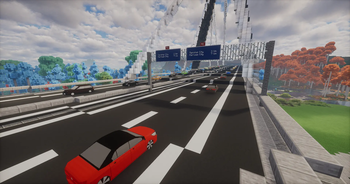

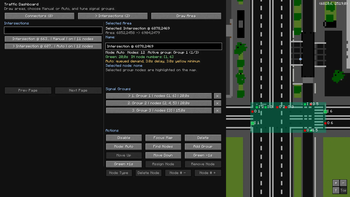
About this Mod

MTR Traffic Addon adds generated road traffic to Minecraft Transit Railway worlds. Place traffic spawn and despawn connectors, manage routes through the Traffic Dashboard, and let vehicles drive through your MTR-based road network. For example you have built bus network using mtr and some resource packs - now you can generate car traffic, manage intersection traffic lights and more!
Features:
- Traffic Spawn and Despawn Connectors
- In-game Traffic Dashboard
- Vehicle pool selection per spawn point
- Intersection areas with signal phases
- Vehicle spacing, queueing, and MTR vehicle awareness
- 8 built in sedan models (MTA Mesh Sedan [8 color variants])
- built in hatchback models
- build in Nissan Sentra models
- AND MUCH MORE!
Important info:
- Requires Fabric, Fabric API, Minecraft 1.20.1/1.20.4/1.21.1 and MTR 4.0.4 or newer
How To Use:
- Install Fabric API, Minecraft Transit Railway, and MTR Traffic Addon.
- Open your world and take the Traffic Spawn Connector, Traffic Despawn Connector, and Traffic Dashboard from the MTR Traffic Addon creative tab.
- Place spawn connectors where traffic should appear, and despawn connectors where traffic should leave.
- Open the Traffic Dashboard to view connectors, refresh routes, clear active vehicles, and manage vehicle pools.
- Select which vehicle models each spawn connector can use.
- For intersections, create an intersection area in the dashboard and assign signal groups for incoming roads.
- Enable the connectors/intersections and traffic will start spawning when a valid route exists.
BEFORE you ask for help - make sure to follow the instruction in documentation
Disclaimer:
- Backup your worlds first before using it!
- You can use this mod on forge with sinytra connector!

For support/discussion use our official channels either on our discord or website
Available Versions
How to Install MTR Traffic Addon on Your Server
Order Server
Order a Minecraft Java server with at least 3 GB RAM (4 GB recommended).
Set fabric Loader
In the panel under "Egg", select the fabric loader and matching Minecraft version (1.21.1).
Install Mod
Open the mod browser in the dashboard and search for "MTR Traffic Addon". Click "Install" – done! Alternatively, upload the .jar via SFTP to the /mods folder.
Compatibility
Mod Loaders
Minecraft Versions
1.21.1, 1.20.4, 1.20.1
Server-side
✓ RequiredRecommended RAM
4 GB(min. 3 GB)Frequently Asked Questions
MTR Traffic Addon server crashes on startup – what to do?
Most common cause: wrong fabric version or insufficient RAM. Check the server log (latest.log) for "OutOfMemoryError" or "Mixin" errors. With Mado Hosting: ensure at least 3 GB RAM is allocated and the loader matches the mod version (1.21.1). You can switch loaders with one click in the panel.
Is MTR Traffic Addon compatible with fabric and forge?
MTR Traffic Addon officially supports fabric, forge for Minecraft 1.21.1, 1.20.4, 1.20.1. Note: Forge and Fabric mods are NOT cross-compatible – pick one loader and stick with it. The Mado dashboard automatically detects incompatible loader combinations.
Server lagging with MTR Traffic Addon – how to optimize performance?
Recommended RAM: 4 GB (per 8 players). Use /spark profiler to check if MTR Traffic Addon consumes the most tick time. Common fixes: reduce server view-distance to 8-10, install "performant" or "starlight" as supplementary mods on Forge. With Mado Hosting, your server runs on NVMe SSDs with dedicated CPU cores for minimal latency.
Similar Mods






Rent Modded Server
Install MTR Traffic Addon with just one click on your server.