![Projectile Trajectory Preview [PTP]](https://cdn.modrinth.com/data/preyrsIh/f39de6eddd837f1e683ed960bb3bda2bc6c85e08_96.webp)
Projectile Trajectory Preview [PTP]
Display the trajectory of your projectiles such as arrows, ender pearls, snowballs, eggs and more!
Screenshots


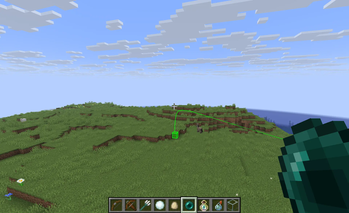
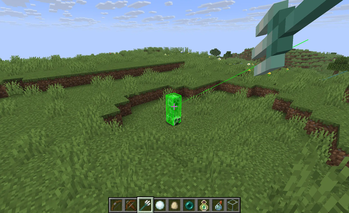
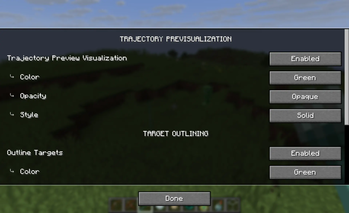
About this Mod

Projectile Trajectory Preview


Ever wondered where your arrow, snowball, or potion will land? This mod gives you a visual preview of projectile trajectories and highlights the target impact zone—perfect for planning shots with precision.
🔎 Features
- Trajectory Visualization: See the path your projectile will follow before you launch it.
- Target Highlighting: Know exactly where your shot is likely to land.
- Customizable: Tailor the look of the trajectory line, target outline, and target highlight to suit your style.
- Accurate: Unlike most other mods that do this, PTP uses accurate maths, offsets and physic. It has correct throwing directions offsets, physic steps order, initial velocity, air drag and gravity for every projectile it supports!
⚙️ Configuration
To edit the settings of the mod:
- Use Mod Menu
- Use the command
/ptpConfigto open the config screen - Edit the config file in
.minecraft/config/ptp.json
⚠️ Limitations and notes
- Minecraft projectiles often have a random offset, so the actual impact may sometime differs a bit from the preview.
- Modded items are not yet supported. If you want compatibility with a specific mod, open an issue on Github and suggest it, I'll do my best to add it.
🛑 Usage on servers
This mod doesn't work on servers to prevent using it as a cheat in PVP. If you want to have it on your custom servers, you still can, just install the mod on both, the client and the server.
📦 Modpack
Feel free to add this mod in your modpacks. If you do so, telling me would also be nice
Available Versions
How to Install Projectile Trajectory Preview [PTP] on Your Server
Order Server
Order a Minecraft Java server with at least 3 GB RAM (4 GB recommended).
Set fabric Loader
In the panel under "Egg", select the fabric loader and matching Minecraft version (26.3).
Install Mod
Open the mod browser in the dashboard and search for "Projectile Trajectory Preview [PTP]". Click "Install" – done! Alternatively, upload the .jar via SFTP to the /mods folder.
Compatibility
Mod Loaders
Minecraft Versions
26.3, 26.2, 26.1.2 (+29 more)
Server-side
~ OptionalRecommended RAM
4 GB(min. 3 GB)Frequently Asked Questions
Projectile Trajectory Preview [PTP] server crashes on startup – what to do?
Most common cause: wrong fabric version or insufficient RAM. Check the server log (latest.log) for "OutOfMemoryError" or "Mixin" errors. With Mado Hosting: ensure at least 3 GB RAM is allocated and the loader matches the mod version (26.3). You can switch loaders with one click in the panel.
Is Projectile Trajectory Preview [PTP] compatible with fabric and neoforge and quilt?
Projectile Trajectory Preview [PTP] officially supports fabric, neoforge, quilt for Minecraft 26.3, 26.2, 26.1.2. The Mado dashboard automatically detects incompatible loader combinations.
Server lagging with Projectile Trajectory Preview [PTP] – how to optimize performance?
Recommended RAM: 4 GB (per 8 players). Use /spark profiler to check if Projectile Trajectory Preview [PTP] consumes the most tick time. Common fixes: reduce server view-distance to 8-10, install "performant" or "starlight" as supplementary mods on Forge. With Mado Hosting, your server runs on NVMe SSDs with dedicated CPU cores for minimal latency.
Similar Mods






Rent Modded Server
Install Projectile Trajectory Preview [PTP] with just one click on your server.