
Modrinth · Forge, NeoForge
[SBW] Skyfront on your Minecraft server
[SBW] Skyfront runs on Minecraft servers with Forge or NeoForge. Order your server, set the loader in the panel and install the mod with one click in the mod browser.
Modern drone warfare for Superb Warfare: recon and thermal quadcopters, FPV kamikaze drones, interceptors, the Molniya strike drone, Shahed launches, radar and air-raid sirens
- Downloads
- 15.7K
- Author
- krutnet
- Loader
- Forge, NeoForge
- Minecraft
- 1.20.1 – 1.21.1
- Updated
- –
Screenshots
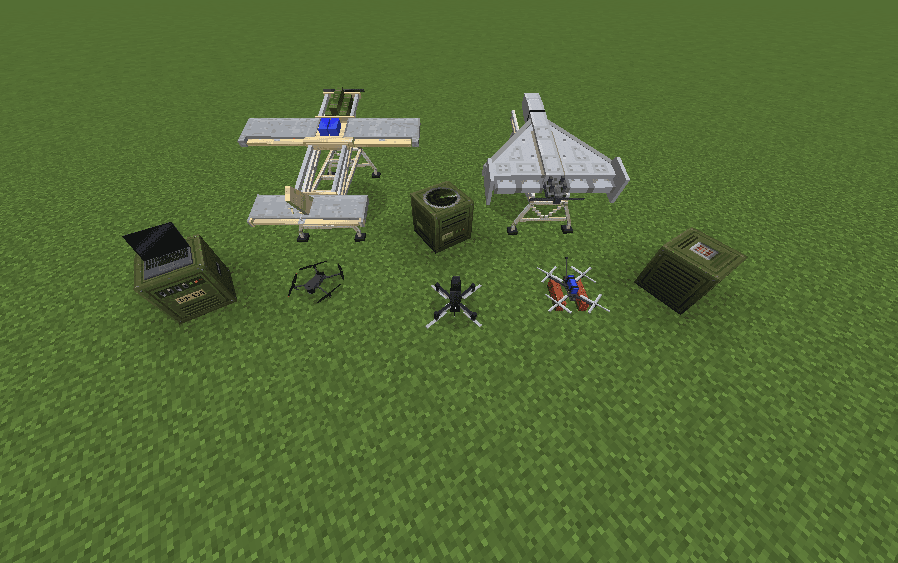
What [SBW] Skyfront looks like


Images: [SBW] Skyfront on Modrinth, published by the project team.
Setup
Install [SBW] Skyfront on your server
The server and players need the same loader and Minecraft version. Back up the world before adding or updating mods.
- 01
Configure
4 GB of RAM is preselected. You choose the term and add-ons and pay by credit card or PayPal.
- 02
Set the loader
In the panel, set the server software to Forge or NeoForge and choose the matching Minecraft version, for example 1.21.1.
- 03
Install the mod
Search the mod browser for “[SBW] Skyfront” and install the release for your loader. Alternatively, upload the .jar to the mods folder via SFTP. Required dependencies are listed on the project page.
- 04
Connect
Every player installs the same [SBW] Skyfront release locally and connects using the server address from the panel.
- On the server
- Required
- On the client
- Required
- Loader
- Forge, NeoForge
- Minecraft
- 1.21.1, 1.20.1
- License
- GNU General Public License v3.0 or later
The panel
Install mods, find errors.
Real screenshots from the Mado panel. Both come with every Minecraft server.
Mod browser
Modrinth and CurseForge, right in the panel.
The browser filters by your Minecraft version. Install mods with one click, without uploading .jar files.

AI crash analysis
When a mod crashes, the analyzer reads the log.
Mods often fail on a wrong loader version, Java version or missing dependency. The analyzer names a likely cause and suggests a fix.

Releases
Published releases
Pick the file that matches your server’s loader and Minecraft version. The server and players need the same release.
[SBW] Skyfront · Modrinth- [SBW] Skyfront 1.6.0November 11, 2026Minecraft 1.20.1 · Forge
- [SBW] Skyfront 1.6.0November 11, 2026Minecraft 1.21.1 · NeoForge
Original description by the project author

🛩️ Skyfront
Modern drone warfare for Minecraft. Recon quadcopters dropping grenades, FPV kamikaze drones with RPG rounds, fibre-optic FPVs that can't be jammed, interceptors hunting incoming strike drones, Shahed-136 and jet Shahed-238 launches with route planning, EW jammers, drone detectors, radar and air-raid sirens. It's an add-on for Superb Warfare, made from the start to run on multiplayer servers.
Available for NeoForge 1.21.1 and Forge 1.20.1.
🌐 Made for servers
The mod was built for multiplayer from day one:
- No input lag: the drone reacts to your controls instantly, while the server keeps everything fair.
- Smooth on bad connections: flight stays in sync even with high ping.
- Fly up to 1000 blocks away: the world around the drone loads as you fly, no edge of the map in front of the camera.
- Light on the server: explosions and debris are drawn on each player's side, not sent piece by piece.
- Version check: players with a different mod version can't join and break things.
🚁 Drones
Mavic 3 Pro: recon quadcopter
- Camera-app style interface with battery, compass and telemetry
- Smooth gimbal and smooth zoom up to 8×
- Carries and drops ordnance with a single press: RGO grenade, M18 smoke grenade, C4 charge (Superb Warfare items)
- Control range 500 blocks
Mavic 3T: thermal quadcopter
- Everything the Mavic 3 Pro has, plus a thermal camera: bodies, engines, explosions and fresh smoke glow hot
- Works with Iris shader packs
- Control range 1000 blocks
P1-SUN: interceptor
- A missile-shaped interceptor with a light warhead, built to bring down Shaheds and Molniyas; it barely scratches vehicles
- Acro flight model based on Betaflight rates: rate-controlled sticks, real thrust, ground effect. Hard to fly, very rewarding
- Betaflight-style OSD with a live battery model (voltage sag, mAh, amps, flight timer, link quality)
- Contact-fused warhead, configurable blast power and damage to Superb Warfare vehicles
- Also available with a thermal camera
FPV drone: kamikaze
- Carries an RPG round (PG-7VM or Yasin TBG) or a mortar shell as its warhead
- Betaflight OSD with GPS: altitude, speed, distance home, home arrow, coordinates, satellites
- Analog video: the picture breaks up with interference the farther you fly, and drops to static when the link is lost
- First-person view shows the props and the warhead in frame, like real FPV footage
- Set down on two bricks so the slung round clears the ground; the bricks disappear after take-off
- Without a round it does no damage at all
KVN: fibre-optic FPV drone
- A bigger FPV quad flown down an optical fibre paid out from a spool on its back: 250, 500 or 1000 blocks of fibre, one model for each
- Can't be jammed and sends nothing over the air, so drone detectors don't see it
- Clean digital picture for as long as the fibre holds
- The fibre is laid out behind it as it flies. When the spool runs out, or someone cuts the line with a hit or a bullet, the link is gone for good
Molniya: fixed-wing strike drone
- Launched from the launch rail, flown like a plane with an INAV-style OSD
- Rocked by wind gusts, nose-fused warhead, 30 hit points
- When shot down it spirals in and goes off on impact
Flying them
- Fly every drone through Superb Warfare's drone monitor
- RC transmitter and gamepad support: plug in a radio (for example a Radiomaster in USB joystick mode), calibrate it in the built-in setup screen, map your switches and fly
- Arming switch (Tab), thermal toggle (T), self-destruct (bindable)
- Batteries run down in flight (can be turned off in the config)
- A drone that falls into water is lost
- Downed drones fall realistically (planes spiral, quads tumble) and come apart into burnt pieces that fly up to 100 blocks from a high blast
🎯 Shahed-136 & Shahed-238
- Placed on the launch rail, launched from the UAV control terminal
- Route planning on a terrain map: set waypoints, a target and the dive mode
- Two dive modes: low and high approach
- Shahed-238: the jet version. Rocket-boosted launch, turbojet, around 320 km/h in cruise and up to 500 km/h in the dive. It turns wide, so its waypoints have to sit further apart
- Massive explosion with fire, smoke, debris and optional block damage
- At night the blast lights up the ground around it and flashes on the sky, visible from far away
- Comes apart into burnt debris when it blows up
📡 Electronic warfare
EW Jammer
- A field jammer you set down on the ground, powered by Superb Warfare battery packs (small, medium or large)
- Three power settings: full jamming within 23, 38 or 75 blocks, with a band of interference beyond that
- Inside the radius drones lose both picture and control. Further out an analog picture breaks up and digital video loses quality
- Doesn't affect the fibre-optic KVN
- Armoured case: it takes a beating, but it can be shot up or blown up
Drone Detector ("Chuika")
- Hand-held detector that picks up FPV, Molniya and P1-SUN video and hears Mavics up to 500 blocks away
- Beeps faster as the drone gets closer; right-click switches between the signals it has found
- Shows the intercepted video feed, so you see what the enemy drone sees
🧱 Blocks & items
| Item | What it does |
|---|---|
| 🖥️ UAV Control Terminal | Plans routes and launches the Shaheds |
| 🚀 Launch Rail | Launch platform for the Shaheds and the Molniya |
| 📡 Radar | Detects drones, shows them in a live GUI, outputs a redstone signal by distance |
| 🚨 Air Raid Siren | Redstone-activated siren, audible from far away (range configurable) |
| 📻 EW Jammer | Jams drone links around it, runs on Superb Warfare battery packs |
| 📟 Drone Detector | Picks up drone video and Mavic signals, shows the intercepted feed |
| 🚁 Drones | Mavic 3 Pro, Mavic 3T, P1-SUN, P1-SUN Thermal, FPV drone, KVN (250 / 500 / 1000), Molniya, Shahed-136, Shahed-238 |
Every drone and item has a crafting recipe. Everything is in the mod's own creative tab, together with Superb Warfare's drone monitor.
🔊 Sound
- 3D positional sound for every drone, rising in pitch as it is driven harder
- Distinct motor sounds for the FPV, the P1-SUN and the Molniya
- Shahed-136 engine with realistic sound over distance, plus a rocket booster roar on launch and the Shahed-238's turbojet
- 5 explosion sounds, delayed by distance like the real speed of sound
- Air-raid siren with distance-based volume
🎮 Commands
All commands need permission level 2 (operator).
| Command | Description |
|---|---|
/skyfront attack shahed|jet_shahed <start> <target> low|high |
Launch a Shahed-136 or Shahed-238 from a point to a target |
/skyfront map rescan / status |
Rebuild / check the terrain map used by the terminal |
/skyfront config |
Show the main settings |
/skyfront config particles enable|disable |
Explosion particles |
/skyfront config particles multiplier <0-500> |
Particle amount (100 = default) |
/skyfront config blockDamage strike|piloted enable|disable |
Whether Shaheds / piloted drones break blocks |
/skyfront config sounds enable|disable |
Custom explosion sounds |
/skyfront config batteryDrain enable|disable |
Whether drone batteries run down in flight |
/skyfront config zone blacklist|whitelist enable|disable |
Forbidden / allowed target zones |
/skyfront config reload |
Reload the config file and sync it to all players |
⚙️ Configuration
Config file: config/skyfront-common.toml. Almost everything can be tuned. The main sections:
- Targeting: blacklist and whitelist zones
- Explosions: particles, block damage (Shaheds and piloted drones separately), sounds
- Shahed: hit points, flight range, waypoints, altitude
- Radar / Siren: detection range, audible range
- Drones: chunk radius for long-range flight, airburst chance of ordnance on downed drones, battery drain
- Mavic 3 Pro / Mavic 3T: flight time, control range, speed, zoom, hit points
- FPV flight (P1-SUN, FPV, KVN, Molniya): flight time, control range, acro rates, thrust, battery, OSD
- P1-SUN / Molniya: speed, hit points, warhead power, vehicle damage
- Detector: range and video feed radius
📋 Requirements
| 1.21.1 | 1.20.1 | |
|---|---|---|
| Loader | NeoForge 21.1+ | Forge 47+ |
| Superb Warfare | 0.8.8+ (required) | 0.8.8+ (required) |
| GeckoLib | 4.6+ (required) | 4.4+ (required) |
Optional: TACZ, whose bullets can cut a KVN's fibre too.
Install on both the server and the client. Worlds from older versions (mod ID sfw) load as before.
💛 Sponsor
Huge thanks to MrCups for supporting the project! Skyfront keeps growing thanks to him.
👥 Credits
Developed by Lexik and Krutnet for KrutEvent.
Mavic 3 Pro / Mavic 3T model: "DJI Mavic 3" by llirikslon, licensed under CC BY 4.0. Reduced and converted for Minecraft.
[SBW] Skyfront server crashes on startup – what to do?
Common causes: the loader or Minecraft version does not match the mod file, a dependency is missing, or RAM is too low. Check the log (latest.log) for “OutOfMemoryError”, “Mixin” or missing mods. At Mado, the AI crash analysis reads the log and suggests a cause. You can change the loader and version in the panel.
Which loader does [SBW] Skyfront run on?
According to Modrinth, [SBW] Skyfront supports Forge, NeoForge for Minecraft 1.21.1, 1.20.1.
How much RAM does a server with [SBW] Skyfront need?
As guidance, 3–4 GB for a server with this mod. This is an estimate, not a measured minimum. More mods, many players and long view distances need more. The spark profiler shows whether a mod is costing tick time.
Similar mods
Popular mods in the same category
 Server-ready

VeinMiner
by Miraculixx
Mine the whole vein on mining a single ore/block. Make the tedious mining experience to something satisfying and fun! FTB Ultimine alternative
 Server-ready

Geckolib
by Gecko
A 3D animation library for entities, blocks, items, armor, and more!
 Client only

VeinMiner Hotkey
by Miraculixx
Veinminer Addon - Use a hotkey to veinmine with a dynamic crosshair & block highlighting
 Server-ready

Fzzy Config
by fzzyhmstrs
Config API with automatic GUIs, powerful validation options, server-client sync, and more!
Ready for your server with [SBW] Skyfront?
4 GB of RAM from €8.00 per month. 35% off your first month with MADO35.