

Modrinth · Fabric, Forge, NeoForge
Spiky Spikes on your Minecraft server
Spiky Spikes runs on Minecraft servers with Fabric or Forge or NeoForge. Order your server, set the loader in the panel and install the mod with one click in the mod browser.
Don't step on it! Hurts almost as much as stepping on LEGO... ouch
- Downloads
- 1.6M
- Author
- Fuzs
- Loader
- Fabric, Forge, NeoForge
- Minecraft
- 1.18.2 – 26.3
- Updated
- –
Screenshots
What Spiky Spikes looks like

Images: Spiky Spikes on Modrinth, published by the project team.
Setup
Install Spiky Spikes on your server
The server and players need the same loader and Minecraft version. Back up the world before adding or updating mods.
- 01
Configure
4 GB of RAM is preselected. You choose the term and add-ons and pay by credit card or PayPal.
- 02
Set the loader
In the panel, set the server software to Fabric or Forge or NeoForge and choose the matching Minecraft version, for example 26.3.
- 03
Install the mod
Search the mod browser for “Spiky Spikes” and install the release for your loader. Alternatively, upload the .jar to the mods folder via SFTP. Required dependencies are listed on the project page.
- 04
Connect
Every player installs the same Spiky Spikes release locally and connects using the server address from the panel.
- On the server
- Required
- On the client
- Required
- Loader
- Fabric, Forge, NeoForge
- Minecraft
- 26.3, 26.2, 26.1.2 +20 more
- License
- Mozilla Public License 2.0
The panel
Install mods, find errors.
Real screenshots from the Mado panel. Both come with every Minecraft server.
Mod browser
Modrinth and CurseForge, right in the panel.
The browser filters by your Minecraft version. Install mods with one click, without uploading .jar files.

AI crash analysis
When a mod crashes, the analyzer reads the log.
Mods often fail on a wrong loader version, Java version or missing dependency. The analyzer names a likely cause and suggests a fix.

Releases
Published releases
Pick the file that matches your server’s loader and Minecraft version. The server and players need the same release.
Spiky Spikes · Modrinth- v26.1.1-mc26.1.x+fabricOctober 21, 2026Minecraft 26.1, 26.1.1, 26.1.2 · Fabric
- v26.1.1-mc26.1.x+neoforgeOctober 21, 2026Minecraft 26.1, 26.1.1, 26.1.2 · NeoForge
- v26.3.1-mc26.3.x+fabricOctober 21, 2026Minecraft 26.3 · Fabric
- v26.3.1-mc26.3.x+neoforgeOctober 21, 2026Minecraft 26.3 · NeoForge
- [NEOFORGE] [26.2.x] v26.2.0June 18, 2026Minecraft 26.2 · NeoForge
Original description by the project author




📖 About:
Spiky Spikes adds some really spikey spikes. There are a bunch of tiers, all with unique abilities. So what are you waiting for? Let's go and improve your mob farms!
📚 Contents:
Spiky Spikes brings you 6 Tiers of spikes, all of them are unique.
- Wooden: Slowly damages mobs, but does not deal a killing blow.
- Stone: Damages and kills mobs, but does not drop any loot or experience.
- Iron: Damages and kills mobs, only drops normal loot without experience.
- Golden: Damages and kills mobs, only drops experience without any loot.
- Diamond: Deals a lot of damage, mobs drop all loot like when killed by a player. Can use most sword enchantments, apply via an anvil.
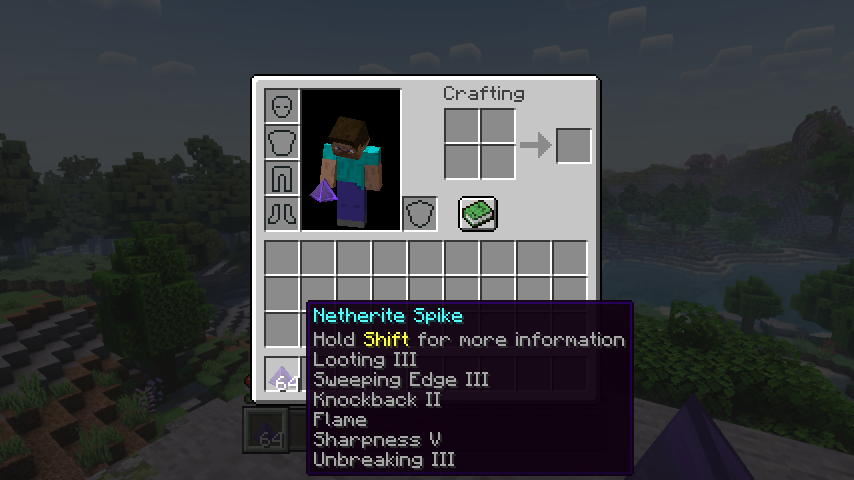
- Netherite: Deals a lot of damage, mobs drop all loot like when killed by a player. Can use most sword enchantments, apply via an anvil. Is resistant to explosions and cannot be destroyed by the wither boss. Deals no damage to players.
Note: Make sure when adding enchantments to diamond and netherite spikes to have all the spikes you want to enchant ready at once. You can apply enchanted books To The Whole Stack, so enchanting more spikes later will needlessly consume more of your precious books.
📷 Media:
 |
 |
|
| Spiky spikes are spikey | Wooden spikes bring mobs down to half a heart | |
 |
 |
|
| Even the wither boss isn't safe from netherite spikes | All the enchantments you can put on spikes | |
💡 FAQ:
Q: How do I configure this mod on Forge?
A: Install my Config Menus for Forge mod and do it directly in-game!
Q: How do I configure this mod on Fabric?
A: Editing configs directly in-game has not yet been implemented. Instead when in a world run the /config showfile <modid> command by choosing either CLIENT or SERVER (depending on the mod), then click the file name (ending with .toml) that appears in chat to be able to manually edit the config file in a separate editor. After saving the file, the config will automatically reload in-game after a couple of seconds, so no game restart required.
🏆 Credits:
Developing Spiky Spikes was helped and inspired by:
- RWTema for inspiring this mod from the spike blocks found in old versions of their Extra Utilities mod
- XFactHD for introducing me to the dark arts of rendering non-cube shapes in Minecraft


 |
 |
|
 |
 |
|
 |
 |
|
 |
 |
|
 |
 |
|
Spiky Spikes server crashes on startup – what to do?
Common causes: the loader or Minecraft version does not match the mod file, a dependency is missing, or RAM is too low. Check the log (latest.log) for “OutOfMemoryError”, “Mixin” or missing mods. At Mado, the AI crash analysis reads the log and suggests a cause. You can change the loader and version in the panel.
Which loader does Spiky Spikes run on?
According to Modrinth, Spiky Spikes supports Fabric, Forge, NeoForge for Minecraft 26.3, 26.2, 26.1.2. Forge and Fabric files are not interchangeable: pick one loader for the server and clients.
How much RAM does a server with Spiky Spikes need?
As guidance, 3–4 GB for a server with this mod. This is an estimate, not a measured minimum. More mods, many players and long view distances need more. The spark profiler shows whether a mod is costing tick time.
Similar mods
Popular mods in the same category
 Server-ready

VeinMiner
by Miraculixx
Mine the whole vein on mining a single ore/block. Make the tedious mining experience to something satisfying and fun! FTB Ultimine alternative
 Server-ready

Geckolib
by Gecko
A 3D animation library for entities, blocks, items, armor, and more!
 Client only

VeinMiner Hotkey
by Miraculixx
Veinminer Addon - Use a hotkey to veinmine with a dynamic crosshair & block highlighting
 Server-ready

Fzzy Config
by fzzyhmstrs
Config API with automatic GUIs, powerful validation options, server-client sync, and more!
Ready for your server with Spiky Spikes?
4 GB of RAM from €8.00 per month. 35% off your first month with MADO35.