
Modrinth · Forge, NeoForge · Client mod
Tinker's Planner Reborn
Tinker's Planner Reborn is a client-side mod. Install it on your computer; the server does not need it.
Tinkers' Blueprint is a client-side add-on for Tinkers' Construct 3 that allows players to preview assembled tools in a blueprint interface and view their stats.
- Downloads
- 364.0K
- Author
- dreamforSh
- Loader
- Forge, NeoForge
- Minecraft
- 1.19.2 – 1.20.1
- Updated
- –
Screenshots
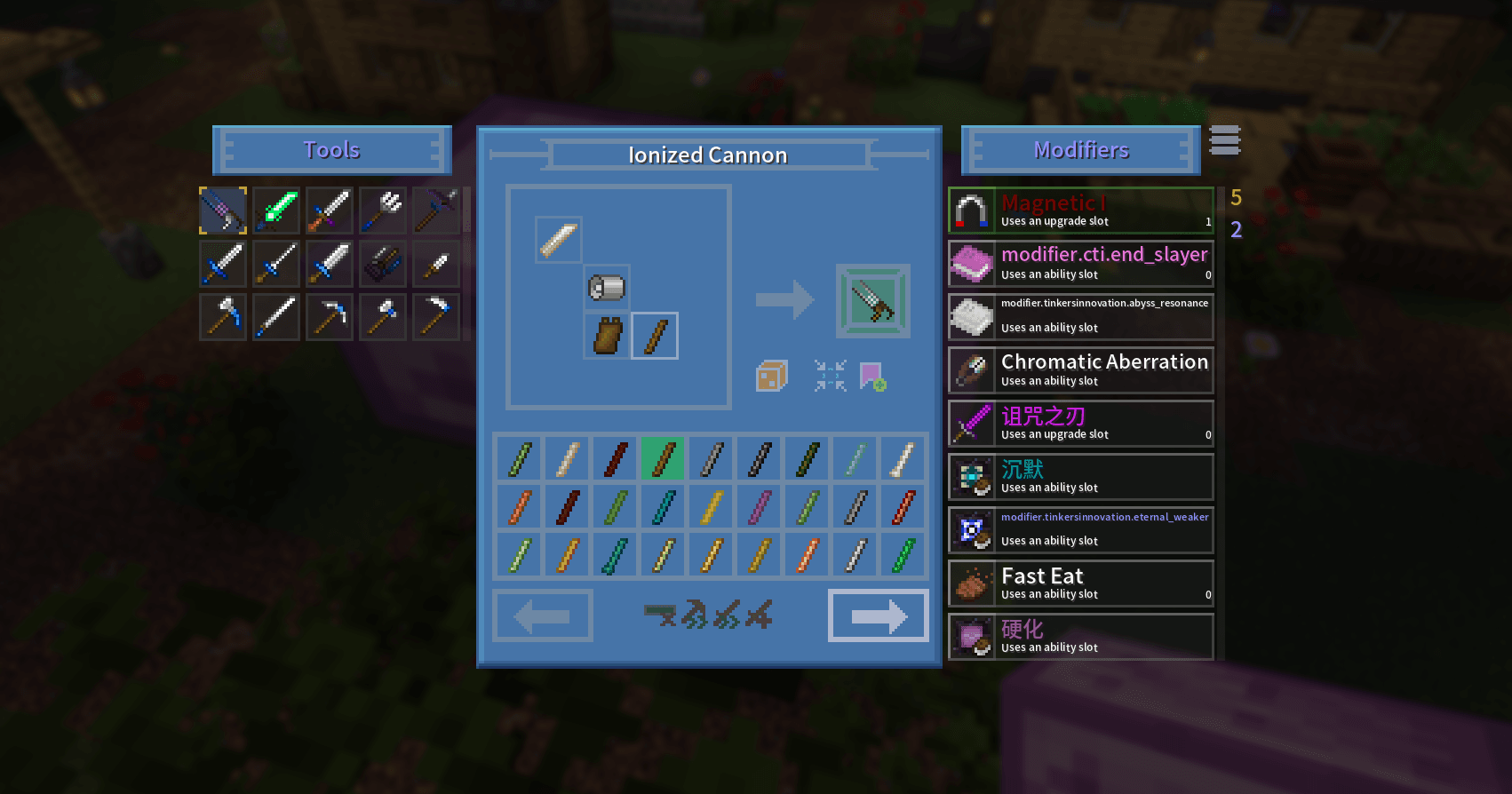
What Tinker's Planner Reborn looks like

Images: Tinker's Planner Reborn on Modrinth, published by the project team.
Setup
Install Tinker's Planner Reborn on your client
Client-side mods only run on your computer. More server RAM does not change their performance.
- 01
Install the loader locally
Install Forge or NeoForge for your Minecraft version in your launcher.
- 02
Download the file
Download the Tinker's Planner Reborn file for your loader and your exact Minecraft version, for example 1.20.1.
- 03
Add it to the mods folder
Put the .jar file in your local .minecraft/mods folder and remove older duplicates.
- 04
Launch
Launch Minecraft with the loader profile. Nothing needs to change on the server.
- On the server
- Not needed
- On the client
- Required
- Loader
- Forge, NeoForge
- Minecraft
- 1.20.1, 1.19.2
- License
- Creative Commons Attribution Non Commercial Share Alike 4.0 International
Releases
Published releases
Pick the file that matches your server’s loader and Minecraft version. The server and players need the same release.
Tinker's Planner Reborn · Modrinth- Tinker's Planner Reborn 1.8.0August 8, 2026Minecraft 1.20.1 · Forge, NeoForge
- Tinker's Planner Reborn 1.6February 25, 2026Minecraft 1.19.2 · Forge
Original description by the project author
Tinker's Planner
A client-side blueprint planner for Tinkers' Construct 3: see exactly what a
tool, armor piece or bow will end up like before you forge it.





Overview
Tinker's Planner is a purely client-side mod. Once installed, a planner icon
appears in the Tinker Station and Tinker's Anvil GUIs; click it to open the
planner.
Inside the planner you can freely combine any parts — even ones you do not
have on hand — and preview the finished item's full stats, so you never again
gather materials for a tool that turns out to be a disappointment.
Features
- Tools and armor modes: switch between Tools and Armors to plan tools,
armor and bows. - Live stat preview: durability, mining speed, attack damage, armor,
accuracy, draw speed and more update as you swap parts. - Sorting and search: sort parts by a chosen attribute, such as mining
speed or durability, or search materials directly. - Bookmarks and stars: save designs you like and come back to compare
them later. - Modifier simulation: edit the modifier stack, add or remove levels and
simulate creative slots. - Import and move parts: import an existing tool from the station into
the planner, or move planned parts back to the station. - Randomize: roll random material combinations for fun or inspiration.
- Translations: English, Simplified Chinese, Japanese, Russian.
License
This project is derived from tiffit's tconplanner, which is released under
the MIT license. Different parts of this repository carry different licenses:
| Part | License | File |
|---|---|---|
Code (src/main/java) |
LGPL-3.0-or-later | LICENSE |
| Textures and artwork | CC BY-NC-SA 4.0 | LICENSE.md |
| Upstream code | MIT, © 2021 tiffit | LICENSE.txt |
Notes:
- MIT permits redistributing a derivative work under a different license as
long as the original copyright notice is retained;LICENSE.txtis that
notice and must ship with any distribution. - Code added or modified in this repository is licensed under
LGPL-3.0-or-later. Distributing a derivative build requires publishing the
corresponding source changes under the same license. - Textures, icons and other artwork
(src/main/resources/assets/tconplanner/texturesandsrc/main/resources/logo.png) are licensed under CC BY-NC-SA 4.0:
attribution, non-commercial, share-alike. Original files inherited from the
upstream MIT release remain usable under MIT. - CC BY-NC-SA 4.0 carries a non-commercial clause. Modpack inclusion,
reuploads and derivative artwork must stay non-commercial and credit the
source. For a commercial license, get in touch through Issues.
Credits
- tiffit — author of the original Tinker's Planner (MIT).
- SpikyStars, xinian — development and maintenance of this fork.
- ssakura49 — feature work and Simplified Chinese translation.
- Twister — Japanese translation.
- Slime Knights — Tinkers' Construct and Mantle.
See also
- [Tinkers' Construct][tconstruct]
- Minecraft Forge
- Creative Commons BY-NC-SA 4.0
- GNU LGPL 3.0
Does Tinker's Planner Reborn need to be installed on the Minecraft server?
No. Modrinth marks Tinker's Planner Reborn as unsupported on the server side. Install it only in your local mods folder. Your server can stay unchanged unless the project page lists an additional dependency.
Which version and loader does Tinker's Planner Reborn require?
Use a file for Forge, NeoForge and your exact Minecraft version. Supported versions include 1.20.1, 1.19.2. Files for different loaders are not interchangeable.
Tinker's Planner Reborn is not working – what should I check?
First check the Minecraft version, loader version and required dependencies. Because the mod is client-side, more server RAM will not fix it.
Similar mods
Popular mods in the same category
 Server-ready

YetAnotherConfigLib (YACL)
by isxander
A builder-based configuration library for Minecraft!
 Server-ready

Text Placeholder API
by Patbox
Placeholder and Text manipulation library for your Minecraft mods.
 Client only

Dynamic FPS
by juliand665
Reduce resource usage while Minecraft is in the background, idle, or on battery.
 Server-ready

No Chat Reports
by Aizistral
Makes chat unreportable (where possible)
Looking for mods for your own server?
The catalog lists mods that run on Minecraft servers.