
Modrinth · Forge
Ambient Additions on your Minecraft server
Ambient Additions runs on Minecraft servers with Forge. Order your server, set the loader in the panel and install the mod with one click in the mod browser.
Adds more atmospheric critters to your world!
- Downloads
- 709.8K
- Author
- codyhuh
- Loader
- Forge
- Minecraft
- 1.20 – 1.20.1
- Updated
- –
Screenshots
What Ambient Additions looks like
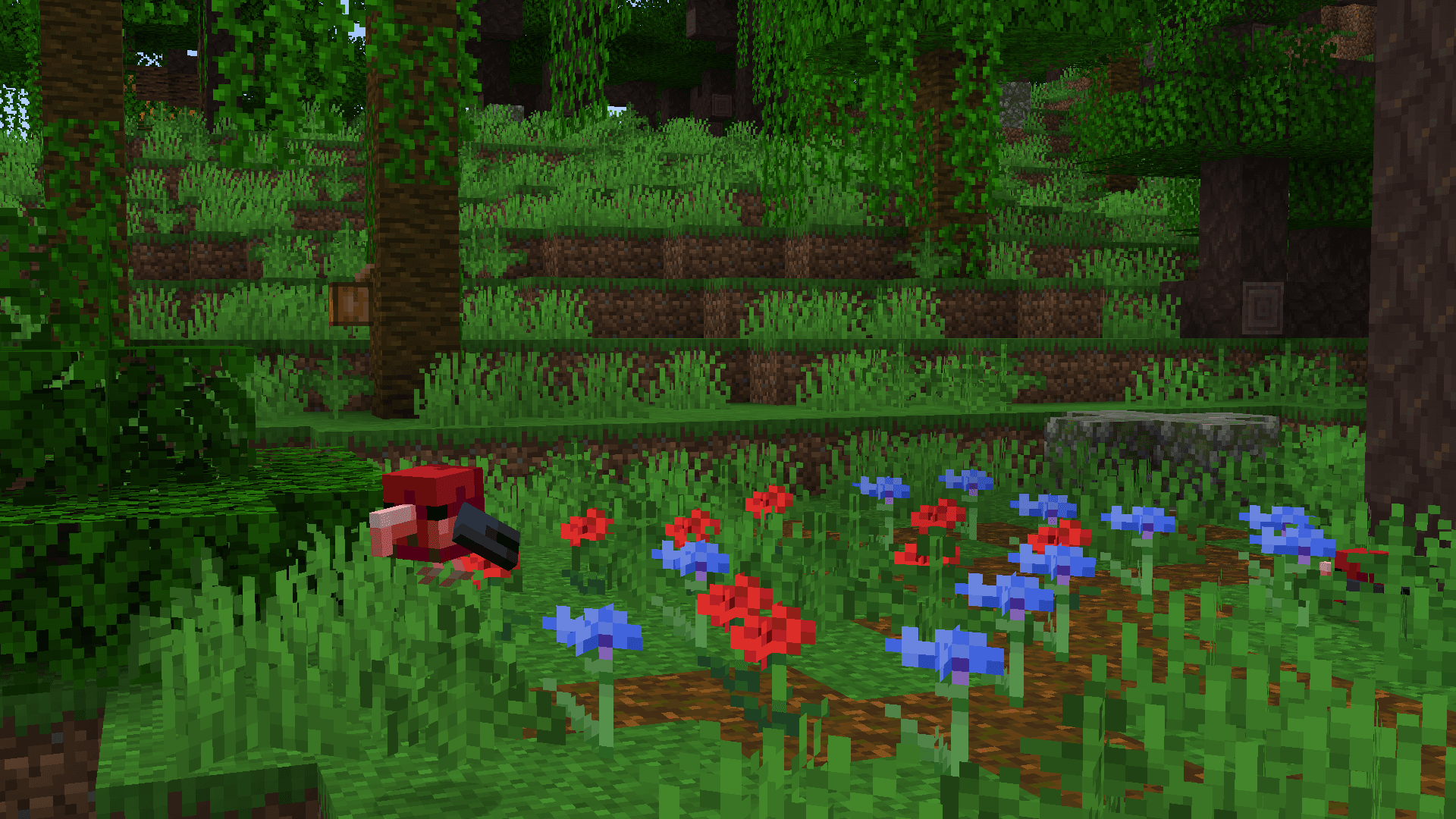
 I'iwi in the jungle
 Mata Mata in the swamp
 Napoleon Wrasse in the warm ocean
 Spider-tailed Adder in the desert
 Siamang Gibbons in the jungle
Images: Ambient Additions on Modrinth, published by the project team.
Setup
Install Ambient Additions on your server
The server and players need the same loader and Minecraft version. Back up the world before adding or updating mods.
- 01
Configure
4 GB of RAM is preselected. You choose the term and add-ons and pay by credit card or PayPal.
- 02
Set the loader
In the panel, set the server software to Forge and choose the matching Minecraft version, for example 1.20.1.
- 03
Install the mod
Search the mod browser for “Ambient Additions” and install the release for your loader. Alternatively, upload the .jar to the mods folder via SFTP. Required dependencies are listed on the project page.
- 04
Connect
Every player installs the same Ambient Additions release locally and connects using the server address from the panel.
- On the server
- Required
- On the client
- Required
- Loader
- Forge
- Minecraft
- 1.20.1, 1.20
- License
- GNU Lesser General Public License v3.0 only
The panel
Install mods, find errors.
Real screenshots from the Mado panel. Both come with every Minecraft server.
Mod browser
Modrinth and CurseForge, right in the panel.
The browser filters by your Minecraft version. Install mods with one click, without uploading .jar files.

AI crash analysis
When a mod crashes, the analyzer reads the log.
Mods often fail on a wrong loader version, Java version or missing dependency. The analyzer names a likely cause and suggests a fix.

Releases
Published releases
Pick the file that matches your server’s loader and Minecraft version. The server and players need the same release.
Ambient Additions · ModrinthOriginal description by the project author

🐌 Ambient Additions 🦀
This mod adds ambient life to your world and utilities to catch them. The mod includes various fully-animated animals, ranging from adorable corgis to radially-symmetric starfish, shy crabs, and miniature armadillos. The aim is to introduce more fauna into your world, in order to fuel players' zoos and critter-catching habits!
🎯 Critter-Catching: Blowguns, Darts, and Crates!
In order to aid you in collecting and transporting animals, a multitude of the mod's animals are able to be put in buckets, pots, bottles, or bowls. Along with this, we have also added a set of items to sedate and crate any animal in general, especially those that cannot be caught by other means.

Crates are a new form of animal transport.
- Empty Crates can be used on sedated entities by right-clicking on them to capture them.
- Entities can be placed from crates by right-clicking again.
- Crates will gain a new texture and enchantment glint when containing a mob and will state the mob contained as a tooltip.
Blowguns & Darts allow you to sedate mobs for capture.
- Blowguns are ranged weapons that use darts as ammunition.
- They can be charged similarly to a bow, and fire a single dart projectile accordingly.
- Darts inflict a single level of "stun" on a mob.

After a certain number of stuns, a mob will enter a sedated mode for 30 seconds, during which it will display sleepy particles.
The number of stuns required to sedate a mob scales with it's health.

Stun requirements
2.5 hearts = 1 stun 5 hearts = 2 stuns 10 hearts = 3 stuns 25 hearts = 4 stuns 25+ hearts = 5 stunsCredits
NinniH for assetwork, code and sounds
OmayPaty for assetwork
GRAUS for assetwork
magmastrider#3837 (from our discord) for screenshots
fool#1369 (from our discord) for screenshots
& special thanks to BisectHosting for sponsoring us! 
Ambient Additions server crashes on startup – what to do?
Common causes: the loader or Minecraft version does not match the mod file, a dependency is missing, or RAM is too low. Check the log (latest.log) for “OutOfMemoryError”, “Mixin” or missing mods. At Mado, the AI crash analysis reads the log and suggests a cause. You can change the loader and version in the panel.
Which loader does Ambient Additions run on?
According to Modrinth, Ambient Additions supports Forge for Minecraft 1.20.1, 1.20.
How much RAM does a server with Ambient Additions need?
As guidance, 3–4 GB for a server with this mod. This is an estimate, not a measured minimum. More mods, many players and long view distances need more. The spark profiler shows whether a mod is costing tick time.
Similar mods
Popular mods in the same category
 Server-ready

VeinMiner
by Miraculixx
Mine the whole vein on mining a single ore/block. Make the tedious mining experience to something satisfying and fun! FTB Ultimine alternative
 Server-ready

Geckolib
by Gecko
A 3D animation library for entities, blocks, items, armor, and more!
 Client only

VeinMiner Hotkey
by Miraculixx
Veinminer Addon - Use a hotkey to veinmine with a dynamic crosshair & block highlighting
 Server-ready

Fzzy Config
by fzzyhmstrs
Config API with automatic GUIs, powerful validation options, server-client sync, and more!
Ready for your server with Ambient Additions?
4 GB of RAM from €8.00 per month. 35% off your first month with MADO35.