
Analog
A server side mod that add radios for Simple Voice Chat.
Screenshots

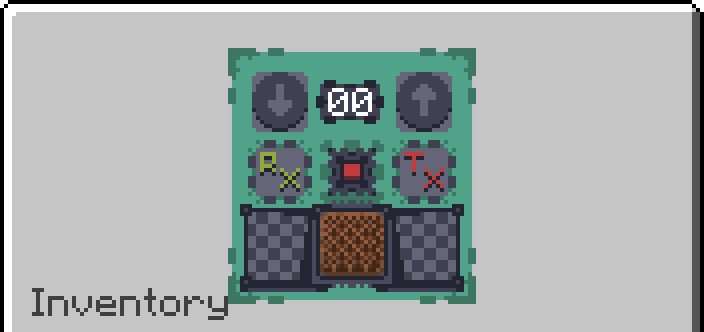
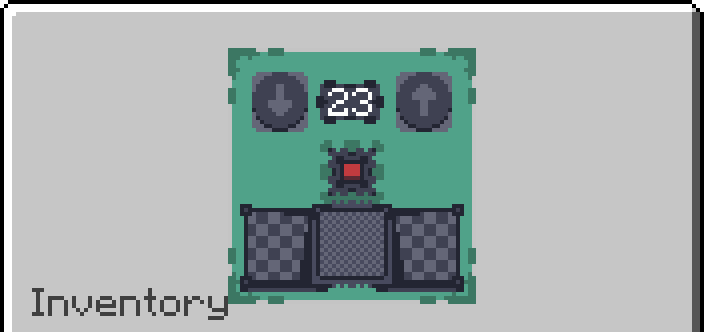
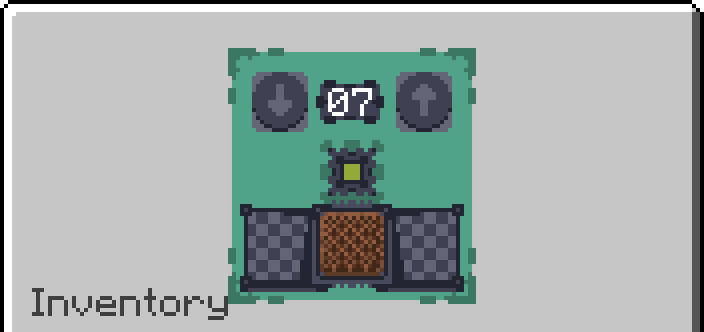
About this Mod
Analog
An addon for Simple Voice Chat that adds handheld radios as well as placeable transmitters and receivers.
Features
- Handheld radios
- Block transmitters that broadcast nearby players' voices
- Block receivers that can be tuned into a channel for passive listening
- You can hear another person's radio and their radio can pickup your voice
- Handheld radios can enable receiving and transmitting seperately from eachother
- Radios can tune to 100 channels (Can be changed in config)
- Radios have infinite range but only within the same dimension
- Transmitters can play music from nearby jukeboxes over the radio, including custom discs from AudioPlayer (1.2.0 or later)
- Receivers output a comparator signal when receiving (1.2.0 or later)
Usage

- Right click while in hand to open the radio GUI
- Use the up and down buttons to select a channel
- Press the ON button, by default Receive will be enabled and you will be listening to the channel
- Press the Transmit button to toggle broadcasting your voice and nearby players' voices over the channel
- Press the Receive button to toggle receiving the channel
- Press F (Swap Hands Key) while in hand to quick toggle Transmitting (1.1.0 or later)

- Right click to open transmitter GUI
- Use the up and down buttons to select a channel
- Press the ON button and the transmitter will broadcast nearby players' voices over the channel

- Right click to open receiver GUI
- Use the up and down buttons to select a channel
- Press the ON button and the receiver will tune into the channel and play anything broadcast over the channel
Recipes
Transmitter Recipe
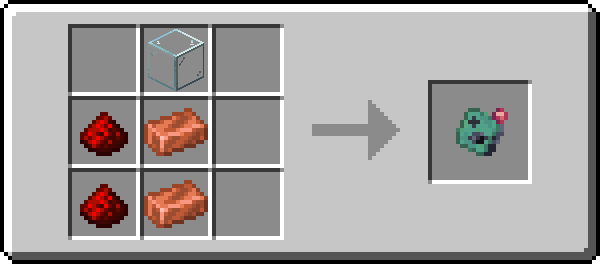
Receiver Recipe
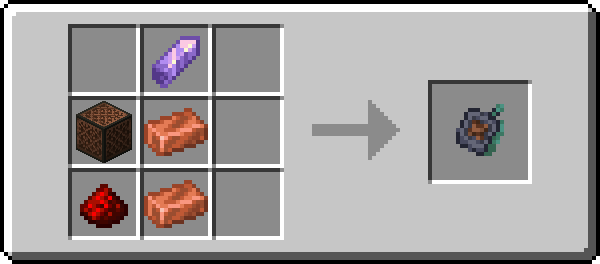
Radio Recipe
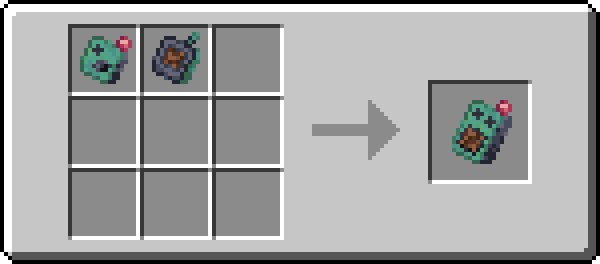
Notes for Servers
Analog requires clients to have the mod on their side or they need to have a resource pack enabled. For a fully server side setup you can use Polymer's Autohost to automatically send the resource pack to clients.
Available Versions
How to Install Analog on Your Server
Order Server
Order a Minecraft Java server with at least 3 GB RAM (4 GB recommended).
Set fabric Loader
In the panel under "Egg", select the fabric loader and matching Minecraft version (1.21.1).
Install Mod
Open the mod browser in the dashboard and search for "Analog". Click "Install" – done! Alternatively, upload the .jar via SFTP to the /mods folder.
Compatibility
Mod Loaders
Minecraft Versions
1.21.1, 1.21, 1.20.6 (+1 more)
Server-side
✓ RequiredRecommended RAM
4 GB(min. 3 GB)Frequently Asked Questions
Analog server crashes on startup – what to do?
Most common cause: wrong fabric version or insufficient RAM. Check the server log (latest.log) for "OutOfMemoryError" or "Mixin" errors. With Mado Hosting: ensure at least 3 GB RAM is allocated and the loader matches the mod version (1.21.1). You can switch loaders with one click in the panel.
Is Analog compatible with fabric?
Analog officially supports fabric for Minecraft 1.21.1, 1.21, 1.20.6. The Mado dashboard automatically detects incompatible loader combinations.
Server lagging with Analog – how to optimize performance?
Recommended RAM: 4 GB (per 8 players). Use /spark profiler to check if Analog consumes the most tick time. Common fixes: reduce server view-distance to 8-10, install "performant" or "starlight" as supplementary mods on Forge. With Mado Hosting, your server runs on NVMe SSDs with dedicated CPU cores for minimal latency.
Similar Mods



![[TaCZ] Timeless and Classics Zero](https://cdn.modrinth.com/data/SzzJttH8/fd27766d2bb8390d284696b1dbd358f87e081439_96.webp)


Rent Modded Server
Install Analog with just one click on your server.