
Anvil Never Too Expensive
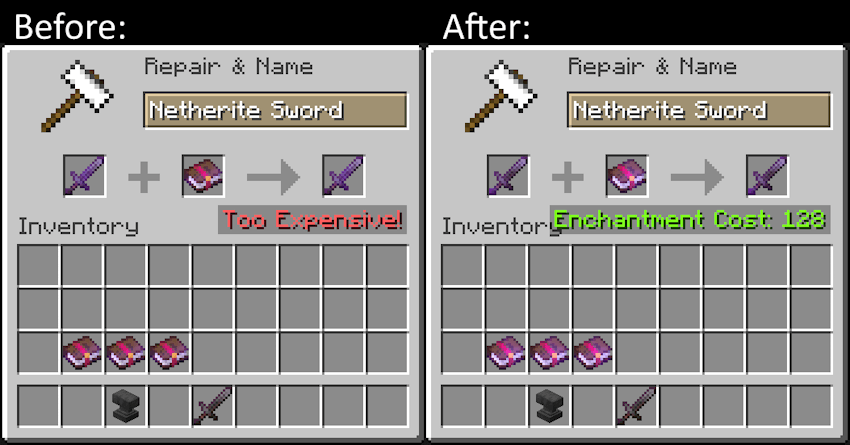
This lightweight Forge mod removes the "Too Expensive!" message that appears in anvils when the XP cost goes above 40 levels. No longer will perfectly fine equip go to waste because the game limits your possibilities!
Screenshots
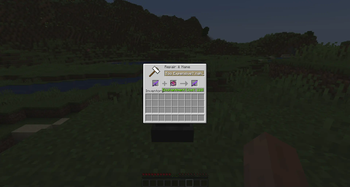
About this Mod






📖 About:
Ever had to let a perfectly enchanted pickaxe break because the game suddenly decided you weren't allowed to use your hard earned levels on repairing it, saying it's "Too expensive!" even though you'd be able to afford it? Well I've been there one too many times and decided to come up with a solution: Anvil Never Too Expensive - ANTE for short - simply removes this level cap entirely, letting you repair, rename, or enchant items no matter the cost, as long as you can afford to.
No longer will perfectly fine equip go to waste because the game limits your possibilities!
✅ Features:
- Removes the level cap when repairing/renaming/enchanting equip on an anvil!
- Is extremely lightweight and will not cause incompatibility with other mods
- Does not enable cheating, the interaction still costs levels
- Recommended on both server & client, but technically only needed server-side!
- When installed on server only, "Too expensive!" will appear but the item can still be repaired
- Supported on Forge, Neoforge, and Fabric
🔧 Configuration:
- None at the moment
🤝 Pairs well with:
Mended Mending: This mod reworks the Mending enchantment to still require repairing equip using resources!
🖼️ Preview:
🧾 Changelog:
Spoiler
1.0 - Sep 7, 2022:
Initial release for 1.19
1.1 - Sep 8, 2022:
Additions:
Initial release for 1.18
Fixes and optimizations:
Fixed game not launching on 1.19-1.19.2 due to typo in Forge version dependency
1.1 - Aug 4, 2023:
Additions:
Initial release for 1.20.1
Fixes and optimizations:
Fixed rare game crash on 1.19.4
1.2 - May 27, 2024:
Initial release for 1.20.4 Multiloader, supporting Forge, Fabric, and Neoforge
1.2 - Jul 1, 2024:
Initial release for Multiloader 1.20.6 and 1.21, supporting Fabric and Neoforge
1.2.1 - Jan 5, 2025:
Readded support for Forge
Release for all 1.21.x versions on NeoForge, Fabric, and Forge
Available Versions
How to Install Anvil Never Too Expensive on Your Server
Order Server
Order a Minecraft Java server with at least 3 GB RAM (4 GB recommended).
Set fabric Loader
In the panel under "Egg", select the fabric loader and matching Minecraft version (1.21.11).
Install Mod
Open the mod browser in the dashboard and search for "Anvil Never Too Expensive". Click "Install" – done! Alternatively, upload the .jar via SFTP to the /mods folder.
Compatibility
Mod Loaders
Minecraft Versions
1.21.11, 1.21.10, 1.21.9 (+17 more)
Server-side
✓ RequiredRecommended RAM
4 GB(min. 3 GB)Frequently Asked Questions
Anvil Never Too Expensive server crashes on startup – what to do?
Most common cause: wrong fabric version or insufficient RAM. Check the server log (latest.log) for "OutOfMemoryError" or "Mixin" errors. With Mado Hosting: ensure at least 3 GB RAM is allocated and the loader matches the mod version (1.21.11). You can switch loaders with one click in the panel.
Is Anvil Never Too Expensive compatible with fabric and forge and neoforge?
Anvil Never Too Expensive officially supports fabric, forge, neoforge for Minecraft 1.21.11, 1.21.10, 1.21.9. Note: Forge and Fabric mods are NOT cross-compatible – pick one loader and stick with it. The Mado dashboard automatically detects incompatible loader combinations.
Server lagging with Anvil Never Too Expensive – how to optimize performance?
Recommended RAM: 4 GB (per 8 players). Use /spark profiler to check if Anvil Never Too Expensive consumes the most tick time. Common fixes: reduce server view-distance to 8-10, install "performant" or "starlight" as supplementary mods on Forge. With Mado Hosting, your server runs on NVMe SSDs with dedicated CPU cores for minimal latency.
Similar Mods



![[TaCZ] Timeless and Classics Zero](https://cdn.modrinth.com/data/SzzJttH8/fd27766d2bb8390d284696b1dbd358f87e081439_96.webp)


Rent Modded Server
Install Anvil Never Too Expensive with just one click on your server.