

Modrinth · Forge, NeoForge
Aquaculture 2 on your Minecraft server
Aquaculture 2 runs on Minecraft servers with Forge or NeoForge. Order your server, set the loader in the panel and install the mod with one click in the mod browser.
Spices up fishing with a number of new biome-specific fish, recipes, and more!
- Downloads
- 1.3M
- Author
- Shadowclaimr
- Loader
- Forge, NeoForge
- Minecraft
- 1.20.1 – 26.3
- Updated
- –
Screenshots
What Aquaculture 2 looks like


Images: Aquaculture 2 on Modrinth, published by the project team.
Setup
Install Aquaculture 2 on your server
The server and players need the same loader and Minecraft version. Back up the world before adding or updating mods.
- 01
Configure
4 GB of RAM is preselected. You choose the term and add-ons and pay by credit card or PayPal.
- 02
Set the loader
In the panel, set the server software to Forge or NeoForge and choose the matching Minecraft version, for example 26.3.
- 03
Install the mod
Search the mod browser for “Aquaculture 2” and install the release for your loader. Alternatively, upload the .jar to the mods folder via SFTP. Required dependencies are listed on the project page.
- 04
Connect
Every player installs the same Aquaculture 2 release locally and connects using the server address from the panel.
- On the server
- Required
- On the client
- Required
- Loader
- Forge, NeoForge
- Minecraft
- 26.3, 26.2, 26.1.2 +11 more
- License
- LicenseRef-All-Rights-Reserved
The panel
Install mods, find errors.
Real screenshots from the Mado panel. Both come with every Minecraft server.
Mod browser
Modrinth and CurseForge, right in the panel.
The browser filters by your Minecraft version. Install mods with one click, without uploading .jar files.

AI crash analysis
When a mod crashes, the analyzer reads the log.
Mods often fail on a wrong loader version, Java version or missing dependency. The analyzer names a likely cause and suggests a fix.

Releases
Published releases
Pick the file that matches your server’s loader and Minecraft version. The server and players need the same release.
Aquaculture 2 · Modrinth- Aquaculture 2-26.3-2.11.3November 15, 2026Minecraft 26.3 · NeoForge
- Aquaculture 2-1.21.11-2.8.10November 3, 2026Minecraft 1.21.11 · NeoForge
- Aquaculture 2-1.21.1-2.7.22November 3, 2026Minecraft 1.21.1 · NeoForge
- Aquaculture 2-26.2-2.10.2November 3, 2026Minecraft 26.2 · NeoForge
- Aquaculture 2-26.1.2-2.9.4November 3, 2026Minecraft 26.1, 26.1.1, 26.1.2 · NeoForge
Original description by the project author
Aquaculture 2
Only works with NeoForge from 1.20.4 and onwards
Aquaculture 2 expands the fishing system in Minecraft with over 30 new fish to catch either with a rod (any modded or vanilla rod will work!) or found swimming in the wild. It also adds a series of new rods which allows you to equip hooks & bait for additional functionality. Customized fishing Line & bobbers are also available to make your fishing rod truly unique. Modifiers & customization items can be applied in the Tackle Box, which also allows you to store additional hooks, bait, line & bobbers.
Each biome type - even modded biomes - have new types of fish that'll spruce up your fishing experience and your world with fish mobs swimming around in rivers, ponds and the ocean! The fish caught can be turned into fish fillets, the amount of fish fillets will depend on the fish (Or weight, if the config option is enabled). Furthermore, you can get shiny new loot while fishing! (Including the fabled Neptunium tools or armor! (Configurable))
The Fishables
Freshwater Smallmouth Bass
 Bluegill
 Brown Trout
 Carp
 Catfish
 Gar
 Minnow
 Muskellunge
 Perch
Arid Bayad
 Boulti (Nile Tilapia)
 Capitaine (Nile Perch)
 Synodontis
Arctic Ocean Atlantic Cod
 Blackfish
 Pacific Halibut
 Atlantic Halibut
 Atlantic Herring
 Pink Salmon (Also in rivers)
 Pollock
 Rainbow Trout
Saltwater Jellyfish
 Red Grouper
 Tuna
Jungle Arapaima
 Arrau Turtle
 Piranha
 Tambaqui
Swamp Leech
 Box Turtle
& Freshwater fish
Mushroom Island Red Shrooma
 Brown Shrooma
& Freshwater fish
Other Loot Driftwood
 Tin Can
 Goldfish
 Message in a Bottle [Right click to reveal a message!]
 Algae (Freshwater biomes)
 Box
 Lockbox
 Treasure Chest
 Neptune's Bounty
Recipes
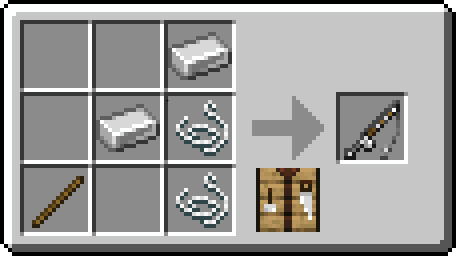
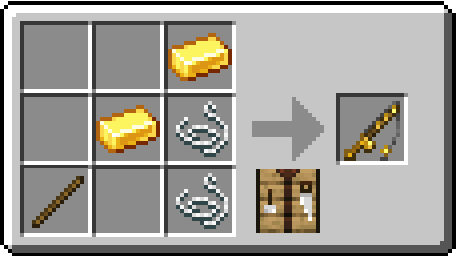
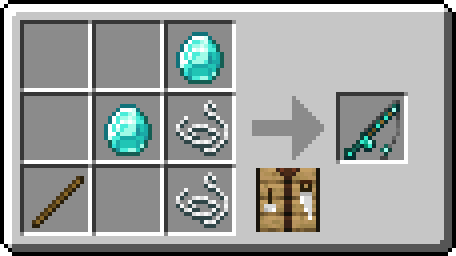


Screenshots



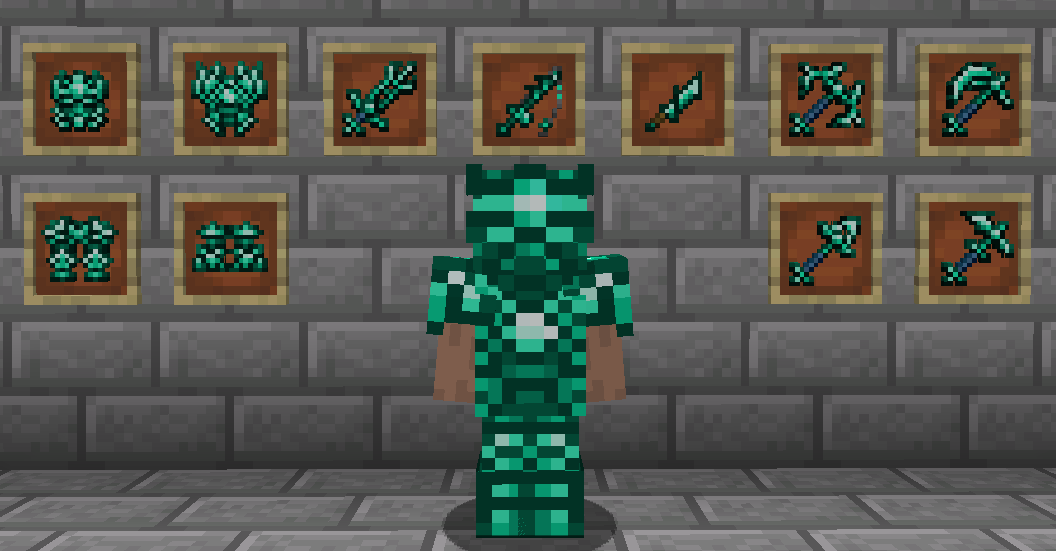
Media


Older versions
All older versions can be found on CurseForge
Rights of Use
You as the user may do the following with this mod without asking my permission.
-You may create videos or take screenshots and post them anywhere you please, I just ask that you note what the mod is and let people know where to get it.
-You may add it to a modpack as long as the modpack gives proper credit and links back to this page.
You as the user, may NOT do the following with the mod.
-You cannot redistribute or re-upload this mod without permission!
-You cannot decompile the code or reuse the artwork for other mods, special circumstances may be granted upon request!
Aquaculture 2 server crashes on startup – what to do?
Common causes: the loader or Minecraft version does not match the mod file, a dependency is missing, or RAM is too low. Check the log (latest.log) for “OutOfMemoryError”, “Mixin” or missing mods. At Mado, the AI crash analysis reads the log and suggests a cause. You can change the loader and version in the panel.
Which loader does Aquaculture 2 run on?
According to Modrinth, Aquaculture 2 supports Forge, NeoForge for Minecraft 26.3, 26.2, 26.1.2.
How much RAM does a server with Aquaculture 2 need?
As guidance, 3–4 GB for a server with this mod. This is an estimate, not a measured minimum. More mods, many players and long view distances need more. The spark profiler shows whether a mod is costing tick time.
Similar mods
Popular mods in the same category
 Server-ready

VeinMiner
by Miraculixx
Mine the whole vein on mining a single ore/block. Make the tedious mining experience to something satisfying and fun! FTB Ultimine alternative
 Client only

VeinMiner Hotkey
by Miraculixx
Veinminer Addon - Use a hotkey to veinmine with a dynamic crosshair & block highlighting
 Server-ready

Curios API
by TheIllusiveC4
A flexible and expandable accessory/equipment API for users and developers.
 Server-ready

[TaCZ] Timeless and Classics Zero
by craneblock6666
The most Immersive and Customizable modern FPS experience in Minecraft - A complete Remaster of the TaC gun mod by the original team.
Ready for your server with Aquaculture 2?
4 GB of RAM from €8.00 per month. 35% off your first month with MADO35.