Modrinth · Forge
Control Craft on your Minecraft server
Control Craft runs on Minecraft servers with Forge. Order your server, set the loader in the panel and install the mod with one click in the mod browser.
Break Newton's rule, Now your machines define gravity!
- Downloads
- 461.7K
- Author
- Rew1nd
- Loader
- Forge
- Minecraft
- 1.20.1
- Updated
- –
Screenshots
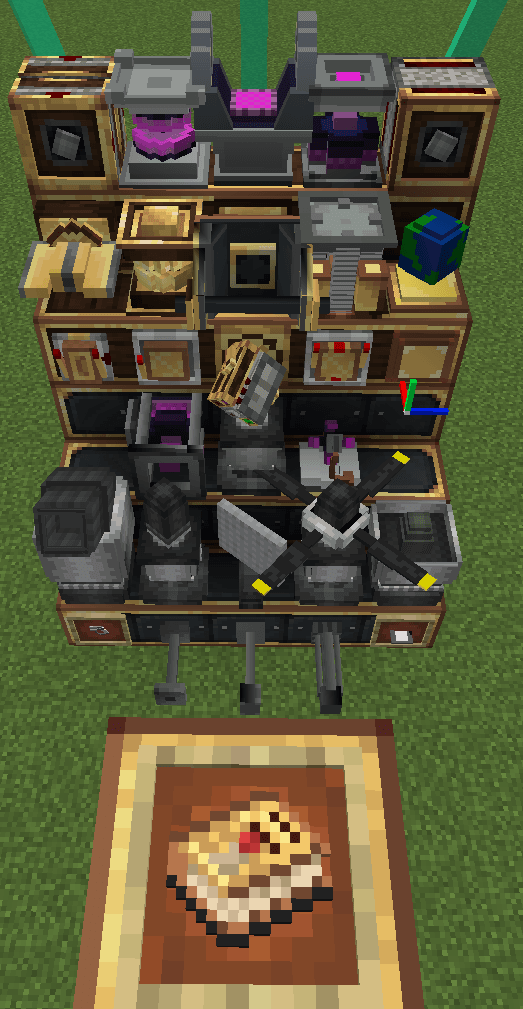
What Control Craft looks like


Images: Control Craft on Modrinth, published by the project team.
Setup
Install Control Craft on your server
The server and players need the same loader and Minecraft version. Back up the world before adding or updating mods.
- 01
Configure
4 GB of RAM is preselected. You choose the term and add-ons and pay by credit card or PayPal.
- 02
Set the loader
In the panel, set the server software to Forge and choose the matching Minecraft version, for example 1.20.1.
- 03
Install the mod
Search the mod browser for “Control Craft” and install the release for your loader. Alternatively, upload the .jar to the mods folder via SFTP. Required dependencies are listed on the project page.
- 04
Connect
Every player installs the same Control Craft release locally and connects using the server address from the panel.
- On the server
- Required
- On the client
- Required
- Loader
- Forge
- Minecraft
- 1.20.1
- License
- LicenseRef-All-Rights-Reserved
The panel
Install mods, find errors.
Real screenshots from the Mado panel. Both come with every Minecraft server.
Mod browser
Modrinth and CurseForge, right in the panel.
The browser filters by your Minecraft version. Install mods with one click, without uploading .jar files.

AI crash analysis
When a mod crashes, the analyzer reads the log.
Mods often fail on a wrong loader version, Java version or missing dependency. The analyzer names a likely cause and suggests a fix.

Releases
Published releases
Pick the file that matches your server’s loader and Minecraft version. The server and players need the same release.
Control Craft · ModrinthOriginal description by the project author

What is Control Craft
Precision Engineering for Valkyrien-Skies
Control Craft is a comprehensive expansion for Valkyrien-Skies, designed to transform your airships and mechanical creations with granular physics control and high-performance automation. By integrating modular controllers, adaptive power systems, and hybrid circuitry, Control Craft empowers engineers to build compact, responsive, and intricately orchestrated machines.
Contents:
- Multi-Functional Physics Controllers
- Dynamic/Kinematic Motors & Pistons: Fine-tune rotational/linear motion.
- Adjustable Power Sources
- Propellers & Vector Thrusters: Direct thrust with customizable torque, angle, and thrust directions.
- Flap Bearings/Compact Flap: Responsive flap controls
- Utilities
- Gravitational Anchor: Customize drag, gravity
- Spatial Anchor: Align physics structures with ease
- Camera: Link from thousands of blocks away, get vision from your ships
- Cimulink Circuitry
- Design circuits using familiar components—logic gates, comparators, analog adders, sensors, and even lua scripts! Then compress entire networks into reusable, block-sized modules, replacing big and janky redstone circuits.
Suggest playing with pathouli to view in-game guide!
Notice:
For feedback and issue reporting, please visit our QQ Channel or Discord Server. Make sure to include a description of the problem, along with supporting materials such as videos, crash reports, and detailed reproduction steps. If an issue could be identified through description alone, it would have been resolved already.
Feedback without supporting evidence means NOTHING.
Control Craft QQ Channel:

Guide:
Control Craft server crashes on startup – what to do?
Common causes: the loader or Minecraft version does not match the mod file, a dependency is missing, or RAM is too low. Check the log (latest.log) for “OutOfMemoryError”, “Mixin” or missing mods. At Mado, the AI crash analysis reads the log and suggests a cause. You can change the loader and version in the panel.
Which loader does Control Craft run on?
According to Modrinth, Control Craft supports Forge for Minecraft 1.20.1.
How much RAM does a server with Control Craft need?
As guidance, 3–4 GB for a server with this mod. This is an estimate, not a measured minimum. More mods, many players and long view distances need more. The spark profiler shows whether a mod is costing tick time.
Similar mods
Popular mods in the same category
 Server-ready

VeinMiner
by Miraculixx
Mine the whole vein on mining a single ore/block. Make the tedious mining experience to something satisfying and fun! FTB Ultimine alternative
 Server-ready

Geckolib
by Gecko
A 3D animation library for entities, blocks, items, armor, and more!
 Client only

VeinMiner Hotkey
by Miraculixx
Veinminer Addon - Use a hotkey to veinmine with a dynamic crosshair & block highlighting
 Server-ready

Fzzy Config
by fzzyhmstrs
Config API with automatic GUIs, powerful validation options, server-client sync, and more!
Ready for your server with Control Craft?
4 GB of RAM from €8.00 per month. 35% off your first month with MADO35.