
Modrinth · NeoForge
Create: Trial & Error on your Minecraft server
Create: Trial & Error runs on Minecraft servers with NeoForge. Order your server, set the loader in the panel and install the mod with one click in the mod browser.
Automate the Trial Chambers with unique and challenging production lines!
- Downloads
- 14.7K
- Author
- koltino
- Loader
- NeoForge
- Minecraft
- 1.21.1 – 1.21.7
- Updated
- –
Screenshots
What Create: Trial & Error looks like


Images: Create: Trial & Error on Modrinth, published by the project team.
Setup
Install Create: Trial & Error on your server
The server and players need the same loader and Minecraft version. Back up the world before adding or updating mods.
- 01
Configure
6 GB of RAM is preselected. You choose the term and add-ons and pay by credit card or PayPal.
- 02
Set the loader
In the panel, set the server software to NeoForge and choose the matching Minecraft version, for example 1.21.7.
- 03
Install the mod
Search the mod browser for “Create: Trial & Error” and install the release for your loader. Alternatively, upload the .jar to the mods folder via SFTP. Required dependencies are listed on the project page.
- 04
Connect
Every player installs the same Create: Trial & Error release locally and connects using the server address from the panel.
- On the server
- Required
- On the client
- Required
- Loader
- NeoForge
- Minecraft
- 1.21.7, 1.21.6, 1.21.5 +4 more
- License
- MIT License
The panel
Install mods, find errors.
Real screenshots from the Mado panel. Both come with every Minecraft server.
Mod browser
Modrinth and CurseForge, right in the panel.
The browser filters by your Minecraft version. Install mods with one click, without uploading .jar files.

AI crash analysis
When a mod crashes, the analyzer reads the log.
Mods often fail on a wrong loader version, Java version or missing dependency. The analyzer names a likely cause and suggests a fix.

Releases
Published releases
Pick the file that matches your server’s loader and Minecraft version. The server and players need the same release.
Create: Trial & Error · Modrinth- [NO REPALETTE] Create: Trial & Error 1.3.2December 21, 2025Minecraft 1.21.1 · NeoForge
- Create: Trial & Error 1.0.1July 3, 2025Minecraft 1.21.1, 1.21.2, 1.21.3, 1.21.4, 1.21.5, 1.21.6, 1.21.7 · NeoForge
Original description by the project author
This is Create: Trial & Error!
While Create has been updated to 1.21 for some time, there hasn't been much interaction between 1.21's new features and Create... until now! Create: Trial & Error allows for full automation of the Trial Chamber's Vaults through various features.
Key Casts: Both regular Trial and Ominous Keys can now be replicated by creating casts of them. While this process has a high chance of failure, once a cast is made, it can be used to make infinite keys using Tuff and Copper.
Deployers & Vaults: In base game, a Vault cannot be opened unless the player is within a certain distance. This has been changed so that Deployers can open Vaults without a player needing to be nearby, allowing for remote vault automation.
Blank Slate: Vaults can now be reattempted using the new Tabula Rasa item. Applying one to a Vault allows it to be reopened. They can be obtained through Ominous Vaults, as well as duplicated using Mechanical Crafters.
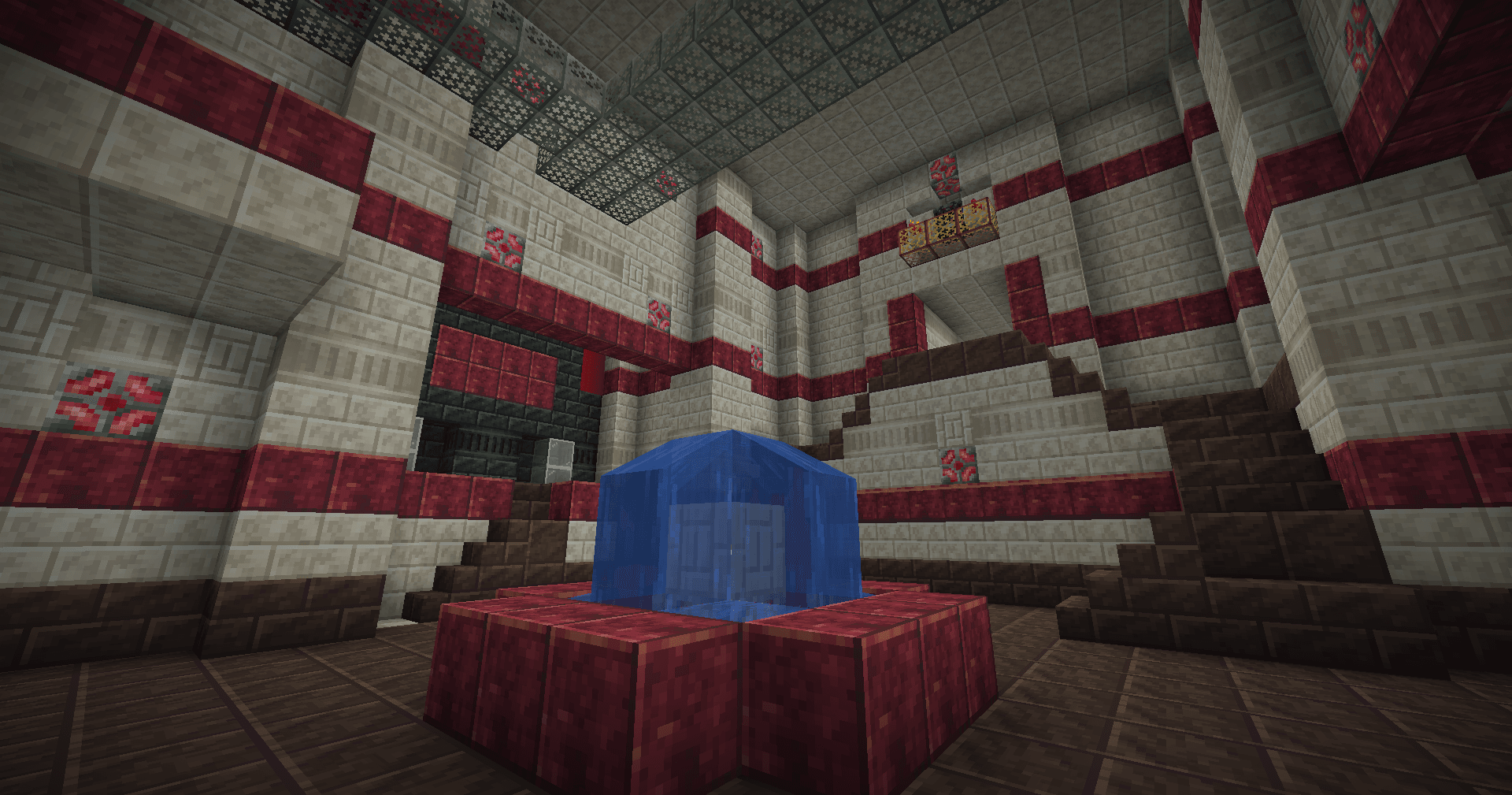
Trial Chambers Aesthetic Overhaul: The Trial Chambers have been palette swapped to feature decorative Create blocks. They also feature a new line of Andesite decorative blocks: Andesite Grates, Bulbs, and Trapdoors. Vaults now also contain Create items such as Zinc and Andesite Alloy with an added on loot pool.
Veridium & Tuff Automation: To facilitate the full automation of Trial Keys, recipes have been added for the automation of Tuff and Veridium, which can both be used to obtain renewable copper.
While the road to automating Trial Chambers is a long one, the end result is a (relatively balanced) infinite source of Diamonds, Heavy Cores, and even Enchanted Golden Apples.
Note that the Ominous Key requires Oxidized Copper. This mod does not provide a recipe for oxidizing copper for balancing purposes, you are meant to automate oxidization using Deployers and Drills. An alternative would be downloading Create: Oxidized, which adds oxidization recipes, here.
Create: Trial & Error server crashes on startup – what to do?
Common causes: the loader or Minecraft version does not match the mod file, a dependency is missing, or RAM is too low. Check the log (latest.log) for “OutOfMemoryError”, “Mixin” or missing mods. At Mado, the AI crash analysis reads the log and suggests a cause. You can change the loader and version in the panel.
Which loader does Create: Trial & Error run on?
According to Modrinth, Create: Trial & Error supports NeoForge for Minecraft 1.21.7, 1.21.6, 1.21.5.
How much RAM does a server with Create: Trial & Error need?
As guidance, 4–6 GB for a server with this mod. This is an estimate, not a measured minimum. More mods, many players and long view distances need more. The spark profiler shows whether a mod is costing tick time.
Similar mods
Popular mods in the same category
 Server-ready

VeinMiner
by Miraculixx
Mine the whole vein on mining a single ore/block. Make the tedious mining experience to something satisfying and fun! FTB Ultimine alternative
 Client only

Euphoria Patches
by SpacEagle17
Euphoria Patches is an add-on for Complementary Shaders, extending it with more optional features and settings.
 Server-ready

Create
by simibubi
Aesthetic Technology that empowers the Player
 Server-ready

Nature's Compass
by Chaosyr
Allows you to locate biomes anywhere in the world.
Ready for your server with Create: Trial & Error?
6 GB of RAM from €12.00 per month. 35% off your first month with MADO35.