
Modrinth · Fabric, NeoForge
Kibe on your Minecraft server
Kibe runs on Minecraft servers with Fabric or NeoForge. Order your server, set the loader in the panel and install the mod with one click in the mod browser.
A miscellaneous mod for Minecraft that adds a bunch of random, and mostly unoriginal things.
- Downloads
- 1.6M
- Author
- D4rkness_King
- Loader
- Fabric, NeoForge
- Minecraft
- 1.16.5 – 1.21.1
- Updated
- –
Setup
Install Kibe on your server
The server and players need the same loader and Minecraft version. Back up the world before adding or updating mods.
- 01
Configure
4 GB of RAM is preselected. You choose the term and add-ons and pay by credit card or PayPal.
- 02
Set the loader
In the panel, set the server software to Fabric or NeoForge and choose the matching Minecraft version, for example 1.21.1.
- 03
Install the mod
Search the mod browser for “Kibe” and install the release for your loader. Alternatively, upload the .jar to the mods folder via SFTP. Required dependencies are listed on the project page.
- 04
Connect
Every player installs the same Kibe release locally and connects using the server address from the panel.
- On the server
- Required
- On the client
- Required
- Loader
- Fabric, NeoForge
- Minecraft
- 1.21.1, 1.20.1, 1.19.4 +12 more
- License
- Mozilla Public License 2.0
The panel
Install mods, find errors.
Real screenshots from the Mado panel. Both come with every Minecraft server.
Mod browser
Modrinth and CurseForge, right in the panel.
The browser filters by your Minecraft version. Install mods with one click, without uploading .jar files.

AI crash analysis
When a mod crashes, the analyzer reads the log.
Mods often fail on a wrong loader version, Java version or missing dependency. The analyzer names a likely cause and suggests a fix.

Releases
Published releases
Pick the file that matches your server’s loader and Minecraft version. The server and players need the same release.
Kibe · Modrinth- Kibe 2.3.1October 20, 2025Minecraft 1.21.1 · NeoForge
- Kibe 2.3.1October 20, 2025Minecraft 1.21.1 · Fabric
Original description by the project author

A miscellaneous mod that adds a bunch of random, and mostly unoriginal things.



Entangled Chests & Entangled Tanks
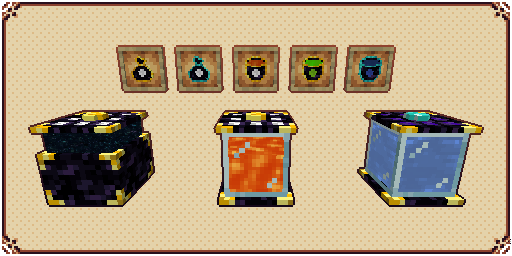
Entangled Chests are universally linked chests that work across dimensions and stores the same items as long as they are color-coded the same.
You can use an Entangled Bag to access the contents of your Entangled Chest directly in your inventory.
Entangled Tanks are exactly like Entangled Chests but they store fluids instead.
You can use an Entangled Bucket to access the contents of your Entangled Tank directly in your inventory.
Cursed Dirt
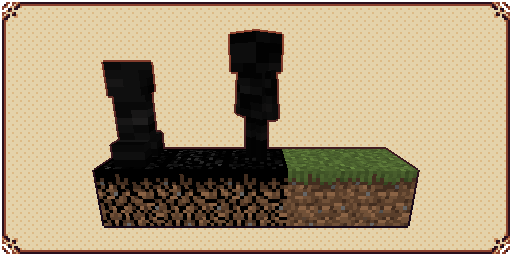
Cursed Dirt is a simple grass-like block that burns when exposed to sunlight, but when in dark environments, will have vastly improved spawn rate for monsters.
They are created by using Cursed Seeds in a regular grass or dirt block, and can only spread 16 blocks from the center.
Cursed Droplets will drop from Wither Skeletons and mobs spawned in Cursed Dirt.
Big Torch
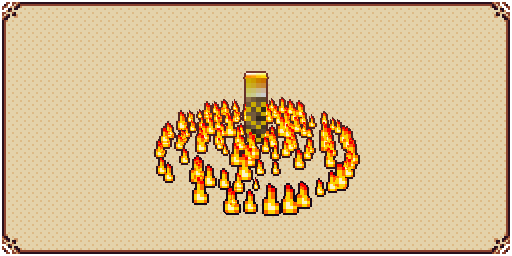
Big Torch is a block that cancels any mob spawning that requires no light in a configurable area. It's useful to protect your base and to clean caves and dungeons.
Elevators
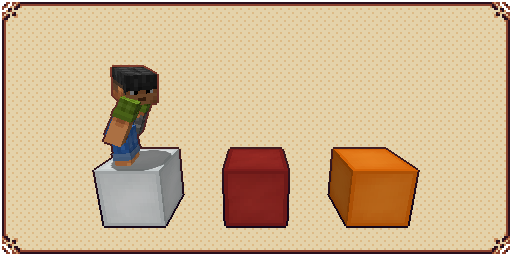
Elevators are simple blocks that, when stepped upon, can teleport the player upwards and downwards, as long as it finds another elevator directly above or below it.
Vacuum Hoppers
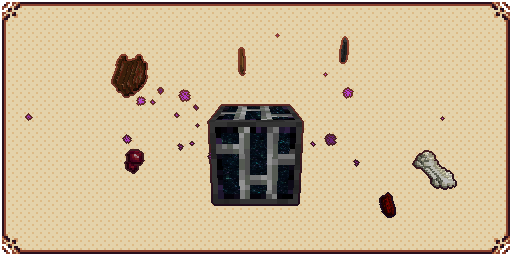
Vacuum Hoppers are blocks that can pull nearby dropped items and experience orbs to their own inventory.
Stored items can be accessed by opening the block's GUI or by using regular Hoppers.
Stored XP can be used to craft Bottle o' Enchanting or Liquid XP buckets
Tanks, Fluid Hoppers, XP Drains, and XP Showers
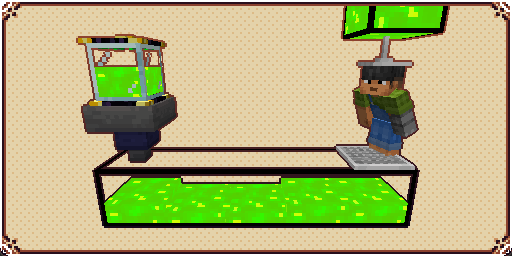
Tanks are blocks that can store fluids, each tank can store up to 16 buckets, and when placed side by side they will connect and fluids will flow through them.
Fluid Hoppers are blocks exactly like vanilla Hoppers but that moves fluids instead of items.
XP Drains are blocks that will drain XP from a player and store it in a fluid container placed directly below it.
XP Showers are blocks that can transform the liquid XP from tanks behind it into experience orbs that players can absorb.
Placers and Breakers
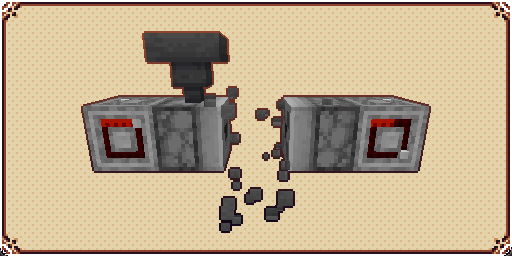
Placers are blocks that when activated by a redstone signal, will place any block in its inventory in front of it, if possible.
Breakers are blocks that when activated by a redstone signal, will break any block in front of it and store its drops in its inventory, if possible.
Witherproof Blocks and Wither Builders
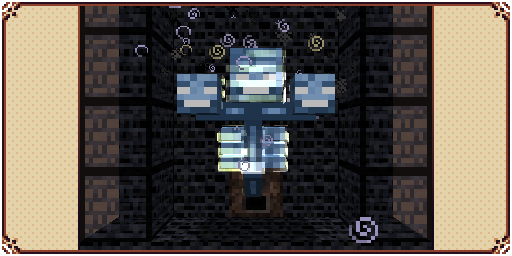
Witherproof Blocks are blocks that cannot be destroyed by the wither boss. They are useful for traps and automatic Wither farms.
Wither Builders are blocks that when activated by a redstone signal, will summon a wither if there's enough building material in its inventory and available space in front of it.
Slime Boots and Slime Sling
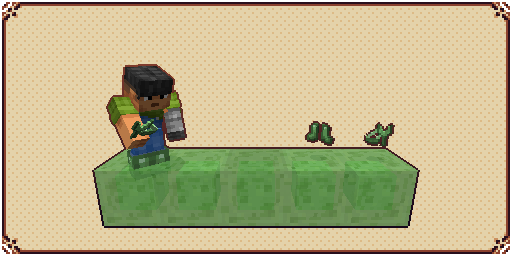
Slime Boots is a wearable item that negates fall damage and makes the player bounce when hitting the floor with considerable speed.
Slime Sling is a usable item that throws the player in the sky when charged while aiming at a block.
Using both together can be a good way of traveling through the world in the early game.
Gliders
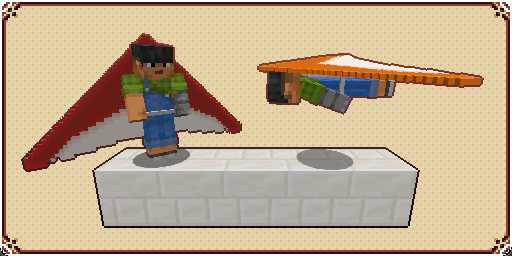
A Glider is an item that when active and being held by a player, will allow them to glide through the skies instead of falling normally.

Rings

There are 5 rings currently available:
Diamond Ring: Used for crafting other rings.
Angel Ring: Gives the wearer the ability to creative flight.
Magma Ring: Gives an infinite Fire Resistance status to the wearer
Water Ring: Gives an infinite Water Breathing status to the wearer
Light Ring: Can be used to place infinite low-profile light sources
Lassos

Lassos are magical items that can capture entities and later release them in another part of the world.
There are 3 lassos currently available:
Golden Lasso: Can only hold passive animals.
Cursed Lasso: Can hold aggressive entities but will add the curse effect to them upon release.
Diamond Lasso: Can hold almost any entity without debuffs
Kibes

A type of food that gives name to the mod. (Has cursed, golden, and diamond alternatives.)
Conveyor Belts

Entities standing above it will be moved.
Cursed Dirt can still spawn mobs when below it.
Spikes

Will damage mobs that step on it.
Mobs killed by Stone Spikes won't drop anything.
Mobs killed by Iron Spikes will drop their regular loot.
Mobs killed by Gold Spikes will drop only experience.
Mobs killed by Diamond Spikes will drop experience and player loot.
Trash Can and Portable Trash Can

Dispose of your items in a proper way!
Portable Crafting Table

Craft the world from your own inventory!
Magnet

When activated, attracts nearby dropped items to your player.
Sleeping Bag

Let you sleep anywhere without overwriting your bed spawn point.
Redstone Timer

Toggles itself on and off automatically and has 16 different speed levels.

For bug reporting please proceed to the mod's GitHub repository: https://github.com/lucaargolo/kibe

Kibe server crashes on startup – what to do?
Common causes: the loader or Minecraft version does not match the mod file, a dependency is missing, or RAM is too low. Check the log (latest.log) for “OutOfMemoryError”, “Mixin” or missing mods. At Mado, the AI crash analysis reads the log and suggests a cause. You can change the loader and version in the panel.
Which loader does Kibe run on?
According to Modrinth, Kibe supports Fabric, NeoForge for Minecraft 1.21.1, 1.20.1, 1.19.4.
How much RAM does a server with Kibe need?
As guidance, 3–4 GB for a server with this mod. This is an estimate, not a measured minimum. More mods, many players and long view distances need more. The spark profiler shows whether a mod is costing tick time.
Similar mods
Popular mods in the same category
 Server-ready

VeinMiner
by Miraculixx
Mine the whole vein on mining a single ore/block. Make the tedious mining experience to something satisfying and fun! FTB Ultimine alternative
 Client only

VeinMiner Hotkey
by Miraculixx
Veinminer Addon - Use a hotkey to veinmine with a dynamic crosshair & block highlighting
 Server-ready

Curios API
by TheIllusiveC4
A flexible and expandable accessory/equipment API for users and developers.
 Server-ready

[TaCZ] Timeless and Classics Zero
by craneblock6666
The most Immersive and Customizable modern FPS experience in Minecraft - A complete Remaster of the TaC gun mod by the original team.
Ready for your server with Kibe?
4 GB of RAM from €8.00 per month. 35% off your first month with MADO35.