
Modrinth · Fabric, NeoForge
Trinkets Updated on your Minecraft server
Trinkets Updated runs on Minecraft servers with Fabric or NeoForge. Order your server, set the loader in the panel and install the mod with one click in the mod browser.
A modern data driven accessory mod. Updated fork of trinkets for 1.21.11 and beyond.
- Downloads
- 421.2K
- Author
- Patbox
- Loader
- Fabric, NeoForge
- Minecraft
- 1.21.11 – 26.3
- Updated
- –
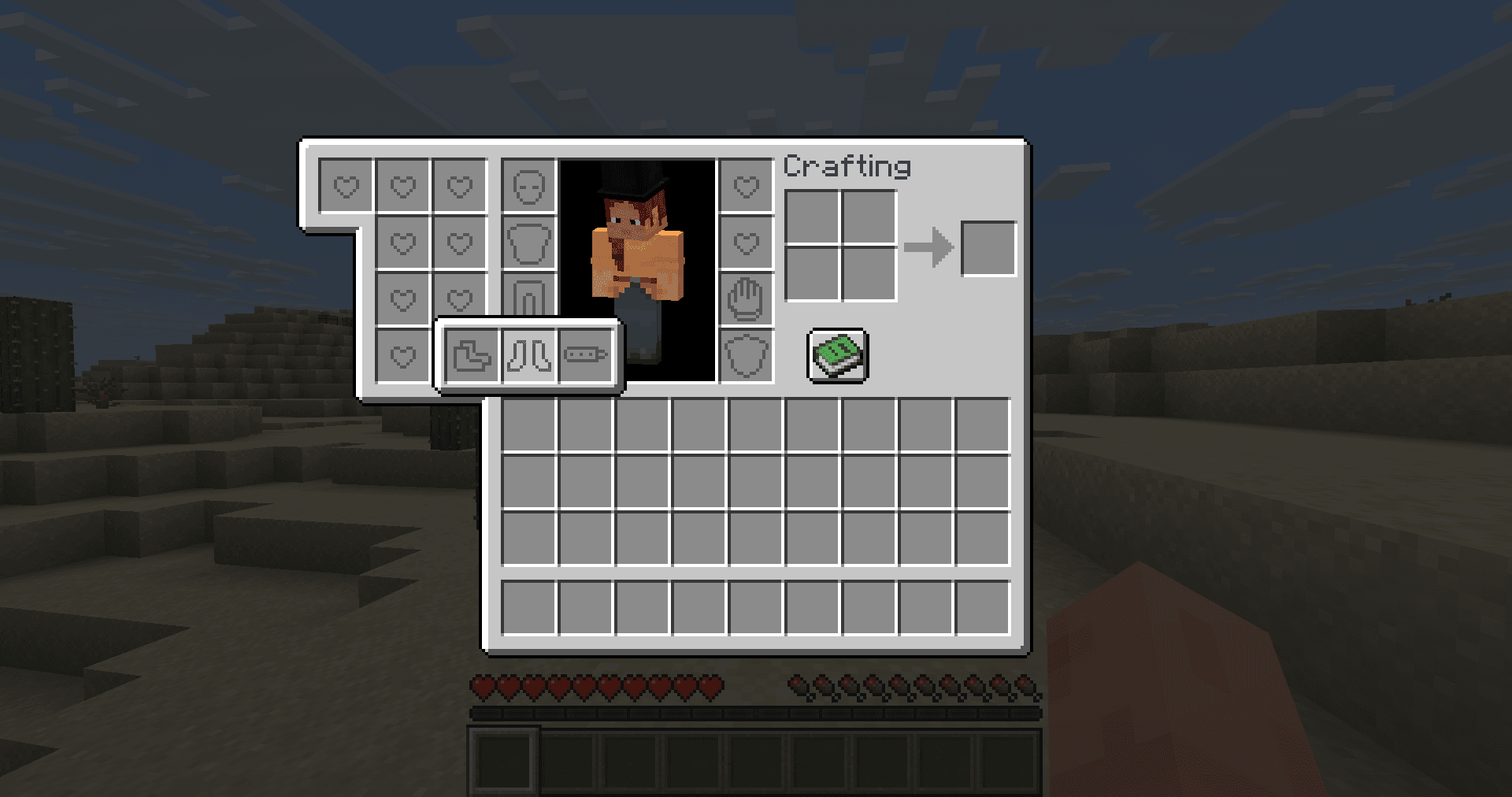
Screenshots
What Trinkets Updated looks like

Images: Trinkets Updated on Modrinth, published by the project team.
Setup
Install Trinkets Updated on your server
The server and players need the same loader and Minecraft version. Back up the world before adding or updating mods.
- 01
Configure
4 GB of RAM is preselected. You choose the term and add-ons and pay by credit card or PayPal.
- 02
Set the loader
In the panel, set the server software to Fabric or NeoForge and choose the matching Minecraft version, for example 26.3-rc-1.
- 03
Install the mod
Search the mod browser for “Trinkets Updated” and install the release for your loader. Alternatively, upload the .jar to the mods folder via SFTP. Required dependencies are listed on the project page.
- 04
Connect
Every player installs the same Trinkets Updated release locally and connects using the server address from the panel.
- On the server
- Required
- On the client
- Required
- Loader
- Fabric, NeoForge
- Minecraft
- 26.3-rc-1, 26.3, 26.2-rc-2 +5 more
- License
- MIT License
The panel
Install mods, find errors.
Real screenshots from the Mado panel. Both come with every Minecraft server.
Mod browser
Modrinth and CurseForge, right in the panel.
The browser filters by your Minecraft version. Install mods with one click, without uploading .jar files.

AI crash analysis
When a mod crashes, the analyzer reads the log.
Mods often fail on a wrong loader version, Java version or missing dependency. The analyzer names a likely cause and suggests a fix.

Releases
Published releases
Pick the file that matches your server’s loader and Minecraft version. The server and players need the same release.
Trinkets Updated · Modrinth- trinkets 4.1.1+26.2September 26, 2026Minecraft 26.2 · Fabric, NeoForge
- trinkets 4.0.1+26.1September 26, 2026Minecraft 26.1, 26.1.1, 26.1.2 · Fabric, NeoForge
- trinkets 4.2.1+26.3September 26, 2026Minecraft 26.3 · Fabric, NeoForge
Original description by the project author
Trinkets Updated
A data-driven accessory mod for Minecraft for Fabric and NeoForge modloaders, based on
Trinkets by Emi

About
Trinkets adds a slot group and slot system to Minecraft.
Slot groups are collections of slots for a certain body part or more vague area.
By default, there are 6 slot groups (head, chest, legs, feet, offhand, hand)
that can have slots added to them, but more groups can be added if desired.
Trinkets' UI is intuitive to use, accessible, and attempts to do away with clutter.
Its system means that you'll never have a slot that's not used for anything, as mods request the slots they want.
Features
Model Attachment API
Flexible and designed with compatibility in mind API allowing you to easily render custom trinkets
as attached to any body part of any entity based on vanilla model system. This includes compatibility with
mods and resource packs such as Entity Model Features and Fresh Animations.
Fully optional Cosmetic Slot support and trinket equipment hiding
Trinkets Updated adds optional support for cosmetic slots and trinket hiding directly into the mod.
While by default these features are disabled (as they could feel unfair in multiplayer setting),
players in singleplayer, server owners on servers and modpacks makers for all can easily enable it by
changing the config file, allowing them to set the desired experience just as they want to.
Configurable styling
While by default Trinkets Updated should look exactly like good old original Trinkets, it exposed multiple
styling options, from changing how the slots are positioned, whatever they are hidden or show extra
indicators such as slot being compatible with currently held item or show that slot contains more other slots within.
Additionally, you can toggle both slot and item tooltips, which can help you to keep the style you wanted.
S
Data Driven at it's core
Custom trinkets can be defined with json files via tags or custom components on the items. Additionally, you can easily
define the rendering of such trinkets purely with a resource pack.
Slots and slot groups are also data driven, making it easy to create and modify them, from their size to
mobs which support them.
Mods need to declare to use slots before they are accessible to the player, preventing creation of unused ones.
You can get some example official datapacks on Modrinth!
Vanilla component and feature support
Trinkets implement a basic support for vanilla features such as glider component, which allows you to enable items
using them to be easily turned into a trinket with a simple data pack and a resource pack. Additionally, things
such as enchantments should also work fully correctly, giving you bit of that needed flexibility.
Multiplatform without extra dependencies needed
Only dependency needed by Trinkets Updated is local mod loader apis (Fabric API on Fabric, nothing extra on NeoForge).
This allows to keep the library slim, easy to port and have minimal effects on other unrelated areas.
Trinkets API's themselves were also made to be used in the same way on both Fabric and NeoForge, eliminating requirement
of handling integration code separately on both platforms.
Download
You can get this mod from Modrinth,
CurseForge
or GitHub Releases
Developers
To add Trinkets to your project you need to add these repos to your repositories in your build.gradle
repositories {
	maven {
		name = "Nucleoid"
		url = 'https://maven.nucleoid.xyz/releases'
	}
}
And then to add Trinkets you add it as a dependency in your build.gradle
dependencies {
	implementation "eu.pb4:trinkets:${trinkets_version}"
}
Trinkets works as a universal jar, which means the same jar file can be used for Fabric, NeoForge and common.
For optional / conditional compatibility, you can check for trinkets_updated mod id on both platform.
For versions, see https://maven.nucleoid.xyz/#/releases/eu/pb4/trinkets
For basic tutorials and comprehensive documentation, visit this repository's wiki!
You can also see the test mod here: https://github.com/Patbox/trinkets/tree/main/src/testmod
Trinkets Updated server crashes on startup – what to do?
Common causes: the loader or Minecraft version does not match the mod file, a dependency is missing, or RAM is too low. Check the log (latest.log) for “OutOfMemoryError”, “Mixin” or missing mods. At Mado, the AI crash analysis reads the log and suggests a cause. You can change the loader and version in the panel.
Which loader does Trinkets Updated run on?
According to Modrinth, Trinkets Updated supports Fabric, NeoForge for Minecraft 26.3-rc-1, 26.3, 26.2-rc-2.
How much RAM does a server with Trinkets Updated need?
As guidance, 3–4 GB for a server with this mod. This is an estimate, not a measured minimum. More mods, many players and long view distances need more. The spark profiler shows whether a mod is costing tick time.
Similar mods
Popular mods in the same category
 Server-ready

VeinMiner
by Miraculixx
Mine the whole vein on mining a single ore/block. Make the tedious mining experience to something satisfying and fun! FTB Ultimine alternative
 Client only

VeinMiner Hotkey
by Miraculixx
Veinminer Addon - Use a hotkey to veinmine with a dynamic crosshair & block highlighting
 Server-ready

Curios API
by TheIllusiveC4
A flexible and expandable accessory/equipment API for users and developers.
 Server-ready

[TaCZ] Timeless and Classics Zero
by craneblock6666
The most Immersive and Customizable modern FPS experience in Minecraft - A complete Remaster of the TaC gun mod by the original team.
Ready for your server with Trinkets Updated?
4 GB of RAM from €8.00 per month. 35% off your first month with MADO35.