
Modrinth · Fabric
Awerial's Pack Editor on your Minecraft server
Awerial's Pack Editor runs on Minecraft servers with Fabric. Order your server, set the loader in the panel and install the mod with one click in the mod browser.
An all-in-one Minecraft customization editor. Mix resource pack textures, draw your own designs, customize PvP visuals, recolour your GUI, equip 3D cosmetics and create your own style!
- Downloads
- 6.5K
- Author
- AwerialYT
- Loader
- Fabric
- Minecraft
- 1.21 – 26.3
- Updated
- –
Screenshots
What Awerial's Pack Editor looks like


Images: Awerial's Pack Editor on Modrinth, published by the project team.
Setup
Install Awerial's Pack Editor on your server
The server and players need the same loader and Minecraft version. Back up the world before adding or updating mods.
- 01
Configure
4 GB of RAM is preselected. You choose the term and add-ons and pay by credit card or PayPal.
- 02
Set the loader
In the panel, set the server software to Fabric and choose the matching Minecraft version, for example 26.3.
- 03
Install the mod
Search the mod browser for “Awerial's Pack Editor” and install the release for your loader. Alternatively, upload the .jar to the mods folder via SFTP. Required dependencies are listed on the project page.
- 04
Connect
Awerial's Pack Editor is optional on the client. Players connect using the server address from the panel.
- On the server
- Optional
- On the client
- Optional
- Loader
- Fabric
- Minecraft
- 26.3, 26.2, 1.21.9 +11 more
- License
- MIT License
The panel
Install mods, find errors.
Real screenshots from the Mado panel. Both come with every Minecraft server.
Mod browser
Modrinth and CurseForge, right in the panel.
The browser filters by your Minecraft version. Install mods with one click, without uploading .jar files.

AI crash analysis
When a mod crashes, the analyzer reads the log.
Mods often fail on a wrong loader version, Java version or missing dependency. The analyzer names a likely cause and suggests a fix.

Releases
Published releases
Pick the file that matches your server’s loader and Minecraft version. The server and players need the same release.
Awerial's Pack Editor · Modrinth- Awerial's Pack Editor 1.45.7November 14, 2026Minecraft 26.3 · Fabric
- Awerial's Pack Editor 1.45.0November 1, 2026Minecraft 26.2 · Fabric
- Awerial's Pack Editor 1.45.0November 1, 2026Minecraft 1.21.11 · Fabric
- Awerial's Pack Editor 1.45.0November 1, 2026Minecraft 1.21.10, 1.21.9 · Fabric
- Awerial's Pack Editor 1.45.0November 1, 2026Minecraft 1.21.6, 1.21.7, 1.21.8 · Fabric
Original description by the project author


✦ Awerial's Pack Editor (APE)
Your Minecraft. Your style. Your creation.
Take complete control of your Minecraft visuals with Awerial's Pack Editor.
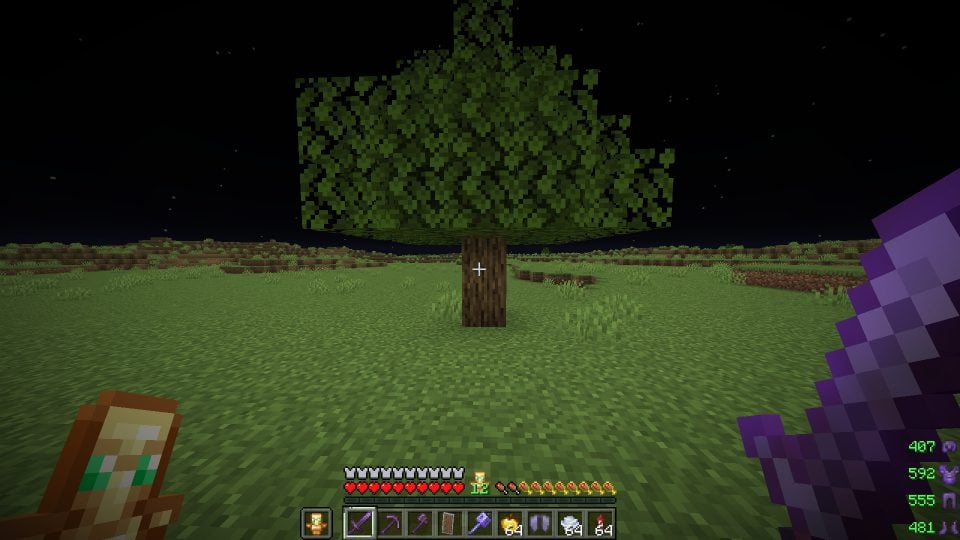
Mix textures from your favourite resource packs, create your own pixel-art designs, customize PvP visuals, recolour your inventory, equip 3D cosmetics, and transform the way Minecraft looks — all from one in-game editor.
Press O in-game to open APE.


Awerial's Pack Editor is an all-in-one Minecraft customization mod designed to give you complete creative freedom.
Instead of manually editing resource packs, APE lets you customize individual textures, combine different packs, draw your own designs, change colours, create presets and personalize your Minecraft experience.
Whether you're building the perfect PvP setup or creating an entirely unique visual style, APE gives you the tools to make Minecraft yours.

🎨 Complete Texture Customization
Choose the appearance of individual Minecraft items and blocks.
End Crystals
Respawn Anchors
Totems
Ender Pearls
Golden Apples
Shields
Weapons and Tools
Armour
Fire
Obsidian and Glowstone
Cobwebs
Crosshairs
And much more!
Mix textures from different resource packs without manually editing files.
✏️ Create Your Own Textures
Your creativity, without limits.
Use the built-in drawing editor to create custom textures pixel by pixel.
Draw directly inside the game
Customize individual texture faces
Create your own crystals and anchors
Choose custom colours
Save your creations
Create animated drawings with up to four frames
Your creations can appear directly in your Minecraft world.
🌈 Advanced Colour Customization
Give your entire game a consistent visual identity.
Choose from 12 built-in colour styles:
Crimson · Frost · Toxic · Royal · Gilded · Sakura · Ocean · Midnight · Neon · Pastel · Monochrome · Inverted
You can also use the custom colour picker to create your own combinations.
Customize inventory interfaces, shields, effects, skies, particles and more.
⚔️ PvP Customization
Customize your visuals to suit your playstyle.
Smaller shields
Smaller Golden Apples
Smaller Ender Pearls
Low fire
Custom shield colours
Disabled shield colours
Custom totem sizes
Crystal customization
Custom crosshair sizes
Explosion particle controls
Custom hitbox colours
Damage and totem effects
Armour customization
📦 Import Your Own Resource Packs
Already have a favourite resource pack?
Import your own resource packs in ZIP or folder format.
APE automatically organizes their textures into the appropriate editor categories and generates previews, making it easy to combine textures from multiple packs.
You can create your own unique combination without manually searching through resource pack files.
🎭 Cosmetics
Customize your character with a growing collection of cosmetics.
Capes
Real 3D hats
Crowns
Halos
Top hats
Witch hats
Cat ears
Devil horns
Auras
Trails
Choose one cosmetic from each category and combine them to create your own look.
New cosmetics can be added without requiring a mod update.
🖥️ Inventory & GUI Customization
Completely change the appearance of your Minecraft interface.
Custom inventory colours
Two-colour gradients
Top-to-bottom gradients
Left-to-right gradients
Diagonal gradients
Custom chest interfaces
Button colours
Hotbar customization
Preview your changes before applying them.
🌌 Effects & Visual Enhancements
Add personality to your Minecraft experience.
Animated title screen
Aurora and night sky
Custom hitbox colours
Crystal glow outlines
Totem pop counter
Damage tint
Armour tint
Kill effects
Mace smash rings
Lunge indicators
Custom hand appearance
Armour durability warnings
Coloured hit and totem particles
Most visual effects can be individually customized.
🗂️ Presets & Configuration Codes
Save your favourite setups and switch between them instantly.
One-click presets
Custom configurations
Import and export configuration codes
Share setups with friends
Configuration gallery
Saved drawings
Animated textures
Share your entire visual setup using a simple APE configuration code.
🎨 Screenshot Colour Extraction
Found a colour scheme you love?
Drag a screenshot from another resource pack into the editor.
APE can extract its colours and apply them to your selected texture while preserving its shading and animation.
📸 Screenshots & Showcase
Explore some of the customization possibilities available in APE.
PvP Customization

Create Your Own Textures

Inventory Gradients

Screenshot Colour Extraction

Cosmetics

3D Hats

Configuration Sharing


Important: Make sure the downloaded mod, Fabric Loader and Fabric API match your Minecraft version.
For Minecraft 26.x, Fabric Loader 0.20.0 or newer is required.

**Minecraft: Java Edition**

APE supports the following versions according to the current release information:

- 26.3
- 26.2
- 26.1 – 26.1.2
- 1.21.11
- 1.21.9 – 1.21.10
- 1.21.6 – 1.21.8
- 1.21.5
- 1.21.4
- 1.21.2 – 1.21.3
- 1.21 – 1.21.1

**Mod Loader:** Fabric

Check the download page for the correct file for your Minecraft version.

How do I open APE?
Press O in-game to open the editor.
Do I need a resource pack?
No. APE includes its own customization tools. You can also import your own resource packs.
Can I create my own textures?
Yes! The built-in drawing editor lets you create custom textures pixel by pixel.
Can I combine multiple resource packs?
Yes. Import your packs and choose individual textures from each one.
Can I share my configurations?
Yes. Save your setup and share it using an APE configuration code.
Can I customize my inventory?
Yes. APE supports custom inventory colours and two-colour gradients.
Are cosmetics included?
Yes. APE includes capes, 3D hats, auras and trails.
Does APE support different Minecraft versions?
Yes. Multiple Minecraft versions are supported. Always download the correct version for your installation.
Does APE update automatically?
APE checks for updates when Minecraft launches and can install updates when you close the game.
Created by Awerial.
Thank you to everyone who uses APE, shares their creations, reports bugs and supports the project.
License: All Rights Reserved (ARR).
Please do not redistribute or mirror the original mod JAR files without permission.
Awerial's Pack Editor is a fan-made Minecraft modification and is not affiliated with, endorsed by, or associated with Mojang or Microsoft.
Thanks to the awesome translators and contributors on GitHub! 
<sub>AWERIAL'S PACK EDITOR — YOUR GAME. YOUR STYLE. YOUR CREATION. 💜</sub>
Awerial's Pack Editor server crashes on startup – what to do?
Common causes: the loader or Minecraft version does not match the mod file, a dependency is missing, or RAM is too low. Check the log (latest.log) for “OutOfMemoryError”, “Mixin” or missing mods. At Mado, the AI crash analysis reads the log and suggests a cause. You can change the loader and version in the panel.
Which loader does Awerial's Pack Editor run on?
According to Modrinth, Awerial's Pack Editor supports Fabric for Minecraft 26.3, 26.2, 1.21.9.
How much RAM does a server with Awerial's Pack Editor need?
As guidance, 3–4 GB for a server with this mod. This is an estimate, not a measured minimum. More mods, many players and long view distances need more. The spark profiler shows whether a mod is costing tick time.
Similar mods
Popular mods in the same category
 Server-ready

VeinMiner
by Miraculixx
Mine the whole vein on mining a single ore/block. Make the tedious mining experience to something satisfying and fun! FTB Ultimine alternative
 Client only

VeinMiner Hotkey
by Miraculixx
Veinminer Addon - Use a hotkey to veinmine with a dynamic crosshair & block highlighting
 Server-ready

Curios API
by TheIllusiveC4
A flexible and expandable accessory/equipment API for users and developers.
 Server-ready

[TaCZ] Timeless and Classics Zero
by craneblock6666
The most Immersive and Customizable modern FPS experience in Minecraft - A complete Remaster of the TaC gun mod by the original team.
Ready for your server with Awerial's Pack Editor?
4 GB of RAM from €8.00 per month. 35% off your first month with MADO35.