
Modrinth · Fabric, NeoForge
Cobblebase on your Minecraft server
Cobblebase runs on Minecraft servers with Fabric or NeoForge. Order your server, set the loader in the panel and install the mod with one click in the mod browser.
Palworld-style Pokemon base management for Cobblemon. Job system with unique per-Pokemon skills, abilities, and base mechanics.
- Downloads
- 101.1K
- Author
- notlown
- Loader
- Fabric, NeoForge
- Minecraft
- 1.21.1 – 26.1.2
- Updated
- –
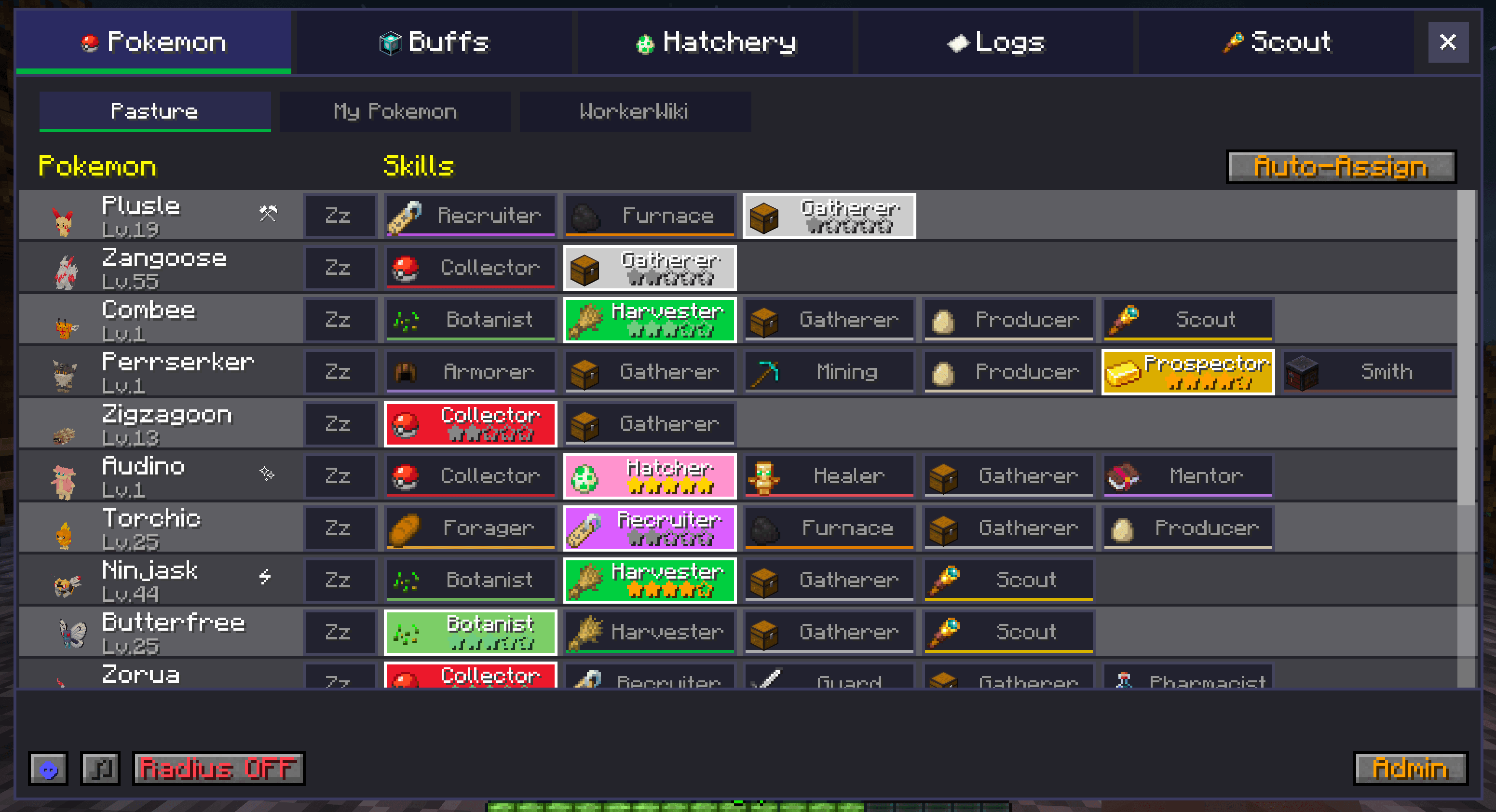
Screenshots
What Cobblebase looks like


Images: Cobblebase on Modrinth, published by the project team.
Setup
Install Cobblebase on your server
The server and players need the same loader and Minecraft version. Back up the world before adding or updating mods.
- 01
Configure
4 GB of RAM is preselected. You choose the term and add-ons and pay by credit card or PayPal.
- 02
Set the loader
In the panel, set the server software to Fabric or NeoForge and choose the matching Minecraft version, for example 26.1.2.
- 03
Install the mod
Search the mod browser for “Cobblebase” and install the release for your loader. Alternatively, upload the .jar to the mods folder via SFTP. Required dependencies are listed on the project page.
- 04
Connect
Every player installs the same Cobblebase release locally and connects using the server address from the panel.
- On the server
- Required
- On the client
- Required
- Loader
- Fabric, NeoForge
- Minecraft
- 26.1.2, 26.1.1, 26.1 +11 more
- License
- Mozilla Public License 2.0
The panel
Install mods, find errors.
Real screenshots from the Mado panel. Both come with every Minecraft server.
Mod browser
Modrinth and CurseForge, right in the panel.
The browser filters by your Minecraft version. Install mods with one click, without uploading .jar files.

AI crash analysis
When a mod crashes, the analyzer reads the log.
Mods often fail on a wrong loader version, Java version or missing dependency. The analyzer names a likely cause and suggests a fix.

Releases
Published releases
Pick the file that matches your server’s loader and Minecraft version. The server and players need the same release.
Cobblebase · Modrinth- Cobblebase 2.0.1+1.8.0October 3, 2026Minecraft 1.21.1, 1.21.10, 1.21.11, 1.21.2, 1.21.3, 1.21.4, 1.21.5, 1.21.6, 1.21.7, 1.21.8, 1.21.9 · Fabric
- Cobblebase 2.0.1+1.8.0October 3, 2026Minecraft 1.21.1 · NeoForge
- Cobblebase 1.5.4+1.7.0April 15, 2026Minecraft 1.21.1, 1.21.10, 1.21.11, 1.21.2, 1.21.3, 1.21.4, 1.21.5, 1.21.6, 1.21.7, 1.21.8, 1.21.9, 26.1, 26.1.1, 26.1.2 · NeoForge
Original description by the project author
Cobblebase
Palworld-style base management for Cobblemon — assign jobs, watch Pokemon work, build the ultimate base.
✨ Overview
Cobblebase transforms the Pasture Block into a living, breathing Pokemon base. Every Pokemon species has hand-crafted job skills and proficiency levels — not based on type, but on identity. A Charizard fills lava cauldrons and guards your base. An Alakazam mentors your entire team. A Mew recruits legendaries.
- 💎 1,367 Pokemon with unique skill assignments (996 hand-crafted + 371 Fakemon)
- ⚡ 43 jobs across 10 categories
- ⭐ Proficiency 1-5 per skill — faster cooldowns, better loot, wider range
- 🎮 Tabbed GUI — Skills, Buffs, Logs, and Discovery panels
- 🔧 Admin GUI — Edit species skills, jobs config, and loot tables live in-game (
/cobblebase admin) - 🍱 Loot Editor — change item drops for any job without writing a datapack, with autocomplete and
#tagbulk-add - 🔒 Multiplayer ready — Pasture lock, owner-only notifications
- 🛡️ Fully customizable via Cloth Config and JSON datapacks


🌐 Online Tools
- 📚 Full Documentation — Guides for every feature
- 📊 Species Database — Browse & edit all 1,367 Pokemon
- 🔧 Datapack Generator — Create custom skill datapacks
🌾 Jobs
| Category | Jobs |
|---|---|
| 🌾 Gathering | Harvester, Fishing, Mining, Producer |
| 🔍 Finding | Alchemist, Pharmacist, Architect, Excavator, Botanist, Collector, Scholar, Chef, Trainer, Armorer, Prospector, Smith |
| ⚔️ Combat | Guard |
| 💚 Support | Healer, Mentor |
| ✨ Buffs | Speed, Strength, Resistance, Night Vision, Water Breathing, Jump, Haste, Saturation, Aura Boost |
| 🌟 Legendary | Lucky Charm (shiny boost), Growth Aura, Extinguisher |
| 📦 Logistics | Item Gatherer |
| 🔭 Exploration | Scout |
| 🌿 Environmental | Irrigator, Lava/Water/Snow Fill, Furnace Fuel, Brew Fuel |
| 🤝 Recruiting | Friend Recruiter, Legendary Recruiter |
🛠️ In-Game Admin GUI
Open with /cobblebase admin. OP-only.
- Species tab — edit any species' skill set, search the full registry, sort by Pokedex number / A-Z / Z-A, filtered to mons your server actually has loaded
- Jobs tab — per-job cooldown, search radius, and enable/disable. Compact category sidebar with hover tooltips for every job
- Loot tab — edit any bundled loot table live. Per-job sidebar with rarity tabs (Common / Uncommon / Rare / Ultra Rare), item icon preview, autocomplete suggestions for item ids and item tags, bulk add via
#namespace:tag(e.g.#c:ores,#minecraft:logs), on/off toggle for default items, save / reset - Wiki tab — quick links to docs, the species database, the datapack generator, and the Discord
All edits persist in the world save and broadcast live to other players — no restart needed.
🎵 Immersion
- 🚶 Idle wandering (15 block radius)
- 🌙 Working mons sleep at night and wake up at sunrise to resume their job
- 🔇 Mute button + cry cooldown (60s per Pokemon)
- 🔄 Stuck detection + escape from solid blocks (clipping recovery)
- 🍃 Leaves escape — Pokemon drop to ground from tree canopies
🎨 Supported Fakemon Packs
Built-in skill assignments for 6 Fakemon packs (371 species):
- 🐾 Lively Mons (59)
- 🔥 Alatias AFP (87)
- ⚡ Laser's Pack (53)
- 🎭 Wilbayan's Fakemons (37)
- 👶 Baby Legends (22) — baby forms of legendaries, inherit their evolution target's skills with prof -1
- 👽 Extra Paradox Mons (27) — paradox alternates with ultra-rare-tier curated skills
Not using one of these? Use /cobblebase admin to assign skills manually — or build a datapack with the generator.
📥 Requirements
- Minecraft 1.21.1 · Cobblemon 1.7.0+ · Cloth Config (required)
- Fabric Language Kotlin (Fabric) or Kotlin for Forge 5.x (NeoForge)
Cobblebase server crashes on startup – what to do?
Common causes: the loader or Minecraft version does not match the mod file, a dependency is missing, or RAM is too low. Check the log (latest.log) for “OutOfMemoryError”, “Mixin” or missing mods. At Mado, the AI crash analysis reads the log and suggests a cause. You can change the loader and version in the panel.
Which loader does Cobblebase run on?
According to Modrinth, Cobblebase supports Fabric, NeoForge for Minecraft 26.1.2, 26.1.1, 26.1.
How much RAM does a server with Cobblebase need?
As guidance, 3–4 GB for a server with this mod. This is an estimate, not a measured minimum. More mods, many players and long view distances need more. The spark profiler shows whether a mod is costing tick time.
Similar mods
Popular mods in the same category
 Server-ready

VeinMiner
by Miraculixx
Mine the whole vein on mining a single ore/block. Make the tedious mining experience to something satisfying and fun! FTB Ultimine alternative
 Client only

VeinMiner Hotkey
by Miraculixx
Veinminer Addon - Use a hotkey to veinmine with a dynamic crosshair & block highlighting
 Server-ready

Curios API
by TheIllusiveC4
A flexible and expandable accessory/equipment API for users and developers.
 Server-ready

[TaCZ] Timeless and Classics Zero
by craneblock6666
The most Immersive and Customizable modern FPS experience in Minecraft - A complete Remaster of the TaC gun mod by the original team.
Ready for your server with Cobblebase?
4 GB of RAM from €8.00 per month. 35% off your first month with MADO35.