
Construction Wand (Fabric)
Unofficial Fabric Port of Construction Wand.
Screenshots
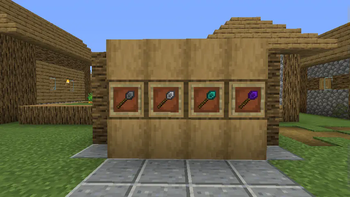
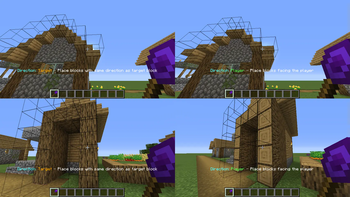
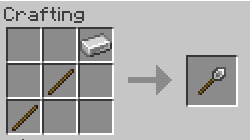
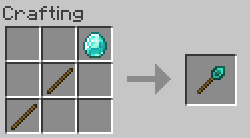
About this Mod


Overview
This is an unofficial port of ConstructionWand for the Fabric Mod Loader.
No balance changes have been made, and no new items have been added.
For a full content description refer to the original mod page.
Please report any issues you encounter using the link in the sidebar!
Usage
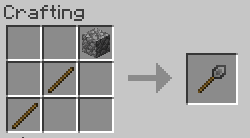
Craft a wand and any desired cores. Apply cores by combining in a crafting grid.
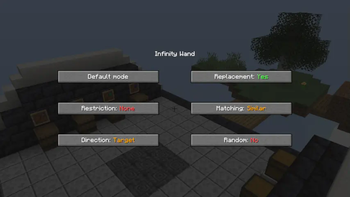
Open the menu with the menu key (V by default) or with Sneak + <OPTION_KEY> while right-clicking air.
To undo, hold Sneak + <OPTION_KEY> while right-clicking any solid block. You will get a preview before.
By default, <OPTION_KEY> is the left control key. This can be changed in the Minecraft settings starting with version 1.1.2! It is also worth noting that this key should not interfere with other keys, such as sprinting, despite it being highlighted in red, though I have observed that this could still happen in combination with certain other mods. In that case simply rebind it.
For older versions you will have to open the config file constructionwand-client.toml and change the keycode manually.
License
Credits go to Theta-Dev for creating the original mod.
This project makes use of the following third-party libraries:
- forge-config-api-port (MPLv2 License), to keep config compatibility between both loaders (for now)
- Botania (Custom License), for its API
- REI (MIT License), for its API
Just like the original release, this mod is licensed under the MIT license!
Available Versions
How to Install Construction Wand (Fabric) on Your Server
Order Server
Order a Minecraft Java server with at least 3 GB RAM (4 GB recommended).
Set fabric Loader
In the panel under "Egg", select the fabric loader and matching Minecraft version (26.3).
Install Mod
Open the mod browser in the dashboard and search for "Construction Wand (Fabric)". Click "Install" – done! Alternatively, upload the .jar via SFTP to the /mods folder.
Compatibility
Mod Loaders
Minecraft Versions
26.3, 26.2, 26.1.2 (+20 more)
Server-side
✓ RequiredRecommended RAM
4 GB(min. 3 GB)Frequently Asked Questions
Construction Wand (Fabric) server crashes on startup – what to do?
Most common cause: wrong fabric version or insufficient RAM. Check the server log (latest.log) for "OutOfMemoryError" or "Mixin" errors. With Mado Hosting: ensure at least 3 GB RAM is allocated and the loader matches the mod version (26.3). You can switch loaders with one click in the panel.
Is Construction Wand (Fabric) compatible with fabric?
Construction Wand (Fabric) officially supports fabric for Minecraft 26.3, 26.2, 26.1.2. The Mado dashboard automatically detects incompatible loader combinations.
Server lagging with Construction Wand (Fabric) – how to optimize performance?
Recommended RAM: 4 GB (per 8 players). Use /spark profiler to check if Construction Wand (Fabric) consumes the most tick time. Common fixes: reduce server view-distance to 8-10, install "performant" or "starlight" as supplementary mods on Forge. With Mado Hosting, your server runs on NVMe SSDs with dedicated CPU cores for minimal latency.
Similar Mods



![[TaCZ] Timeless and Classics Zero](https://cdn.modrinth.com/data/SzzJttH8/fd27766d2bb8390d284696b1dbd358f87e081439_96.webp)


Rent Modded Server
Install Construction Wand (Fabric) with just one click on your server.