
Disenchanter
A flexible Disenchanter because loot shouldn't go to waste
About this Mod

The Disenchanter is a deceptively simple device for recovering enchantments from items. Use it by itself, and the first enchantment will be returned and the item destroyed. Use one of the Catalysts however and you will get a different set of enchantments back. Some of them will even preserve the item in the process!
To use the Disenchanter, craft one, place it down and right-click to open its interface. In the leftmost slot you can put the item you want to be disenchanted. The rightmost slot takes books onto which the enchantments are transferred. The center slot is for the Catalysts, which are outlined in the following section. As mentioned above, you can also the Disenchanter without having anything in that slot.
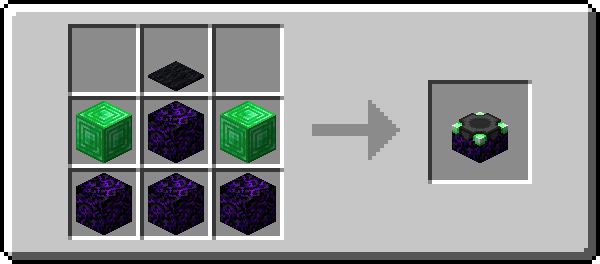

- Amethyst Shard: Recovers the first enchantment and preserves the item
- Diamond: Recovers two random enchantments and the first one
- Emerald: Recovers two random enchantments
- Ender Pearl: Recovers one random enchantment. Here, the item is also preserved but will take 500 durability damage
- Experience Bottle: Recovers all enchantments that are at the same level as the highest one present
- Heart Of The Sea: Recovers all enchantments but reduces them by one level
- Nether Star: Recovers all enchantments and preserves the item
Available Versions
How to Install Disenchanter on Your Server
Order Server
Order a Minecraft Java server with at least 3 GB RAM (4 GB recommended).
Set fabric Loader
In the panel under "Egg", select the fabric loader and matching Minecraft version (1.21.10).
Install Mod
Open the mod browser in the dashboard and search for "Disenchanter". Click "Install" – done! Alternatively, upload the .jar via SFTP to the /mods folder.
Compatibility
Mod Loaders
Minecraft Versions
1.21.10, 1.21.9, 1.21.3 (+18 more)
Server-side
✓ RequiredRecommended RAM
4 GB(min. 3 GB)Frequently Asked Questions
Disenchanter server crashes on startup – what to do?
Most common cause: wrong fabric version or insufficient RAM. Check the server log (latest.log) for "OutOfMemoryError" or "Mixin" errors. With Mado Hosting: ensure at least 3 GB RAM is allocated and the loader matches the mod version (1.21.10). You can switch loaders with one click in the panel.
Is Disenchanter compatible with fabric and quilt?
Disenchanter officially supports fabric, quilt for Minecraft 1.21.10, 1.21.9, 1.21.3. The Mado dashboard automatically detects incompatible loader combinations.
Server lagging with Disenchanter – how to optimize performance?
Recommended RAM: 4 GB (per 8 players). Use /spark profiler to check if Disenchanter consumes the most tick time. Common fixes: reduce server view-distance to 8-10, install "performant" or "starlight" as supplementary mods on Forge. With Mado Hosting, your server runs on NVMe SSDs with dedicated CPU cores for minimal latency.
Similar Mods



![[TaCZ] Timeless and Classics Zero](https://cdn.modrinth.com/data/SzzJttH8/fd27766d2bb8390d284696b1dbd358f87e081439_96.webp)


Rent Modded Server
Install Disenchanter with just one click on your server.